What Is Virtualization Technology Explained
What Is Virtualization Technology Explained
Have you ever wondered how major cloud platforms like AWS and Azure manage to serve millions of users with incredible efficiency, or how a single physical server in your data center can host dozens of distinct applications? The secret lies in virtualization technology. At its core, virtualization is the process of creating a software-based, or virtual, representation of something physical. This could be a server, a storage device, a network, or even an entire operating system.
This innovative approach allows a single piece of hardware to be segmented into multiple, isolated computing environments, each operating completely independently. For IT professionals pursuing certifications like the CompTIA A+, AWS Certified Cloud Practitioner, or Azure Fundamentals, understanding virtualization isn't just beneficial—it's foundational. It underpins nearly every modern IT infrastructure, from on-premises data centers to vast global cloud networks.
Demystifying Virtualization Technology: The Core Concept
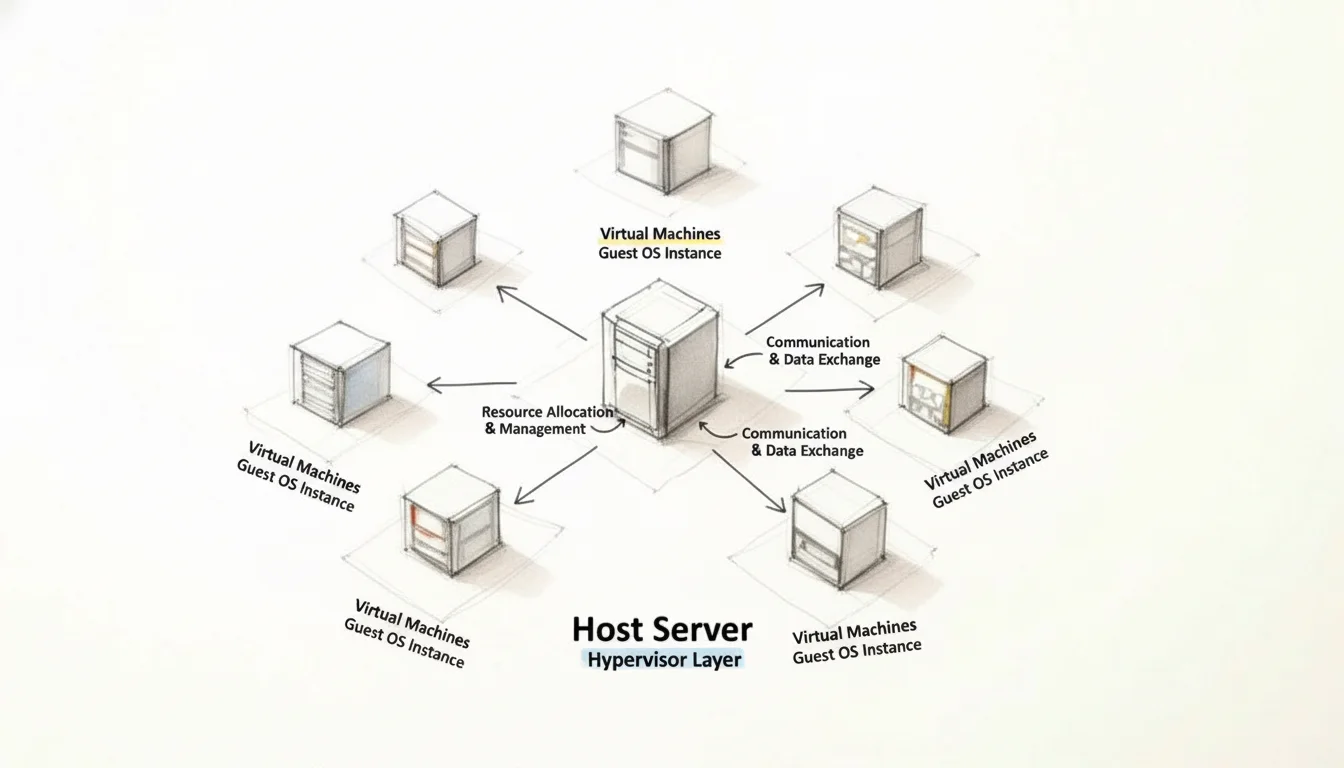
To truly grasp virtualization, let's start with a relatable analogy. Imagine you have a powerful desktop computer. Traditionally, you could only run one operating system on it, say Windows 11. However, with virtualization, you introduce a special software layer called a hypervisor. This hypervisor acts as an intelligent resource manager, sitting directly on your physical hardware (or within your existing OS).
The hypervisor's primary role is to carve out and allocate portions of your physical hardware—CPU cycles, RAM, and storage—to create several virtual machines (VMs). Each VM functions as an entirely separate computer, complete with its own virtual CPU, RAM, and storage, and runs its own operating system (the Guest OS). For example, one VM could run Windows Server, another a specific Linux distribution for a web application, and a third might host a development environment. Crucially, each VM believes it has dedicated hardware, even though they all share the same underlying physical resources.
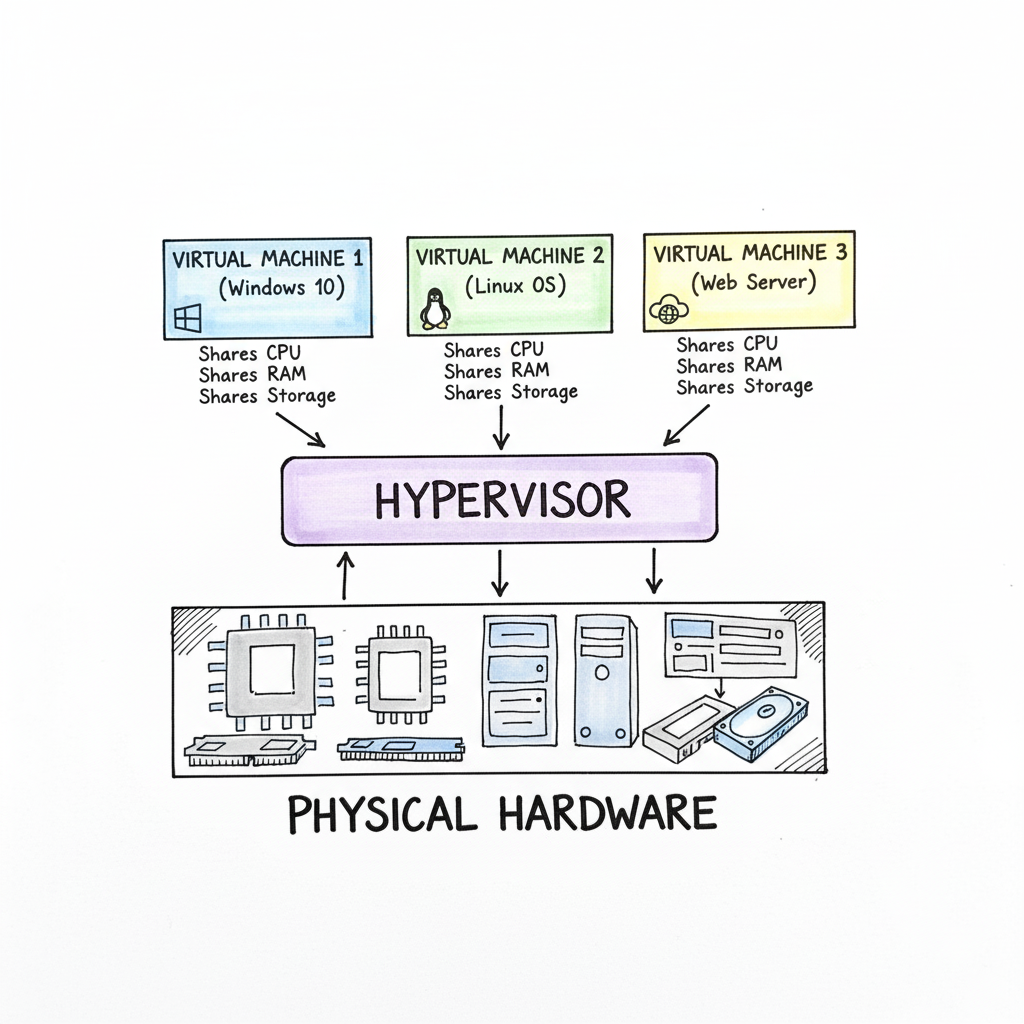 Caption: Virtualization allows a single physical server to efficiently allocate its resources (CPU, RAM, storage) across multiple isolated virtual machines, powering everything from local development to global cloud services.
This fundamental separation of software from physical hardware is what makes virtualization a cornerstone of modern IT. It's the enabling technology behind massive cloud platforms, enterprise data centers, and the secure, sandboxed environments where developers meticulously test new code. To clarify these essential concepts, let's break down the key components.
Virtualization at a Glance: Key Concepts
This table provides a concise overview of the main components of virtualization, translating their technical roles into simple, actionable terms.
| Component | Technical Role | Simple Analogy |
|---|---|---|
| Host Machine | The physical hardware (server, desktop) that provides the actual computing resources (CPU, RAM, storage). | The apartment building itself—the physical structure that provides the foundation and utilities. |
| Hypervisor | The software layer that creates, manages, and isolates virtual machines, intelligently distributing physical resources among them. | The building manager who assigns individual apartments, oversees shared utilities, and ensures tenants don't interfere with each other. |
| Virtual Machine (VM) | A self-contained, software-based computer with its own virtual CPU, RAM, and OS, acting as an independent system. | An individual apartment suite, fully equipped and designed to be separate and self-sufficient, yet part of a larger building. |
| Guest OS | The operating system (e.g., Windows, Linux) that runs inside a virtual machine, just as if it were on physical hardware. | The tenants living inside each apartment, each with their own lifestyle and requirements, but sharing the building's infrastructure. |
Understanding these four elements is paramount to grasping how virtualization functions and how it enables complex IT infrastructures.
Reflection Prompt: Can you think of a scenario in your current IT environment where these four components are clearly at play? How does the hypervisor specifically contribute to the efficiency of your systems?
The Growing Importance of Virtualization in Modern IT
Virtualization is far from a niche technology; it's a foundational driver of the modern digital economy. By allowing organizations to run numerous systems on significantly fewer physical servers, it has fundamentally transformed operational efficiency across industries. This shift isn't just about cost-cutting; it’s about strategic agility and resilience.
The market trends clearly illustrate this impact. The global virtualization software market, valued at a substantial USD 94.82 billion in 2023, is projected to surge to an astonishing USD 218.76 billion by 2030. This exponential growth underscores how deeply embedded and indispensable virtualization has become in today's IT landscape.
Virtualization isn’t merely about conserving hardware resources. It's a strategic framework for constructing IT systems that are inherently agile, robust, and scalable, capable of rapidly adapting to dynamic business requirements and technological advancements.
Why Mastering Virtualization Matters for Your IT Career
For any IT professional, especially those aiming for certifications, a deep understanding of virtualization is no longer optional—it's a critical skill. It forms the bedrock for advanced topics that dominate today's tech world, including:
- Cloud Computing: Virtualization is the core technology powering public clouds like AWS, Microsoft Azure, and Google Cloud Platform. Understanding it is essential for cloud architecture, deployment, and management roles.
- Containerization: While distinct, containers (like Docker and Kubernetes) often run within virtual machines or on virtualized infrastructure, making understanding both crucial for modern application development and DevOps.
- Cybersecurity: Virtualization provides isolation for sandboxing suspicious applications, creating secure test environments, and enhancing network segmentation.
- Data Center Management: Optimizing physical server usage, implementing disaster recovery, and ensuring business continuity all heavily rely on virtualization concepts.
For professionals pursuing entry-level certifications, a solid grasp of virtualization and cloud computing concepts is a core requirement for exams like the CompTIA A+. As you progress to more advanced certifications like the AWS Certified Solutions Architect or Microsoft Certified: Azure Administrator Associate, your understanding of hypervisors, VMs, and their management will be tested extensively. At MindMesh Academy, we emphasize these foundational technologies to prepare you for both certification success and real-world application.
In the following sections, we will delve into the technical mechanics, explore real-world applications, and provide you with the essential knowledge to confidently navigate this powerful technology.
How the Hypervisor Makes It All Possible
The "magic" behind virtualization unequivocally resides in a critical piece of software known as the hypervisor. It is the central orchestrator that enables multiple operating systems and applications to coexist and operate simultaneously on a single physical machine.
Consider a physical server as a high-performance, multi-story office building. The hypervisor is both the architect and the building manager. It's the indispensable software layer that interfaces directly with the server’s physical hardware, meticulously dividing and managing its resources to create separate, self-contained "apartments"—our virtual machines.
The hypervisor intelligently monitors and allocates the server’s core resources: processing power (CPU), volatile memory (RAM), and persistent storage. Its fundamental task is to ensure that each individual VM receives the necessary slice of these resources to run its own operating system and applications efficiently, while maintaining complete isolation from every other VM. This isolation is the hypervisor's "secret sauce" for stability and security. If one VM encounters a software crash, experiences a memory leak, or becomes compromised by malware, the other VMs sharing the same physical hardware remain unaffected and continue their operations without interruption.
The diagram below visually illustrates the hypervisor's pivotal position, acting as the fundamental interface layer between the raw physical hardware and the dynamic virtual machines it hosts.
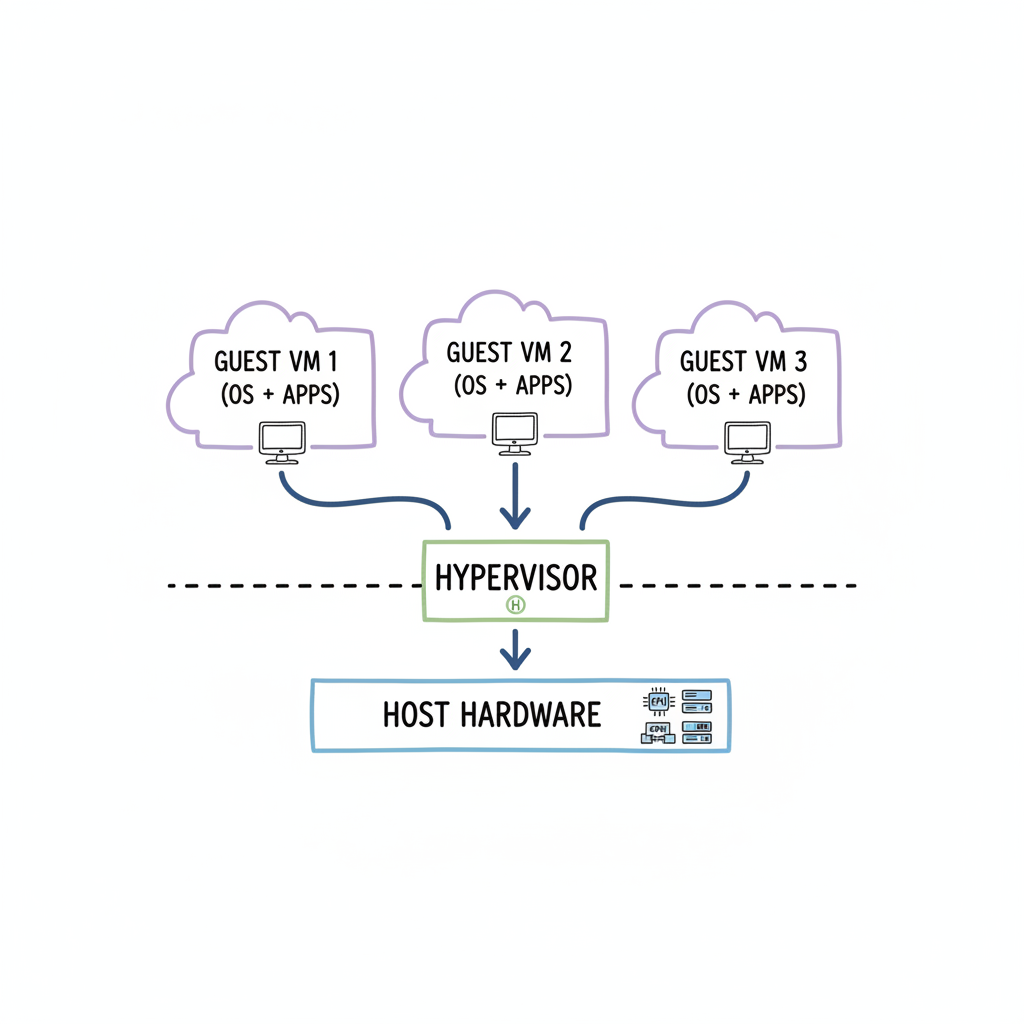 Caption: The hypervisor is the essential abstraction layer, enabling multiple, independent virtual machines to efficiently share and utilize the resources of a single physical server.
As evident, it is the hypervisor that meticulously orchestrates the simultaneous execution of multiple, distinct operating systems side-by-side on a singular physical machine, maximizing hardware utility and operational flexibility.
The Two Flavors of Hypervisors: Type 1 vs. Type 2
Hypervisors are not monolithic; they are categorized into two primary types, each employing a distinct architectural approach to managing virtual environments. Grasping this distinction is crucial for understanding how virtualization is implemented across various scales, from immense cloud data centers to a single developer's workstation. For IT professionals pursuing certifications, a solid understanding of virtualization concepts including hypervisors and VMs is frequently a tested domain.
Type 1: The "Bare-Metal" Hypervisor
A Type 1 hypervisor, often referred to as a "bare-metal" hypervisor, represents the pinnacle of virtualization performance and efficiency. It earns its name because it is installed directly onto the server's physical hardware, without an intervening host operating system. In essence, the hypervisor is the operating system that manages the hardware and hosts the VMs. This direct interaction with the hardware minimizes latency and overhead, leading to exceptional performance, robust security, and high stability.
With no additional software layer to navigate, Type 1 hypervisors deliver optimal resource utilization and speed. Consequently, they are the indispensable choice for demanding, enterprise-grade deployments, including large-scale cloud computing infrastructure (like AWS EC2 or Azure Virtual Machines) and corporate data centers, where every millisecond of performance and guaranteed uptime are critical.
- How it works: Installed directly on the physical server hardware.
- Performance: Extremely high, due to direct hardware access and minimal overhead.
- Common examples: VMware vSphere/ESXi, Microsoft Hyper-V (when used as a server role), and KVM (Kernel-based Virtual Machine), which is integrated into Linux kernels.
- Best for: Production servers, cloud infrastructure, enterprise data centers, and environments where performance, stability, and security are paramount. Often a key component in certifications focusing on server infrastructure or cloud administration.
You can conceptualize a Type 1 hypervisor as a purpose-built apartment complex foundation, designed from the ground up specifically to house and efficiently manage numerous independent tenants (VMs) with maximum security and resource allocation.
Type 2: The "Hosted" Hypervisor
Conversely, a Type 2 hypervisor, or "hosted" hypervisor, operates as a standard application installed on top of an existing host operating system (such as Windows, macOS, or Linux). You first install your desired OS, and then install the hypervisor program just like any other software application.
This architecture makes Type 2 hypervisors remarkably easy to deploy and use, making them highly popular among developers, testers, students, and IT professionals for personal use or proof-of-concept environments. You can quickly provision an isolated virtual environment on your desktop to test a new application with a different OS, experiment with new software, or learn about server configurations without requiring dedicated hardware. The trade-off for this convenience is performance. The hypervisor must route its requests through the host OS to access the physical hardware, introducing an additional layer of overhead that can reduce efficiency compared to bare-metal solutions.
A hosted hypervisor is analogous to renting a large industrial warehouse (the host OS) and then constructing individual, self-contained office pods (the VMs) inside. While the pods function effectively, their operations are always dependent on and routed through the main infrastructure of the warehouse.
Here’s a quick rundown of the key differences:
| Feature | Type 1 (Bare-Metal) | Type 2 (Hosted) |
|---|---|---|
| Installation | Directly on physical hardware | As an application on a host OS |
| Performance | Higher (near native) | Lower (due to host OS overhead) |
| Isolation & Security | Stronger (direct hardware control) | Moderate (dependent on host OS security) |
| Use Case | Data centers, cloud infrastructure, enterprise production environments | Personal desktops, development, testing, training, education, running legacy apps |
| Examples | VMware ESXi, Microsoft Hyper-V (server role), KVM | VMware Workstation, Oracle VirtualBox, VMware Fusion |
The selection between Type 1 and Type 2 hypervisors is dictated by the specific requirements of the environment. For mission-critical, large-scale systems requiring optimal performance and high availability, Type 1 is the unequivocal champion. For individual users or small-scale development teams prioritizing flexibility, ease of setup, and cost-effectiveness, Type 2 serves as an excellent and accessible solution.
Reflection Prompt: Consider your personal or professional use cases. Which type of hypervisor would be most appropriate for setting up a lab for your next certification exam, and why?
The Different Flavors of Virtualization: Beyond Servers
Virtualization is not a singular, monolithic technology; rather, it’s a versatile toolkit comprising various specialized approaches, each engineered to address specific IT challenges. Understanding these distinct forms is crucial for appreciating how virtualization comprehensively solves a wide spectrum of business problems, from enabling secure remote work to operating vast, efficient cloud data centers.
While each type of virtualization targets a different segment of the IT infrastructure, they all adhere to the same core principle: abstracting software from its underlying physical hardware. This abstraction unlocks unparalleled efficiency, flexibility, and scalability.
The diagram previously shown illustrates the hypervisor's role as the central intermediary, efficiently mediating between the physical hardware and the multiple virtual machines it hosts. Now, let’s explore how this foundational concept is practically applied across various facets of IT.
1. Server Virtualization: The Foundation of Modern Data Centers
This is arguably the most prevalent and impactful form of virtualization. For decades, the conventional IT strategy was a one-to-one relationship: "one physical server, one application." If a new business application was introduced, a new physical server was purchased, deployed, and managed. This often led to server rooms filled with expensive hardware operating at extremely low utilization rates.
Server virtualization revolutionized this paradigm. By installing a Type 1 hypervisor on a powerful physical server, IT administrators can partition it into dozens of isolated virtual servers. Each of these virtual machines (VMs) can run its own distinct operating system and applications, all sharing the resources of that single physical machine. This approach significantly boosts hardware utilization, making data centers far more efficient.
Key Takeaway for Certification Candidates: The primary objective of server virtualization is consolidation and efficiency. By maximizing the number of virtual servers on fewer physical hosts, organizations dramatically reduce capital expenditure on hardware, lower operational costs (power, cooling, physical space), and simplify management. It's common for server utilization rates to skyrocket from a dismal 5-15% (in traditional setups) to as high as 80% or more. This concept is fundamental for cloud and data center administration exams.
2. Desktop Virtualization (VDI): Empowering the Modern Workforce
Building upon server virtualization, Desktop Virtualization, more commonly known as Virtual Desktop Infrastructure (VDI), extends the virtualization concept to end-user computing. Instead of users having a traditional physical PC with an OS and applications installed locally, their entire desktop environment—including the OS, applications, and data—runs as a virtual machine on a centralized server within the data center or cloud.
Users can then securely access and interact with their personalized virtual desktop from virtually any device: a lightweight "thin client," a laptop, a tablet, or even a smartphone. VDI offers compelling advantages for businesses:
- Centralized Management: IT teams can efficiently patch, update, and manage thousands of desktop environments from a single console, eliminating the need for individual workstation visits. This streamlines IT operations significantly.
- Enhanced Security: All sensitive company data resides securely in the data center, never locally on endpoint devices, drastically reducing the risk of data loss from stolen or compromised hardware.
- Flexible Remote Access: Onboarding new remote employees becomes instantaneous. IT can provision a new virtual desktop in minutes, allowing immediate, secure access from anywhere.
- Cost Savings: Extending the lifespan of older endpoint devices and reducing hardware refresh cycles.
VDI has become an indispensable solution for organizations supporting remote, hybrid, or distributed workforces, providing a secure, consistent, and efficient user experience.
3. Network Virtualization: Agile Infrastructure Management
Just as server virtualization abstracts applications from physical hardware, network virtualization abstracts network resources from the underlying physical network infrastructure. It allows administrators to create complex, fully functional network topologies entirely in software, running logically on top of the existing physical network hardware. This is a core component of Software-Defined Networking (SDN).
Consider a scenario where a development team requires an isolated, custom network environment to test a new multi-tier application. Traditionally, this would involve physically configuring switches, routers, and firewalls—a time-consuming and labor-intensive process. With network virtualization, an administrator can provision this entire virtual network—complete with virtual switches, routers, firewalls, and load balancers—in mere minutes through a software interface.
This decoupling of network services from physical devices provides unparalleled agility, granular control, and enhanced security through segmentation, capabilities that are extremely challenging and costly to achieve with hardware-centric approaches alone.
4. Storage Virtualization: Simplifying Data Management
Finally, storage virtualization addresses the increasing complexity and scale of managing vast amounts of data. It functions by aggregating physical storage capacity from multiple disparate devices (e.g., SANs, NAS, direct-attached storage) into a single, unified, logical storage resource. This unified "virtual" storage pool is then managed from a central console.
Administrators can dynamically provision and allocate storage to servers and applications as needed, without requiring knowledge of which specific physical disk array or individual drive the data physically resides on. This abstraction simplifies daily tasks such as backups, archiving, disaster recovery, and data migration. The storage virtualization layer intelligently handles all the underlying complexity, presenting a cohesive and flexible storage environment to the rest of the IT infrastructure.
Comparing Virtualization Types
To consolidate your understanding, the table below provides a concise comparison of the main virtualization types, highlighting their primary applications and key benefits.
| Virtualization Type | Primary Use Case | Key Benefit | Example Application |
|---|---|---|---|
| Server Virtualization | Consolidating physical servers to run multiple operating systems and applications on a single machine. | Drastically improves hardware utilization, reduces operational costs (power, cooling, space), and enhances resource flexibility. | An organization running 30 virtual web servers, database servers, and application servers on just three powerful physical host machines in a data center. |
| Desktop Virtualization (VDI) | Hosting user desktop environments on a central server and streaming them to endpoint devices for remote or office access. | Centralized management, enhanced data security, seamless remote work enablement, and simplified software deployment. | A call center or healthcare provider giving employees secure access to their standardized work desktop from any device, anywhere. |
| Network Virtualization | Creating and managing entire computer networks in software, independent of the underlying physical network hardware. | Rapid deployment of complex network topologies, improved security through micro-segmentation, and greater network agility and automation (SDN). | A development team instantly spinning up an isolated virtual network environment to test a new multi-tier application with specific firewall rules. |
| Storage Virtualization | Pooling physical storage from multiple disparate devices into a single, centrally managed virtual storage resource. | Simplified storage management, improved flexibility in allocating resources, easier data migration and protection, and optimized storage utilization. | An enterprise combining storage from various vendors (e.g., Dell, HP, NetApp) into one unified, scalable storage pool accessible by all virtual servers. |
Each type of virtualization serves a distinct strategic purpose, but collectively, they empower organizations to build more flexible, efficient, secure, and cost-effective IT environments.
Reflection Prompt: How might combining two or more of these virtualization types create an even more resilient or agile IT infrastructure for a cloud-based application?
The Business Case for Virtualization Technology: Driving Value
_Caption: This video from IBM provides a visual overview of how virtualization works and its fundamental benefits._Beyond the technical intricacies, why has virtualization become such an indispensable technology for businesses worldwide? The compelling business case for virtualization stems from a powerful combination of significant cost savings, enhanced operational agility, and vastly improved resilience against failures. It's not merely about cramming more onto less hardware; it's about establishing a smarter, more responsive, and robust foundation for an organization's entire IT operation.
The most immediately apparent benefit is the dramatic reduction in operational and capital expenditures. In pre-virtualization eras, the "one application, one server" paradigm led to data centers overflowing with physical servers, most of which were grossly underutilized, often operating at a mere 5-15% of their total capacity. This resulted in exorbitant hardware procurement costs, excessive power consumption, and substantial cooling expenses.
Virtualization radically alters this landscape. By consolidating numerous virtual servers onto a handful of powerful physical machines, organizations can drastically cut their hardware investments, significantly reduce energy bills, and reclaim valuable data center floor space. These are tangible savings that directly impact the bottom line, making virtualization an easy decision for many IT leaders.
Gaining Unmatched Agility and Speed
In today's fast-paced digital economy, the ability to rapidly adapt and innovate is a critical competitive differentiator. Virtualization empowers IT teams with a level of speed and flexibility that was previously unattainable.
Consider the process of provisioning a new server environment for testing a software patch or deploying a new application. Without virtualization, this could involve weeks of procurement, delivery, physical installation, and configuration. With virtualization, an administrator can now spin up a brand-new virtual machine, complete with its operating system and necessary configurations, in a matter of minutes. This on-demand provisioning capability significantly accelerates development cycles, fosters innovation, and allows teams to experiment and iterate without the financial risk or time overhead of physical hardware. To truly appreciate this agility in action, it's beneficial to explore concepts like cloud-based development services, which are built upon virtualized foundations.
This inherent nimbleness permeates the entire IT department. Because virtual machines are essentially self-contained files, they are exceptionally easy to clone, migrate, or back up. This portability simplifies workload management, facilitates load balancing across different physical hosts, and enables seamless resource optimization.
A Game-Changer for Disaster Recovery and Business Continuity
One of the most profound benefits of virtualization lies in its transformative impact on disaster recovery (DR) and business continuity (BC) strategies. Protecting a business from server failures, data corruption, or major outages used to be an exceedingly complex and costly endeavor.
With virtualization, a server's complete identity—its operating system, installed applications, configuration, patches, and data—is encapsulated within a single, portable VM file. This inherent packaging simplifies the entire backup and restoration process.
You can back up an entire virtual server as a single file. If a disaster strikes, you can quickly restore that VM to any available physical machine in minutes, rather than hours or days. This capability dramatically reduces Recovery Time Objectives (RTO) and Recovery Point Objectives (RPO), significantly minimizing downtime and mitigating the financial and reputational impact of an outage.
This approach imbues your business continuity plan with significant capabilities:
- Rapid Recovery: Restoring a VM is substantially faster than rebuilding a physical server from scratch, allowing for quicker service restoration.
- Hardware Independence: VM backups are not tied to specific physical hardware. This flexibility means you can restore a VM onto a completely different physical machine or even migrate it to a cloud environment, providing immense resilience and avoiding vendor lock-in.
- Simplified Testing: Virtualization enables effortless, non-disruptive testing of disaster recovery plans. You can easily clone production VMs and perform test restores in an isolated environment without impacting live operations, ensuring your DR plan is always viable.
Strengthening Security and Reducing Your Environmental Footprint
Virtualization also offers significant security enhancements. Each virtual machine is logically isolated and segmented from other VMs running on the same physical hardware. This means that if one VM becomes compromised with malware or experiences a security breach, the infection is typically contained within that VM, preventing it from spreading to neighboring virtual machines or the host system. This provides a built-in "sandboxing" effect for your servers, a crucial defensive tactic in modern cybersecurity.
Finally, the substantial consolidation achieved through virtualization yields a welcome environmental benefit. Fewer physical servers translate directly to reduced electricity consumption, lower cooling requirements, and consequently, a smaller carbon footprint for data centers. This aligns with corporate sustainability initiatives and contributes to more environmentally responsible IT operations.
The business case for virtualization is compelling and multifaceted. The market trends reflect this enduring value: valued at approximately USD 8.5 billion in 2024, the data center virtualization market is projected to expand to USD 21.1 billion by 2030, driven by the relentless demand for more efficient, agile, and sustainable IT infrastructures. Virtualization unequivocally delivers measurable value across financial, operational, and strategic dimensions.
Virtualization vs. Containers: What Every IT Pro Needs to Know
As you delve deeper into modern infrastructure technologies, you will invariably encounter another transformative concept: containers. While both virtualization and containerization aim to solve similar problems—running multiple isolated applications on a single machine—they achieve this through fundamentally different architectural approaches. Grasping this distinction is absolutely crucial for making informed design and deployment decisions in today's IT landscape, especially as you prepare for advanced certifications.
The most effective way to conceptualize the difference is through an analogy that highlights their core architectural divergence.
Imagine a virtual machine (VM) as a complete, standalone house. Each house has its own dedicated foundation, plumbing, electrical system, roof, and all necessary utilities. It is fully self-sufficient and independent. A container, in contrast, is akin to an apartment within a modern high-rise building. Each apartment provides a private, secure living space for its tenants, but all apartments share the building's core infrastructure—the main foundation, communal plumbing lines, central heating system, and common structural elements.
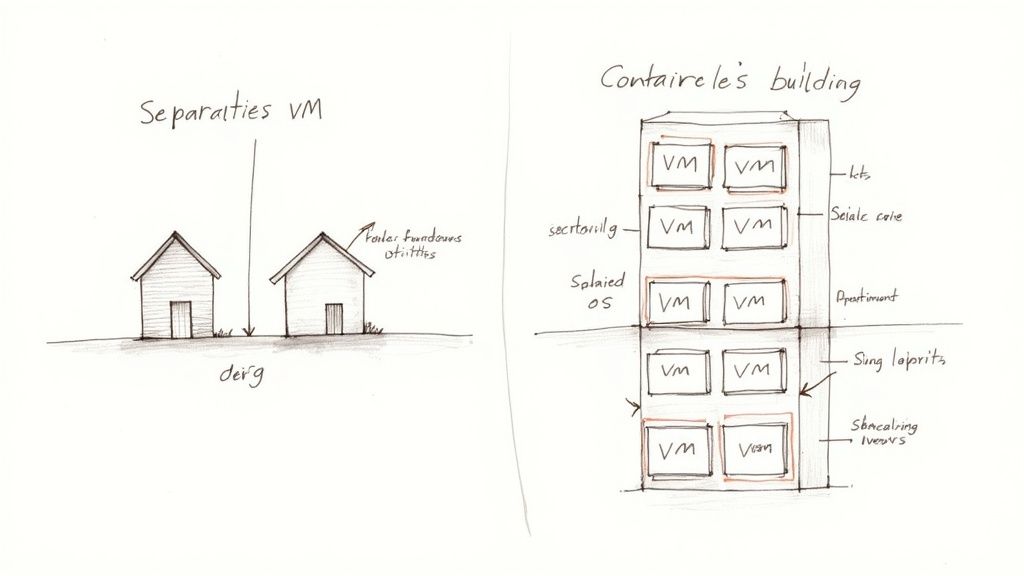 Caption: Visualizing VMs as independent houses versus containers as apartments within a shared building clarifies their distinct architectural approaches to resource isolation.
This analogy succinctly captures the architectural split and resource utilization philosophy between these two powerful technologies.
The Key Technical Difference: Isolation Levels
Virtual machines achieve isolation by virtualizing the hardware itself. A hypervisor intercepts requests from each VM and presents it with a complete, virtualized set of hardware resources—virtual CPUs, virtual RAM, virtual network interfaces, and virtual storage. Crucially, on top of this virtual hardware, you must install a full guest operating system (OS) (e.g., Windows Server, a specific Linux distribution) inside every single VM. This architecture provides exceptional isolation, creating strong security boundaries and allowing completely different OS types to run on the same physical server. However, it is also resource-heavy, as each VM carries the overhead of its own full OS, which can be gigabytes in size.
Containers, on the other hand, operate at the operating system level, representing a much lighter-weight approach. Instead of virtualizing hardware, a container engine (like Docker) leverages the host machine’s OS kernel. Multiple containers share this single host OS kernel. Each container merely bundles the application code, its specific runtime, system tools, and libraries—everything it needs to run—but without a full guest operating system. This makes containers incredibly lean, efficient, and fast to start.
When to Choose One Over the Other
Due to their differing architectures, VMs and containers excel in different use cases:
-
Choose Virtualization (VMs) when:
- Maximum Isolation and Security are Needed: When you require the strongest possible isolation between applications or tenants, or need to run applications that demand completely different operating systems (e.g., a Windows-based application and a Linux-based application) on the same physical server. The deep separation a VM provides creates a robust security boundary.
- Legacy Applications are Involved: For older software that is tightly coupled to a specific, potentially outdated, operating system version or complex configurations that are difficult to containerize.
- Specific OS Kernels are Required: If applications specifically require different kernel versions or unique OS-level configurations that cannot be shared.
-
Choose Containers when:
- Speed, Efficiency, and Portability are Key: Containers are exceptionally lightweight and can spin up in seconds, making them ideal for modern microservices architectures, rapid development, testing, and CI/CD pipelines.
- High Density and Resource Optimization are Goals: Since they share the host OS kernel, you can pack significantly more containers onto a single server than you can VMs, leading to higher resource utilization.
- Application Deployment and Scaling are Prioritized: A container packages an application and all its dependencies, guaranteeing it behaves identically whether it's running on a developer's laptop, a test environment, or a production server. This "build once, run anywhere" philosophy is powerful for DevOps.
For IT professionals in development, operations, or engineering roles, proficiency in both technologies is essential. If you're working in cloud environments, especially with platforms like AWS, understanding how to manage container platforms for scalability (e.g., AWS ECS, EKS) is a critical skill.
Ultimately, virtualization and containers are not competing technologies but rather complementary tools in the modern IT professional's arsenal. Many containerized applications, particularly in cloud environments, often run on virtualized infrastructure, leveraging the strengths of both.
Reflection Prompt: Imagine you need to deploy a new web application and its database. Which technology (VMs or containers) would you choose for each component, and what factors would influence your decision?
Common Questions About Virtualization Technology
As you deepen your understanding of virtualization, several practical questions frequently arise. Getting clear, concise answers to these is vital for solidifying your grasp of how this technology operates in real-world IT environments. Let’s address some of the most common inquiries.
What Is a Host Versus a Guest Machine?
This distinction is fundamental to virtualization.
- The host machine is the physical server or computer—the tangible hardware (CPU, RAM, storage) that you can physically interact with. It's the underlying infrastructure that provides the raw computing power.
- The guest machine, on the other hand, is the virtual machine (VM) that runs on that host. You can have numerous guest machines operating concurrently on a single host. Think of the host as a large apartment building. Each guest machine is a separate, self-contained apartment within that building, equipped with its own virtual utilities (CPU, RAM, OS), but all sharing the same physical foundation and resources of the host.
Is Virtualization Secure by Default?
Virtualization inherently offers significant security advantages, primarily through its robust isolation capabilities. Since each VM operates in its own logically separated environment, a security breach, virus infection, or software vulnerability within one guest VM typically will not spread to other guest VMs or compromise the host machine. This natural segmentation is a powerful defensive mechanism.
However, virtualization is not a complete security panacea. The hypervisor—the software responsible for managing all the VMs—is a critical component. If the hypervisor itself is compromised, every single guest machine it controls becomes vulnerable. Therefore, securing the hypervisor, applying patches promptly, and configuring it with security best practices are just as crucial as protecting any other core element of your IT infrastructure. The real security benefit is containment: a problem inside one VM largely stays inside that VM, preventing widespread propagation across your environment.
Can You Run Different Operating Systems Together?
Absolutely, and this is one of virtualization's most compelling features. A single physical host can concurrently manage and operate multiple virtual machines, each running a completely different operating system. This provides unparalleled flexibility and resource optimization.
For example, a single powerful physical server could simultaneously host:
- A VM running Windows Server to manage Active Directory and file shares.
- Another VM running a Linux distribution like Ubuntu to power a high-traffic web server or a container orchestration platform.
- A third VM running an older, unsupported version of Windows or Linux, specifically kept alive to support a critical legacy application that cannot be easily updated.
The hypervisor intelligently orchestrates resource allocation, ensuring each operating system receives the necessary hardware resources to run smoothly and efficiently side-by-side, without mutual interference.
Do You Need Special Hardware for Virtualization?
For any serious or production-grade virtualization, yes, special hardware support is highly recommended and practically mandatory for optimal performance. Modern processors from manufacturers like Intel (featuring VT-x technology) and AMD (featuring AMD-V) incorporate specific virtualization extensions directly into their silicon architecture.
These hardware-assisted virtualization capabilities are designed to significantly accelerate virtualization tasks by offloading specific hypervisor functions directly to the CPU. While it's technically possible to run some types of virtualization (especially Type 2 hypervisors) without these hardware assists, the resulting performance degradation is substantial, leading to slower VM execution and inefficient resource utilization. For any professional or enterprise environment, using CPUs with these built-in virtualization extensions is not merely a good idea—it is standard, critical practice to ensure efficient, high-performance virtualized infrastructure.
Ready to confidently master the core concepts needed for your next IT certification, from virtualization to cloud computing and beyond? MindMesh Academy provides expert-led study guides, practice questions, and evidence-based learning tools specifically designed to help you not just pass your exams, but truly understand and apply the material in real-world scenarios. Start your journey toward IT mastery at MindMesh Academy today.

Written by
Alvin Varughese
Founder, MindMesh Academy
Alvin Varughese is the founder of MindMesh Academy and holds 15 professional certifications including AWS Solutions Architect Professional, Azure DevOps Engineer Expert, and ITIL 4. He's held senior engineering and architecture roles at Humana (Fortune 50) and GE Appliances. He built MindMesh Academy to share the study methods and first-principles approach that helped him pass each exam.