
Difference Between PaaS IaaS and SaaS: Cloud Model Comparison
When selecting cloud services, IT professionals choose from three primary models: Infrastructure as a Service (IaaS), Platform as a Service (PaaS), and Software as a Service (SaaS). Knowing these differences is vital for cloud architecture, security, and daily operations. This knowledge is also necessary to prepare for and pass current certification exams like the AWS Certified Cloud Practitioner (CLF-C02), Microsoft Azure Fundamentals (AZ-900), and CompTIA Cloud+.
MindMesh Academy teaches these concepts because they define your operational duties and cost structures. The distinction between IaaS, PaaS, and SaaS centers on a single question: how much responsibility will you keep versus how much will the cloud provider manage? This division of labor defines the cloud shared responsibility model, which is a core topic in most professional cloud curricula.
The following pizza analogy clarifies these levels of control:
- IaaS (Infrastructure as a Service): You make a pizza from scratch at home. You purchase the raw ingredients like flour, yeast, tomatoes, and cheese. You are responsible for the entire process, including dough preparation, topping preparation, and baking. In cloud computing, this means you manage everything from the operating system, middleware, and runtime to the data and applications.
- PaaS (Platform as a Service): You use a pre-made pizza kit. The dough and sauce are already prepared for you. You add your preferred toppings and bake the pie in an oven provided by the kit manufacturer. The platform is ready for you to build upon. This allows developers to focus on application code while the provider manages hardware and operating systems.
- SaaS (Software as a Service): You order a fully cooked pizza for delivery. You do not worry about ingredients, preparation, or kitchen maintenance; you simply consume the final product. In the cloud, this means you access a finished application through a web browser or API. The vendor manages every layer of the technology stack, including updates and security.
Understanding the Core Cloud Service Models
Selecting a cloud service model is a business decision that dictates your budget, staffing needs, and speed to market. Each model—Infrastructure as a Service (IaaS), Platform as a Service (PaaS), and Software as a Service (SaaS)—offers a different balance of control and convenience. This balance is struck by moving management tasks for the technology stack to the cloud provider. For IT professionals, understanding these differences is necessary for building effective systems and making smart recommendations. When you choose a model, you are deciding whether to spend money on physical hardware and maintenance or shift to a subscription-based model where the provider handles the technical heavy lifting.
The pizza analogy is a standard teaching tool in cloud certification courses to explain these responsibilities:
- IaaS (Your Kitchen, Your Pizza): The cloud provider delivers the basic kitchen tools: an oven (virtual server), utilities (networking), and storage space (pantry). You are responsible for the rest. You must install the operating system, manage middleware, and protect your data. You handle the cooking and ensure the final product is safe to eat. This model provides the most control but requires significant hands-on work, such as patching the OS and managing security configurations.
- PaaS (Kitchen + Pizza Kit): The provider gives you the kitchen plus a pre-made kit with dough and sauce. This kit represents the development platform and runtime environments. Your team focuses entirely on your unique toppings, which are your application code. You do not have to worry about buying the oven or setting up the kitchen. The provider handles scaling and load balancing, allowing developers to focus on writing code and deploying products faster.
- SaaS (Fully Cooked & Delivered): You simply consume the finished pizza. The provider manages the kitchen, sources ingredients, cooks the meal, and delivers it. You just log in and use the application. Examples like Google Workspace or Slack show how this works. You do not manage updates, server hardware, or the platform. You use the service as it is provided.
IaaS vs PaaS vs SaaS At-a-Glance Comparison
For IT professionals preparing for certification exams, a clear visualization of management responsibilities is useful. This table shows exactly where duties lie, demonstrating how management shifts from your team to the cloud provider as you move from IaaS to SaaS.
| Managed By | IaaS (Infrastructure) | PaaS (Platform) | SaaS (Software) |
|---|---|---|---|
| You Manage | Applications, Data, Runtime, Middleware, Operating System | Applications, Data | --- |
| Provider Manages | Virtualization, Servers, Storage, Networking | Runtime, Middleware, OS, Virtualization, Servers, Storage, Networking | Everything |
Certification Insight: This table explains the shared responsibility model, a vital concept in major cloud exams. You must know where your responsibility ends and the provider's begins. This knowledge helps you identify security gaps, find ways to save money, and follow operational best practices.
These distinctions change how an IT department supports a business. IaaS is best for teams that need direct control over virtualized hardware. PaaS hides the complexity of the infrastructure, giving developers a ready-made environment to build and launch apps. SaaS delivers software directly to users, which removes the need for local setup or maintenance.
Learning these basics is your first move toward cloud proficiency. If you are studying for the Microsoft Azure Fundamentals (AZ-900) or the AWS Certified Cloud Practitioner (CLF-C02) exam, you must learn these models well. To see how these apply to Azure, review our study guide on the Azure cloud service models.
When to Choose Infrastructure as a Service (IaaS)
When selecting a cloud model, the decision depends on a specific trade-off: the level of control your IT team requires versus the amount of administrative work you are prepared to handle. Infrastructure as a Service (IaaS) sits at the end of the spectrum that provides maximum control. It offers direct access to raw computing resources, specifically virtual servers, storage systems, and networking components.
IaaS functions as a "build-it-yourself" cloud environment. It is the preferred choice for organizations that need to customize their configurations at a granular level. Unlike other models where a provider manages the underlying environment, IaaS requires the user to oversee the majority of the software stack.
Caption: IaaS provides the foundational cloud resources, giving IT teams maximum control over virtual machines, storage, and networking. You manage everything from the operating system up.
In the PaaS or SaaS models, vendors manage the operating system, middleware, and application layers. In contrast, IaaS shifts these responsibilities to your organization. This division is often called the Shared Responsibility Model. While the cloud provider ensures the physical hardware, data centers, and virtualization software remain functional, your DevOps and IT teams manage everything else. This includes selecting the OS, installing runtimes, managing databases, applying security patches, and configuring firewalls. If a security vulnerability appears in the operating system, it is the user's job to fix it, not the provider's.
Ideal Scenarios for Maximum Control
Specific situations make this high level of control necessary. IaaS is often the only viable option when an organization has unique or complex infrastructure needs that pre-configured platforms cannot support. This is where the functional difference between cloud models becomes most visible.
For example, large enterprises often need to move mission-critical legacy applications to the cloud. These applications might depend on a specific version of a legacy operating system or require custom network configurations that a PaaS environment would block. IaaS allows architects to build a virtual environment that mirrors their existing on-premises setup. This minimizes the need to change the application's code during the migration.
Standard use cases where IaaS is the primary choice for technical professionals include:
- Migrating Legacy Systems ("Lift and Shift"): This strategy involves moving applications to the cloud without redesigning them. IaaS allows you to create a virtual machine with the exact CPU, memory, and OS requirements of the original server. This path is faster and less expensive than a total software rewrite.
- Complete Customization & Control: Organizations often need to build a specialized software stack or implement strict security protocols. If you are handling sensitive financial or healthcare data, you may need to install specific encryption tools at the kernel level. IaaS provides the administrative access required for these low-level modifications.
- High-Performance Computing (HPC): Tasks like big data processing, scientific simulations, and machine learning training require immense power. IaaS allows you to provision clusters of high-performance virtual machines, often with dedicated GPUs or high-speed networking, to handle these massive workloads efficiently.
- Development and Test Environments: Software teams use IaaS to create and tear down environments quickly. A developer can spin up a Linux server to test a specific configuration, then delete it an hour later to stop the billing. This flexibility allows for experimentation without the cost of physical hardware.
- Disaster Recovery: Companies use IaaS to build secondary sites in different geographic regions. By replicating on-premises data to the cloud, an organization can maintain a standby environment. In the event of a local failure, they can boot up their cloud-based virtual machines to keep the business running with minimal downtime.
Key Takeaway for Certifications: The primary value of IaaS is flexibility. You are essentially renting virtual hardware, but you own the software environment. This gives IT teams power but also adds the burden of maintenance and security for everything above the hypervisor. Certification exams often ask which model requires the most customer management; IaaS is always the answer.
Leading IaaS Providers and Their Role
A few major companies dominate the IaaS market. They provide the components that serve as the foundation for modern web applications and corporate IT systems. If you are preparing for a certification, you must understand these providers and their specific product names.
The "Big Three" in IaaS, often featured in certification exams:
- Amazon Web Services (AWS): As the market leader, AWS offers an extensive list of services. Its main IaaS product is Amazon EC2 (Elastic Compute Cloud). EC2 provides virtual servers that users can scale up or down based on demand. Certification candidates should know that EC2 works alongside Amazon EBS for storage and Amazon VPC for networking. These three services combined allow users to build a complete virtual data center.
- Microsoft Azure: This is the top choice for companies that already use Microsoft software. Azure Virtual Machines are the equivalent of EC2 instances. They offer easy integration with Active Directory and other Windows-based tools. For Azure certifications, you should understand how Virtual Machines connect to Azure Virtual Networks and how data is stored in Azure Disk Storage.
- Google Cloud Platform (GCP): Google is often recognized for its networking speed and data analytics tools. Its core IaaS product is Google Compute Engine. Compute Engine is known for fast boot times and flexible pricing, such as sustained-use discounts that automatically lower costs for long-running workloads.
These providers do more than just rent out virtual machines. They offer a whole ecosystem of components, including block storage, object storage, load balancers, and virtual firewalls. For those starting their career or studying for the AWS Certified Cloud Practitioner (CLF-C02) exam (verify current pricing on the vendor site), understanding Infrastructure as a Service (IaaS) is a requirement. Most higher-level cloud services are actually built on top of these basic IaaS components.
Choosing IaaS is a strategic decision for IT departments. It is the best option for teams with the technical skills to manage servers and networking. By using IaaS, these teams gain the benefits of the cloud—like scalability and global reach—without losing the ability to configure their systems exactly how they want. This balance between administrative control and infrastructure flexibility remains a defining characteristic of the IaaS model. While SaaS focuses on ease of use and PaaS focuses on developer speed, IaaS focuses on providing a blank canvas for the systems architect.
Speed Up Your Build with Platform as a Service (PaaS)
IaaS provides the raw materials and a blank canvas for cloud computing. In contrast, Platform as a Service (PaaS) provides a functional workshop designed specifically for developers and engineers. PaaS handles the underlying infrastructure—servers, storage, operating systems, and networking—so your team can skip the mechanical setup of the environment. Instead, they focus their energy on writing, testing, and deploying application code. This shift toward faster development is a major factor in the difference between PaaS, IaaS, and SaaS.
Use this analogy: IaaS is like leasing an empty plot of land where you must build every structure yourself. PaaS is similar to renting a carpentry workshop that is already operational. When you walk in, the workbench, power tools, and even some pre-cut materials are ready for use. You can begin working on your project immediately without the delay of building the shop, purchasing machinery, or installing utilities.
Caption: PaaS provides a complete development and deployment environment. This allows developers to focus on code instead of managing servers, operating systems, or middleware.
What’s Inside a PaaS Solution?
An effective PaaS offering bundles the tools a development team needs to build, test, deploy, and update applications. This environment shortens the development cycle because the cloud provider handles most of the routine operational tasks. Services like operating system patching, security updates, load balancing, and database administration are managed for you.
For IT professionals and developers, a PaaS solution generally includes these components:
- Development Tools: Pre-configured environments that work with popular IDEs. These include compilers, debuggers, and code editors that are ready to use immediately.
- Middleware: The software that connects applications to databases and other services. This is managed by the provider to ensure data moves correctly between different software components.
- Operating Systems: The provider manages the OS entirely. This frees your developers from worrying about system updates, security patching, or kernel configurations.
- Database Management: Immediate access to scalable database systems such as SQL or NoSQL. You do not have to perform manual setup or handle the administrative work of running a database server.
- Runtime Environments: Native support for programming languages and frameworks. These usually include Java, Python, Node.js, Ruby, .NET, and PHP.
- Scalability & Load Balancing: Automated features that handle changing traffic levels. The platform can scale resources up or down and use load balancing to distribute incoming requests across instances.
- CI/CD Integration: Tools that connect with Continuous Integration and Continuous Delivery pipelines. This allows for automated code deployments and faster testing cycles.
AWS Elastic Beanstalk and Azure App Service are clear examples of this model. A developer pushes their application code to the service. The platform then automates the provisioning and deployment process. This can turn a project into a live web application in minutes rather than days or weeks.
When PaaS is the Perfect Fit
In what situations does PaaS offer the most value for IT and development teams? Imagine a startup with a small engineering team. Their main goal is to launch a new mobile application and acquire users as quickly as possible. They do not have the time, the budget, or the staff to manage virtual machines, install operating systems, or track security patches.
This is the ideal use case for PaaS. By using a platform like AWS Elastic Beanstalk or Azure App Service, developers can put all their effort into building features for the application. The PaaS provider manages the infrastructure tasks in the background. If a marketing campaign leads to a sudden spike in users, the platform adds resources to maintain performance. This happens automatically without manual work from the developers. Speed, agility, and lower operational work are the primary benefits of PaaS.
Exam Focus: PaaS serves as a middle ground in cloud computing. It gives developers the freedom to build custom applications without the work of managing the underlying infrastructure. It is the preferred choice when speed to market and developer productivity are the priorities. You will often see this model described in scenario-based questions on developer and DevOps certification exams.
The Trade-Offs: Less Control and Potential Vendor Lock-In
The convenience of PaaS comes with specific trade-offs. The most significant issue is the reduction in control. Because the provider manages the technology stack, your team is limited to the programming languages, frameworks, and services supported by that platform. If your application needs a specific dependency, such as a niche database or a custom runtime configuration, the platform might be too restrictive. You cannot simply log into the underlying server to change a configuration file as you would with IaaS.
Another major point for IT strategists is the risk of vendor lock-in. When you build an application on a specific PaaS, you integrate with its proprietary APIs and deployment methods. Moving that application to a different cloud provider later can be difficult and expensive. Your organization becomes dependent on the provider's pricing, future features, and business health. While PaaS is excellent for rapid development, teams must consider the long-term impact of being tied to a single provider environment. Migrating a complex application to a different cloud provider often requires rewriting large portions of the code or reconfiguring the entire deployment pipeline. Decisions made for short-term speed can create long-term dependencies on a provider's pricing and roadmap.
Reflection Prompt: Think about a project where your team had to develop and deploy an application quickly. Would PaaS have been a good choice? What features or limitations would have mattered most for that specific project?
What is Software as a Service (SaaS)?
Software as a Service (SaaS) is the most common cloud model. Most people use it daily without considering the technical architecture supporting the application. As the top layer of the cloud service stack, SaaS provides a finished product. It delivers functional software directly to users through a web browser or a small client application. Your company does not need to install local files, manage server hardware, or perform manual updates. The provider takes care of the backend, leaving you to focus on using the tool.
Comparing the three models clarifies the differences. IaaS resembles leasing a plot of land to build a custom house. PaaS mirrors renting a professional workshop already stocked with tools. SaaS functions like moving into a finished office building. You do not worry about the structural foundation, the electrical wiring, or the plumbing. You simply enter the building, sit at a desk, and start working. This ease of use explains why SaaS is so popular and remains a primary distinction in the comparison between PaaS, IaaS, and SaaS.
Caption: SaaS applications are managed entirely by the provider. This offers immediate access and eliminates the need for local installations or infrastructure management.
The Default Model for Modern Business
Market data shows that SaaS is the largest segment of the cloud industry. While IaaS and PaaS are growing, SaaS adoption continues to lead because it offers the highest level of convenience. The service provider manages the entire technical environment. This includes the application software, data storage systems, the runtime, middleware, the operating system, servers, and networking hardware. Your employees only need a stable internet connection and an active account to be productive. This model removes the burden of technical maintenance from the customer and places it on the vendor.
Core Benefits for Business Leaders and IT Professionals
For IT leaders and business decision-makers, SaaS offers a way to access powerful tools without the usual infrastructure requirements. It changes how companies think about software procurement and maintenance.
- Predictable Costs: Most SaaS platforms use a subscription model based on monthly or annual fees. These are often calculated per user or per feature set. This structure helps management plan budgets because it removes the risk of sudden hardware repair costs or expensive software version upgrades. It shifts IT spending from a capital expense to a consistent operating expense.
- Rapid Deployment & Time to Value: Setting up a new service like Slack or Salesforce can happen in minutes. You avoid the long cycles required for traditional software, such as purchasing hardware, configuring servers, and running local tests. This speed allows departments to address business needs as soon as they arise.
- Effortless Scalability: If your company expands from 10 employees to 10,000, you do not need to buy more servers. You simply purchase more licenses from the vendor. The provider scales the underlying resources to handle the increased load, ensuring that the software remains fast for every user regardless of the total headcount.
- Work From Anywhere Access: Because SaaS lives in the cloud, users can access their work from any location. Whether an employee is in the office, at home, or traveling, they can log in via a browser on any compatible device. This accessibility is a foundation for modern hybrid work environments and global teams.
- Automatic Updates & Maintenance: Vendors perform security patching and software updates on their own servers. This ensures that every user is always running the most recent version of the tool. IT departments no longer need to schedule downtime for manual installations across hundreds of employee laptops or office workstations.
Business Advantage: SaaS provides wider access to high-level enterprise software. Small businesses can use the same advanced tools that Fortune 500 companies use. This allows smaller teams to stay competitive without spending a large amount of money upfront on servers and data centers. The model serves as a primary method for generating business value through technical efficiency.
What to Watch Out For Before Adopting SaaS
No cloud model is perfect for every situation. The convenience of SaaS involves some specific trade-offs that IT professionals must analyze.
One major issue is the lack of deep customization. SaaS uses a multi-tenant setup, meaning many different companies share the same software instance. While you can change your settings or adjust specific workflows to match your company branding, you cannot rewrite the software's core code. If your business has a highly unique process that requires custom code modifications, a standard SaaS product might be too restrictive.
Security and governance are also vital. When you move company data to a SaaS provider, you are trusting a third party with sensitive information. You must verify their security standards and compliance history. Check for certifications like ISO 27001, SOC 2, HIPAA, or GDPR. IT teams must also understand the shared responsibility model as it applies to SaaS. The vendor secures the platform and the physical infrastructure, but the customer remains responsible for managing who has access to the data and ensuring the content of that data meets legal requirements.
Integration remains another potential obstacle. Most modern SaaS tools provide APIs or pre-built connectors to communicate with other software. However, if you use a niche application or an older legacy system, connecting it to a new SaaS product can be difficult. Building custom integrations often requires significant time and specialized development skills, which can increase the total cost of ownership over several years.
A technical review of the Software as a Service (SaaS) model helps IT professionals decide when to move away from on-premises solutions and which vendors to trust.
Reflection Prompt: Your organization is considering adopting a new HR payroll system. Would SaaS be a viable option? What are the top three questions your IT team would ask the vendor regarding data security and integration?
Diving Into Real-World Scenarios
Understanding the definitions of IaaS, PaaS, and SaaS helps on a conceptual level, but the true test of your technical knowledge lies in applying these models to actual business challenges. The best choice for any organization depends on the specific project goals, the technical skill sets available within the internal team, and the desired balance between manual control and operational speed.
Cloud certification exams often present these models through scenario-based questions. These questions require you to identify which service model fits a set of constraints like budget, time, or administrative overhead. Let's look at several common situations to see how each model performs in practice.
Building a New Mobile App Backend
A startup is working to launch a new mobile application in a competitive market. They have a small team of skilled developers but lack a dedicated operations staff. Their priority is to reach the market quickly. They need a backend that scales automatically as users download the app, but they do not want to spend time managing underlying server configurations.
- The IaaS Route (High-Control, High-Effort): If this startup chooses IaaS, they must build everything from the ground up. The developers would have to provision virtual machine instances, select and install the operating system, and apply security patches. They would also need to configure the databases, set up the networking rules, and manually create scaling groups to handle traffic. While this gives the team total control over every setting, it requires a massive time investment. For a small startup, this often acts as a distraction from their primary goal of building application features.
- The PaaS Route (The Sweet Spot for Speed): This scenario is a classic use case for PaaS. By using a service such as AWS Elastic Beanstalk or Azure App Service, the development team can upload their code directly to the platform. The provider then manages the difficult operational tasks. This includes provisioning the servers, configuring load balancers, and ensuring the application scales dynamically as demand shifts. The team can focus all their energy on writing code and perfecting the user experience, which drastically reduces the time needed to launch the app.
Migrating a Legacy Enterprise System
Contrast the startup with a large financial institution that needs to move a legacy accounting system to the cloud. This system is decades old and built for an on-premises environment. It requires a specific, older version of a Linux distribution and depends on highly customized network configurations that are not standard in modern environments. The goal is to move the system off physical hardware to save on maintenance costs without rewriting the entire software stack.
- SaaS (A Non-Starter): A custom legacy system cannot be replaced by a standard SaaS product. SaaS providers offer finished applications, not a place to host custom, specialized software. Therefore, SaaS is not a viable option for this migration.
- PaaS (Too Inflexible): A standard PaaS environment would also fail here. PaaS providers offer managed runtimes and updated operating systems. They generally do not allow users to install old, unsupported OS versions or make the deep kernel-level changes that a legacy system might require. The platform’s standardized nature is a hindrance in this specific case.
- IaaS (The Only Real Option): This is the best choice for a "lift and shift" migration strategy. IaaS gives the IT team the tools to build a virtual environment that mirrors their old physical data center. They can install the exact operating system version the application requires, replicate complex internal network settings, and move the application with few or no changes to the source code. This path provides the necessary flexibility that the other models lack.
Choosing a New Company-Wide CRM
A mid-sized marketing agency needs a reliable Customer Relationship Management (CRM) system to track client interactions. The agency is staffed by marketing professionals and creative directors, not software developers or systems engineers. They want a tool that works immediately, is accessible via a web browser, and requires no technical maintenance from their staff.
Strategic Question for IT Leaders: When making this choice, ask: Does the organization gain value from building software, or from using software to improve business results? If the goal is to improve operations using existing tools, SaaS is the most efficient path.
- IaaS/PaaS (Complete Overkill): Attempting to build a custom CRM using IaaS or PaaS would be a waste of resources for a marketing agency. It would require hiring developers and engineers to build a product that already exists in the market. The cost and time involved in such a project would far outweigh any benefit of having a custom-built tool.
- SaaS (The Obvious Choice): A SaaS CRM like Salesforce or HubSpot is the correct fit. The agency simply pays a subscription fee and grants access to its employees. The provider takes care of all security updates, data backups, and server uptime. This allows the agency to start using the tool on the first day, with a predictable monthly cost that makes budgeting easier for the finance department.
Many companies use a hybrid approach that incorporates all three models. They might use SaaS for their daily office tasks and email, PaaS for their custom customer-facing applications, and IaaS to support their older back-office infrastructure. Successful organizations use each model where its strengths match the specific business need.
Detailed Feature and Use Case Comparison
The following table summarizes the differences between these models. It maps business needs and technical roles to the appropriate cloud service. This breakdown is a helpful reference for IT professionals who are making architectural decisions or preparing for certification exams.
| Criteria | IaaS (Infrastructure as a Service) | PaaS (Platform as a Service) | SaaS (Software as a Service) |
|---|---|---|---|
| Who Manages It? | You manage the operating system, middleware, runtime, and the applications. The provider manages the physical hardware, virtualization layer, and networking. | You manage the applications and the data. The provider manages the runtime, middleware, OS, and all underlying infrastructure. | The provider manages every layer of the stack. You are responsible only for your own user settings and data input. |
| Ideal User | IT Administrators, Cloud Architects, and Security Engineers who need granular control. | Software Developers and DevOps teams who want to deploy code without managing servers. | Business employees, managers, and end-users who need to perform specific tasks. |
| Flexibility & Control | Maximum Control: You are responsible for configuring the entire software stack above the hypervisor. | Balanced: You control the code and data, while the provider manages the platform stability. | Minimal Control: You can change settings within the app, but you cannot change how the app is built or hosted. |
| Speed to Market | The slowest option because you must configure the infrastructure before you can install and run your software. | High speed for development because the environment is ready for code immediately. | The fastest option. The software is ready for use as soon as you sign up or log in. |
| Typical Use Cases | Migrating legacy apps, performing high-performance computing, or building custom security environments. | Building web and mobile applications, creating APIs, and managing CI/CD pipelines. | General business tools like email, project management, CRM, and accounting software. |
| Real-World Example | Hosting a secure e-commerce site on Azure Virtual Machines to meet specific data privacy regulations. | Using AWS Elastic Beanstalk to deploy a new social media application that needs to scale with user growth. | Using Microsoft 365 for company communication or Trello to manage department tasks. |
This comparison highlights that IaaS provides the raw materials, PaaS provides the workshop and tools, and SaaS provides the finished product ready for immediate use. Understanding these distinctions allows you to choose the model that fits the technical requirements and the budget of any given project.
Choosing the Right Cloud Service Model for Your Business
Choosing a cloud service model is more than a technical task; it is a business decision that affects how an organization operates for years. IT professionals must evaluate team skills, financial limits, and the required speed for product delivery. The core difference between PaaS, IaaS, and SaaS rests on the balance between control and convenience. Your position on this spectrum determines which model fits your needs.
To make this choice, architects and IT leaders should perform a clear assessment of their company's strengths and the results they want to achieve.
Key Questions to Guide Your Decision
Answering specific questions helps clarify which cloud model, or combination of models, serves the business strategy. IT teams must be honest about their current resources and their most important technical priorities.
- How much infrastructure control do we actually need? Some IT teams must manage operating systems at the kernel level or set up unique network rules. Others need to implement specific security frameworks or compliance standards that standard cloud offerings do not support. In these cases, IaaS is usually the only practical choice because it provides the necessary low-level access and customization.
- What is the primary focus of our engineering team? If you employ a team of developers who provide the most value by writing code and creating features, they likely should not spend time managing servers. PaaS removes the complexity of the underlying infrastructure. It allows your developers to spend their time building the application rather than patching hardware or managing middleware.
- Is getting to market immediately the highest priority? Your business might need a functional tool right now, such as a customer relationship management (CRM) platform, an enterprise resource planning (ERP) system, or a shared project tracker. If you do not have the time to develop a custom solution or manage a complex installation, SaaS is the fastest route. Most organizations can subscribe and start using these tools within a few hours or days.
The Guiding Principle for IT Strategy: The decision often comes down to one goal: offload as much infrastructure management as possible to the provider. This shift in responsibility lets your IT staff focus on tasks that create unique value and help the company compete in its specific market.
A Hybrid Approach Is the New Norm
IT professionals rarely have to choose a single cloud model for an entire company. Most modern enterprises use a hybrid strategy. They mix IaaS, PaaS, and SaaS to balance cost, performance, and security across different parts of the business.
A single enterprise might use a variety of models simultaneously:
- The sales and marketing departments use SaaS platforms like Salesforce or Microsoft 365 for daily operations. This ensures high uptime and predictable monthly costs without any local maintenance.
- The software engineering group builds the main customer application on a PaaS such as Azure App Service or AWS Elastic Beanstalk. This choice speeds up the development cycle and allows the application to scale automatically as traffic grows.
- The data science team or systems administrators run legacy internal databases and high-performance computing (HPC) tasks on IaaS. These workloads require specific operating system versions or custom networking configurations that only a raw infrastructure model can provide.
This multi-model approach helps IT organizations manage costs while remaining agile. By understanding the strengths and trade-offs of each service type, professionals can build a technology stack that is flexible and meets strict regulatory rules. Advanced certifications, such as the AWS Solutions Architect Professional or the Azure Solutions Architect Expert, cover these hybrid strategies in detail. Being well-prepared for these exams requires a solid grasp of how to integrate all three models into a unified corporate environment.
Frequently Asked Questions About Cloud Models
IT professionals often encounter practical hurdles when applying IaaS, PaaS, and SaaS concepts to real-world infrastructure. These common questions address the technical and financial trade-offs required for effective implementation.
"Do I have to pick just one cloud service model for my organization?" No. In reality, most enterprises adopt a multi-faceted strategy. They combine different cloud service models to use the specific advantages of each. One organization might use a SaaS product like Salesforce for its sales department while building a custom internal tool on a PaaS like Azure App Service. Simultaneously, that same company could run high-performance computing clusters or legacy software on IaaS via AWS. This multi-model approach allows for better resource allocation and cost management across different business units. It ensures that specialized workload requirements are met without forcing a "one size fits all" solution.
"How does security responsibility differ across IaaS, PaaS, and SaaS?" The division of security duties is defined by the Shared Responsibility Model. Understanding this is vital for daily operations and is a core topic on cloud certification exams.
- IaaS: This model places the highest security burden on your team. The vendor secures the physical infrastructure, hardware, and the virtualization layer. You must secure everything above that, including the operating system, firewall configurations, identity management, and all stored data.
- PaaS: Responsibility is split. The provider manages the infrastructure, operating system, and platform software like databases or runtimes. Your team focuses on securing application code, the data processed, and user permissions.
- SaaS: The vendor manages nearly all security layers, from the physical hardware up to the application itself. Your tasks involve managing user access—like strong passwords and Multi-Factor Authentication (MFA)—and ensuring your data meets internal compliance standards.
"How do these models impact my IT budget?" Pricing models differ significantly between services. Understanding these variations is the key to effective cost management.
- IaaS: This model uses a pay-as-you-go structure. You are billed for resources like CPU hours, memory, storage, and network data transfer. This provides flexibility, but requires monitoring to prevent billing surprises from idle resources.
- PaaS: Billing often combines a base platform fee with costs that scale based on usage, like application instances or database throughput. This is often cost-effective because it removes the labor required for server management.
- SaaS: Pricing is usually the most predictable, typically involving a per-user, per-month/year subscription fee. While this simplifies budgeting and removes upfront hardware costs, total expenses grow as more users are added.
Making a Quick Decision
When you need to choose a model quickly, use a decision tree focused on two variables: control and speed.
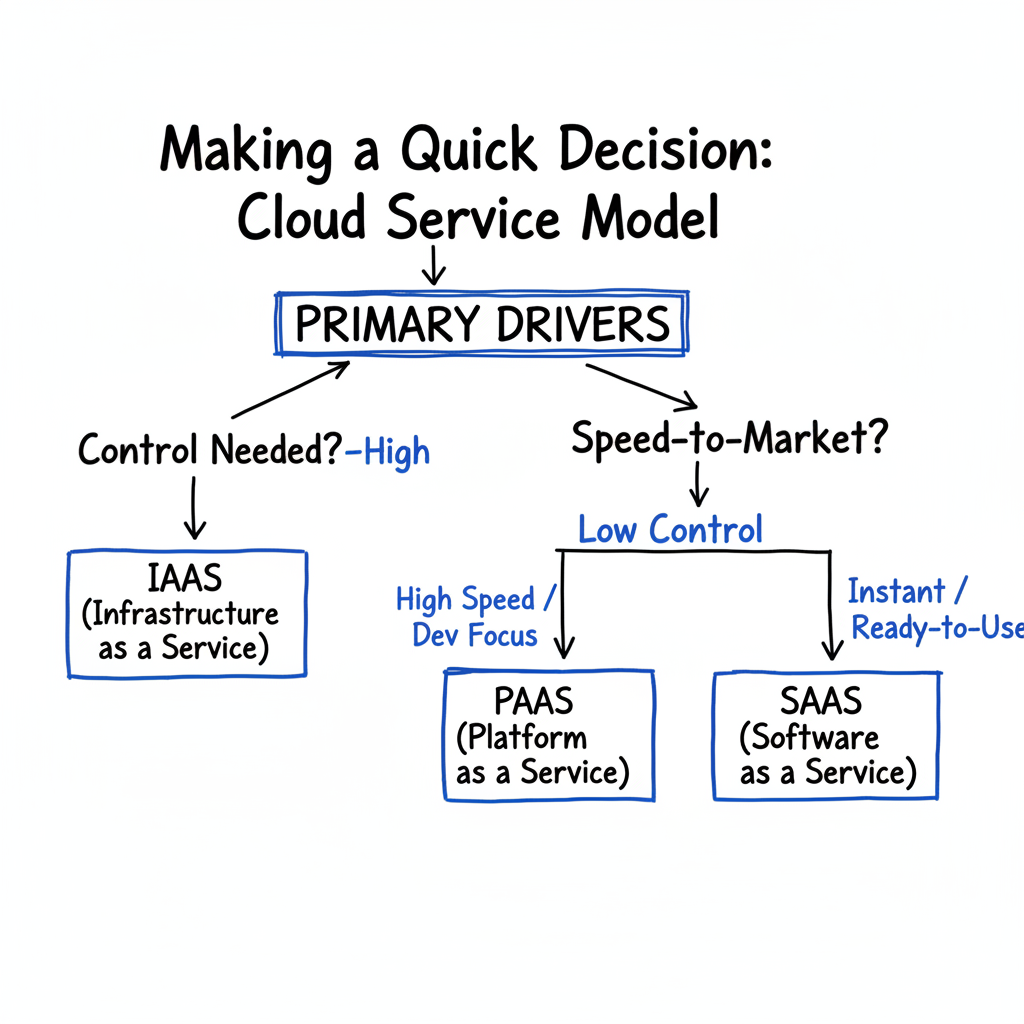
Caption: This decision tree provides a guide to choosing a cloud service model based on your needs for administrative control and speed-to-market.
As the tree shows, if your priority is maintaining total control over the environment, IaaS is the best option. If you want to increase speed by delegating infrastructure management, the choice depends on your goal. PaaS is the right fit for building and deploying custom software rapidly. SaaS is the best choice for organizations that need a ready-made application they can use immediately.
Ready to master cloud concepts and earn your next certification? MindMesh Academy provides expert-led study materials and proven learning techniques to help you pass exams for AWS, Azure, and more. Begin your preparation at AWS Cloud Practitioner Practice Exams and accelerate your career.

Written by
Alvin Varughese
Founder, MindMesh Academy
Alvin Varughese is the founder of MindMesh Academy and holds 15 professional certifications including AWS Solutions Architect Professional, Azure DevOps Engineer Expert, and ITIL 4. He's held senior engineering and architecture roles at Humana (Fortune 50) and GE Appliances. He built MindMesh Academy to share the study methods and first-principles approach that helped him pass each exam.