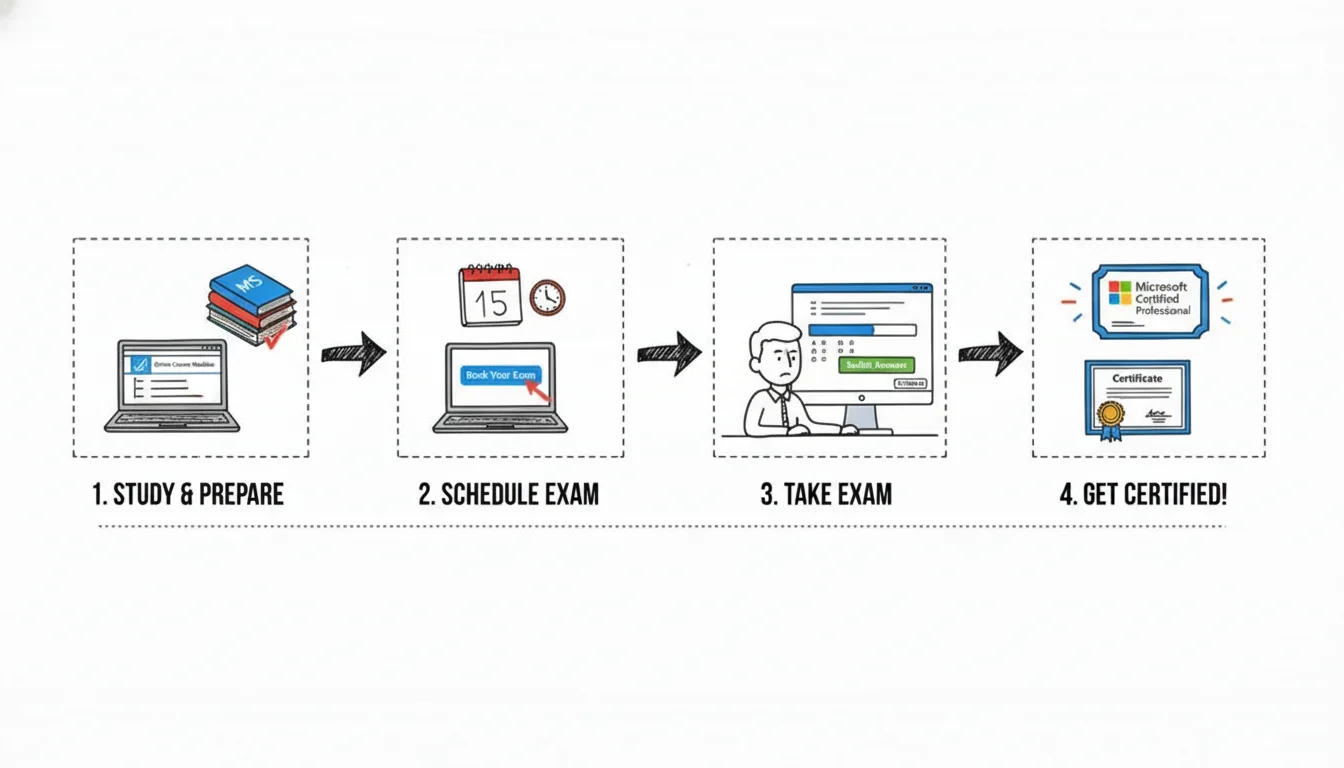
How to Get Certified with Microsoft
Earning a Microsoft certification transcends merely passing an exam; it's a calculated investment in your professional trajectory as an IT professional. This comprehensive guide, informed by the expertise at MindMesh Academy, outlines a clear, step-by-step approach: from identifying your career aspirations and selecting the ideal credential, to mastering the necessary material and confidently passing your proctored exam. The core strategy lies in meticulously aligning your certification choice with both your existing skill set and your future ambitions—whether that’s leveraging Azure for cutting-edge cloud architecture, specializing in Power Platform for robust business intelligence, or mastering other critical domains. A well-structured study plan then becomes your indispensable tool for success.
Your Roadmap to Microsoft Certification
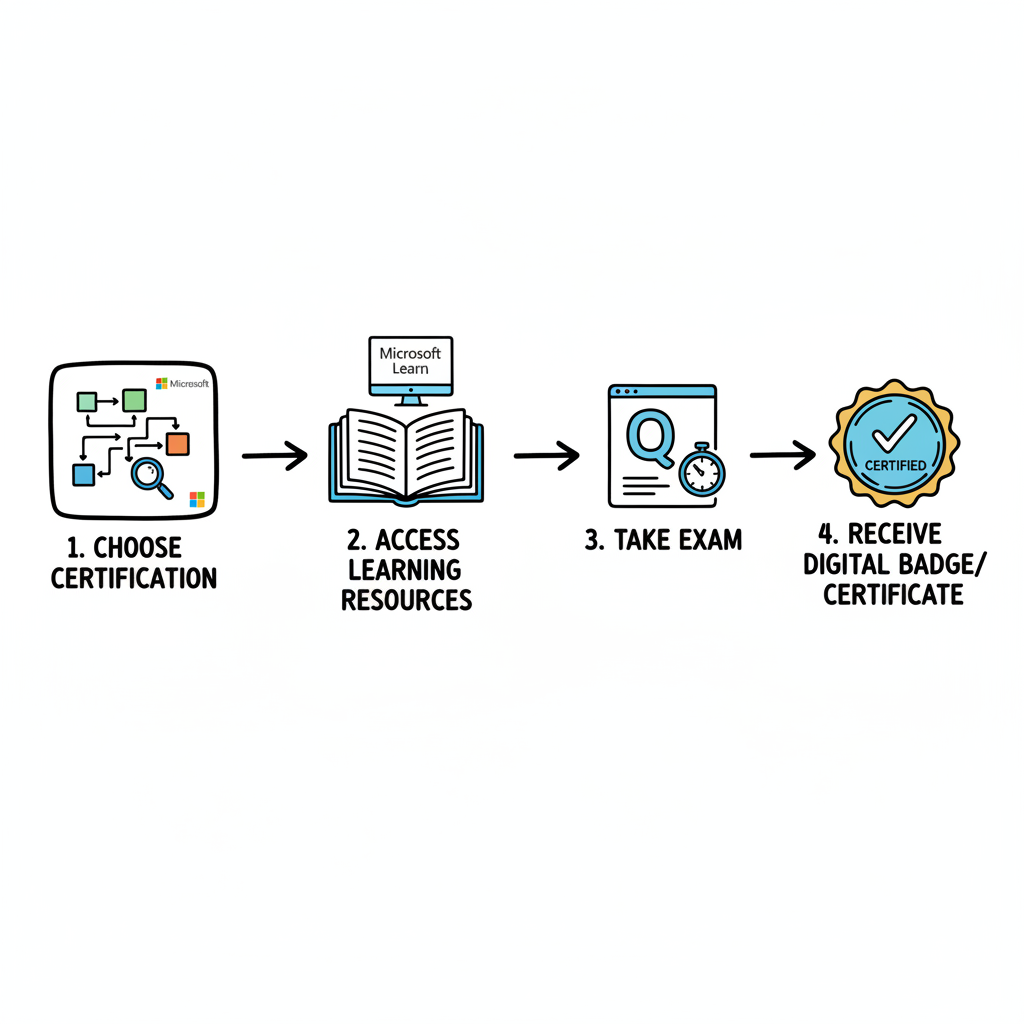 Caption: Demonstrating the tangible career advancement and recognition that a Microsoft certification badge represents in the IT industry.
For IT professionals, earning a Microsoft certification can be a pivotal career accelerator. However, navigating the extensive landscape of available options often feels overwhelming. This section aims to demystify the process, providing a clear, actionable roadmap that empowers you to approach your certification journey with strategic clarity and unwavering confidence.
The strategic value of these credentials has never been higher, directly correlating with the explosive growth in cloud-based and specialized IT roles. Microsoft's shift to a role-based certification model is particularly beneficial for professionals. Unlike older models that might test abstract product features, current exams validate real-world competencies essential for specific job functions—be it an Azure Administrator, a Security Analyst, or a Power BI Data Analyst. This ensures that the knowledge and skills gained during preparation are immediately applicable and valuable in your daily work.
Setting the Stage for Success
Before delving into specific study materials, it's crucial for IT professionals to grasp the strategic importance of this investment in their skills. The demand for qualified technical professionals across various domains—from cloud architecture to cybersecurity—is experiencing unprecedented growth. For instance, the U.S. Bureau of Labor Statistics projects that jobs in computer and IT fields will grow significantly faster than the average for all other occupations between 2023 and 2033. Microsoft certifications directly address this market need by providing verifiable proof of expertise in these high-demand areas. Think of it like a Project Management Professional (PMP) certification for project managers or an ITIL certification for service management; Microsoft certifications offer a similar industry benchmark for technical skills.
This comprehensive guide will equip you to navigate your entire certification process, from initial planning to long-term maintenance:
- Identifying Your Goals: Strategically align your long-term career aspirations with a specific certification path, considering areas like cloud computing (e.g., AWS Certified Solutions Architect or Azure Administrator) or data analytics.
- Choosing Your Credential: Learn how to pinpoint the exact role-based certification that best suits your target job function and future growth.
- Mastering the Material: Discover the most effective study resources, including crucial hands-on labs, to thoroughly prepare for your exam.
- Passing the Exam: Gain essential insights into the registration process, exam format, and strategies for success on test day.
- Staying Current: Understand the simple, free annual renewal process that keeps your valuable certification valid and your skills up-to-date.
A Microsoft certification is far more than just a digital badge for your online profile. It serves as a robust, verifiable signal to potential employers that you possess the practical skills to tackle complex technical challenges using industry-standard tools, and that you are prepared to contribute meaningful value from day one. It's a testament to your hands-on capability.
Beyond the Exam: A Career-Focused Approach
As you meticulously plan your certification journey, consider its broader impact beyond merely passing the exam. This new credential is a powerful asset to enhance your professional brand and unlock new career opportunities. Once earned, optimizing your LinkedIn profile becomes a critical subsequent step to ensure recruiters and hiring managers recognize your newly validated expertise. Focus on highlighting your certification prominently, detailing the specific skills you've mastered, and connecting with relevant industry groups to maximize visibility.
Ultimately, this entire process is about architecting a more resilient and rewarding career in IT. By committing to a clear plan and focusing intently on practical skills, you can confidently earn a credential that genuinely propels your professional growth. If your interests specifically lie in the dynamic world of cloud computing, our comprehensive guide on Azure learning paths and certifications offers an excellent starting point. You can explore it further here.
Choosing the Right Microsoft Certification Path
Embarking on the Microsoft certification journey can initially feel like navigating a vast, intricate network—much like a global transit map with countless connections. The key to successful navigation for IT professionals is to first clearly define your desired professional destination, and then methodically chart the most direct route backward. Consider your ultimate career goals before you even look at the individual certification options.
Are you an individual who thrives on architecting, deploying, and managing complex cloud infrastructure, perhaps akin to an AWS Solutions Architect? Or do you find immense satisfaction in deciphering large datasets to uncover actionable insights? Let your genuine professional interests and innate aptitudes guide your selection. Microsoft meticulously organizes its primary certification families—Azure, Microsoft 365, Dynamics 365, and Power Platform—around distinct, real-world IT job roles. This role-based model ensures that the certifications are highly relevant to industry demands.
Before moving on, take a moment to reflect: What kind of technical challenges truly energize you? Where do you see yourself making the most impact in the IT landscape in the next 3-5 years?
Aligning Your Ambition with Certification Paths
For IT professionals, viewing these certifications not as mere badges, but as calculated strategic investments in your career progression is essential. A seasoned on-premises system administrator aiming to transition into a cloud operations role will naturally pursue a vastly different certification path than a business analyst striving to master advanced data visualization techniques. Each credential is a stepping stone tailored to distinct professional growth trajectories.
To assist you in precisely aligning your goals, Microsoft structures its credentials across three progressive levels:
- Fundamentals: This serves as your foundational entry point. These exams validate a core, conceptual understanding of a specific technology or service. They are ideal for individuals new to the IT field, those undergoing a career transition, or even non-technical professionals who require a strong grasp of cloud terminology and concepts, similar to how an ITIL Foundation cert provides a common language for service management.
- Associate: At this level, you demonstrate practical, hands-on capability. Associate-level certifications are rigorously role-based, signifying to employers that you possess the operational skills required to effectively implement, manage, and troubleshoot within a specific IT job role, such as an Azure Administrator or a Microsoft 365 Administrator.
- Expert: Representing the pinnacle of expertise, Expert-level certifications require passing one or more challenging exams, validating deep, comprehensive knowledge and advanced problem-solving abilities in complex solution areas, often akin to a PMP certification in project leadership or a highly specialized AWS Certified Advanced Networking – Specialty certification.
The official Microsoft Learn portal is an indispensable resource. It allows you to meticulously browse, filter, and discover all available options, ensuring you find the perfect fit for your professional aspirations.
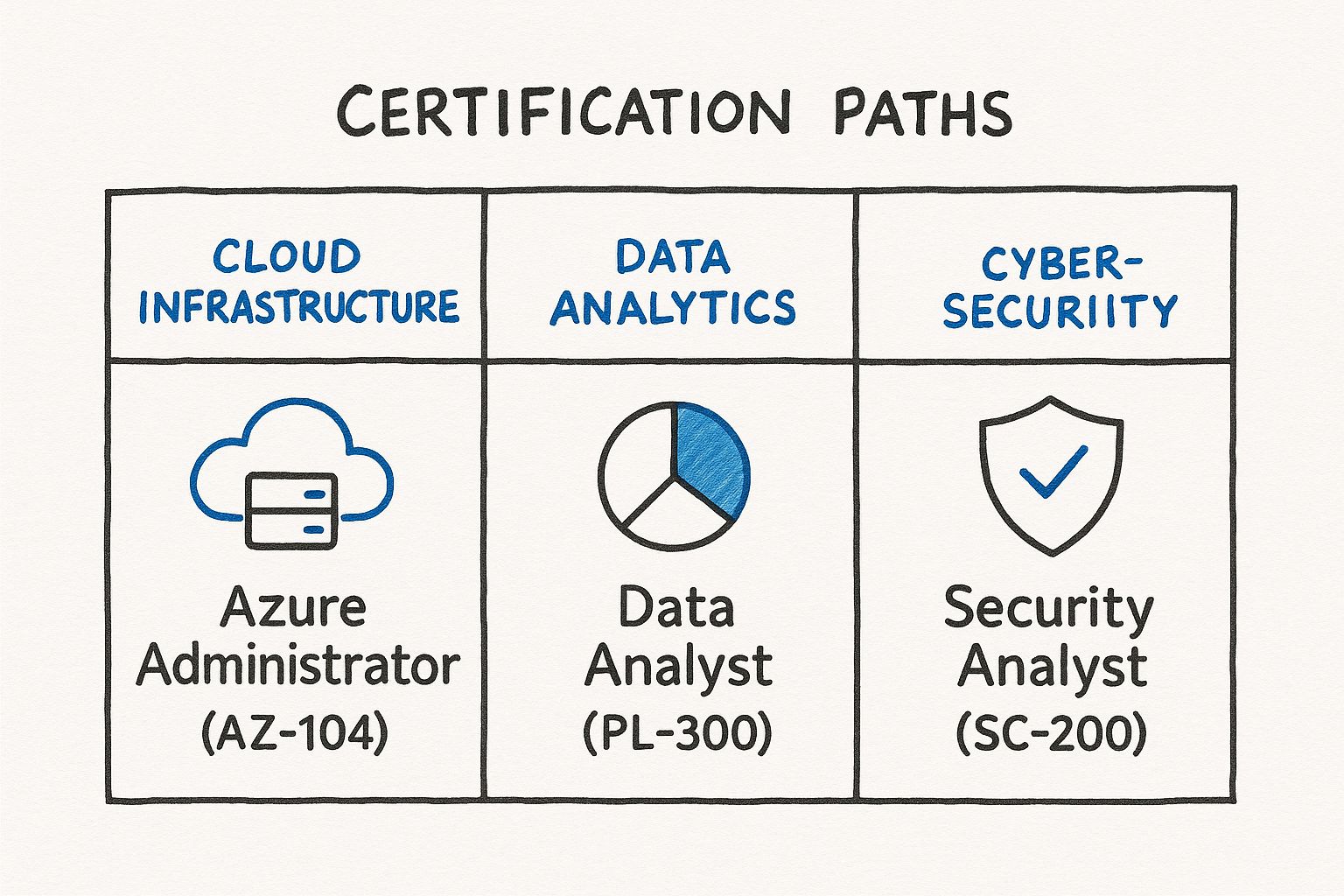 Caption: A visual representation of the Microsoft Learn credentials browser, illustrating how IT professionals can easily filter and identify relevant certification paths.
The ability to precisely narrow down the vast catalog by your target job role or a specific product like Azure or Power Platform makes selecting the right certification significantly more efficient and tailored to your career objectives.
Real-World Scenarios and Popular Choices
Let’s ground these concepts in practical scenarios. Consider yourself a seasoned traditional IT administrator, deeply familiar with on-premises servers, who now aspires to transition into a cloud administration role. A highly logical initial step would be the AZ-900: Azure Fundamentals to establish a solid grasp of core cloud concepts. Progressing from there, your target would be the AZ-104: Azure Administrator Associate, widely recognized as the benchmark credential for that specific job function.
Alternatively, envision yourself as a business analyst determined to add greater value by independently building custom reports and interactive dashboards. Your journey would wisely commence with PL-900: Power Platform Fundamentals, subsequently advancing to the PL-300: Power BI Data Analyst Associate to gain profound expertise in data modeling, visualization, and actionable insights.
These role-based certifications are immensely valuable precisely because they directly align with the specific skill sets hiring managers actively seek. Microsoft Azure certifications are particularly in high demand as organizations continue their rapid migration to cloud infrastructures. In fact, a significant 70% of organizations view recognized credentials as a critical component of skills training, underscoring the direct correlation between obtaining certification and becoming job-ready. For those curious about the most in-demand cloud certifications, exploring insights about top Azure certifications can provide a valuable understanding of current industry trends and career roadmaps in cloud, AI, and data.
Comparing Popular Microsoft Certification Paths
To provide a clearer, at-a-glance perspective, the table below outlines some of the most popular Microsoft certification paths, detailing their core focus areas and the IT professional roles they are designed to prepare you for. This can help you visualize where your skills and ambitions might best fit.
| Certification Path | Core Focus Area | Ideal for Roles Like | Example Certification |
|---|---|---|---|
| Azure Infrastructure | Cloud services, networking, storage, and compute | Cloud Administrator, Solutions Architect, Azure DevOps Engineer | AZ-104: Azure Administrator Associate |
| Data & AI | Database management, data analytics, machine learning, and AI solutions | Data Engineer, Data Analyst, AI Engineer, Machine Learning Scientist | DP-900: Azure Data Fundamentals |
| Security, Compliance, and Identity | Threat protection, information governance, identity management, and security operations | Security Engineer, Security Operations Analyst, Identity and Access Administrator | SC-200: Security Operations Analyst Associate |
| Microsoft 365 | Productivity tools, collaboration, endpoint management, and modern workplace administration | M365 Administrator, Endpoint Administrator, Teams Administrator | MS-900: Microsoft 365 Fundamentals |
| Power Platform | Low-code application development, business process automation, and data visualization | App Maker, Power BI Developer, Functional Consultant | PL-300: Power BI Data Analyst Associate |
This structured comparison helps illustrate how each path is meticulously tailored to a specific set of skills and job functions within the IT ecosystem, facilitating an informed decision about your professional trajectory.
Making Your Final Decision
To solidify your choice and ensure it aligns perfectly with your professional aspirations, engage in a practical self-assessment by asking these direct and probing questions:
- What specific job title do I aspire to hold in the next two to three years? Actively research this role on prominent job boards. Observe which Microsoft certifications are consistently listed as requirements or strong recommendations. This provides tangible market validation.
- What are my existing strengths and areas of expertise? If you possess a robust networking background, an Azure networking specialty certification could be a natural and highly effective progression. Similarly, if scripting and automation are your forte, a DevOps certification path might offer the most rewarding challenge.
- Which technology domains genuinely ignite my passion and curiosity? Your commitment to studying will be significantly amplified if you are intrinsically excited about the subject matter—whether it's cutting-edge AI, the intricacies of cybersecurity, or the innovation of business applications. Passion fuels perseverance.
Based on these questions, which certification path resonates most strongly with your personal and professional vision? Write it down.
Selecting your ideal certification is not merely about opting for what is currently popular; it's about making a strategic choice that is unequivocally right for your unique career path. A thoughtfully chosen certification validates your existing knowledge, significantly boosts your professional confidence, and provides a clear, actionable roadmap for your ongoing career development.
Once you have confidently identified the appropriate certification, the next critical phase involves constructing a smart, efficient, and truly effective study plan. This is where your ambition transforms into a concrete, executable strategy for exam success.
Building a Study Plan That Actually Works
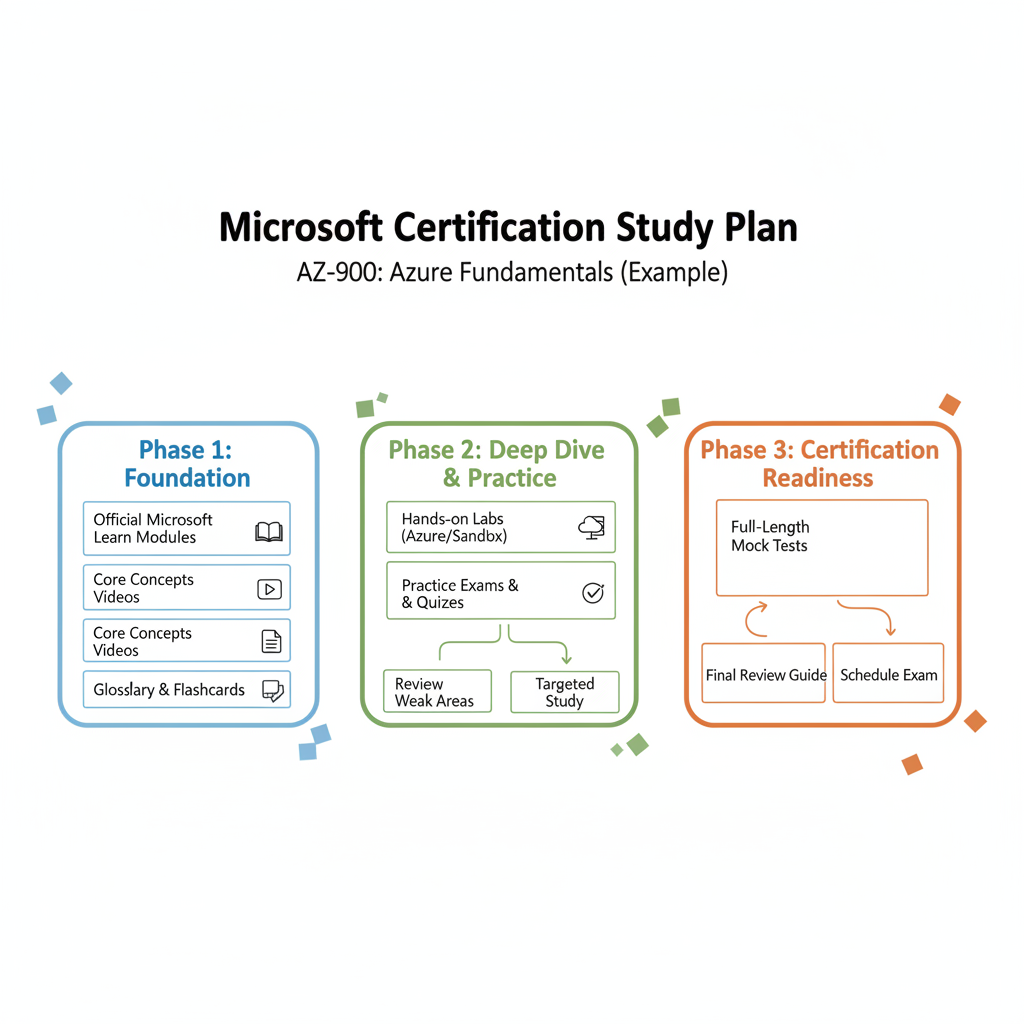 Caption: A well-organized study space, essential for focused learning and effective preparation for IT certification exams.
With your target certification firmly in mind, the journey shifts to building a study plan that delivers tangible results. For IT professionals, a successful plan is never a generic checklist; it's a personalized, dynamic system that harmonizes with your individual learning style and demanding schedule. This requires a strategic blend of official Microsoft resources, extensive hands-on practice, and astute time management techniques.
The absolute cornerstone of your preparation is a profound understanding of the exam content. Microsoft provides this invaluable information in the official skills outline for every certification exam. This document is your definitive guide—a blueprint detailing every topic, its relative weighting on the exam, and the specific competencies you are expected to demonstrate. We highly recommend printing it out and using it as a living checklist to meticulously guide and track your entire preparation process.
Start with Microsoft's Official Resources
Your primary and most essential starting point should unequivocally be Microsoft Learn. This free, comprehensive platform is an unparalleled educational asset, replete with meticulously designed learning paths that precisely mirror the official exam objectives. These aren't just passive documents; they are structured for active, engaging learning.
- Learning Paths: These curated paths serve as guided tours, systematically leading you through the curriculum in a logical and progressive sequence.
- Knowledge Checks: Integrated quizzes appear strategically after modules, serving as immediate feedback mechanisms to confirm your comprehension and retention of the material.
- Hands-On Labs: This is arguably the most critical feature for IT professionals. Many modules embed you directly into a sandboxed Azure environment or other relevant Microsoft services, allowing you to gain practical, "dirty-hands" experience without incurring personal subscription costs or risking your production environments.
Time and again, I observe that a common pitfall is merely passively consuming content—watching videos or simply reading documentation. To truly internalize these complex concepts, active engagement and practical application are paramount. Theoretical understanding is merely the starting line; hands-on application is the indispensable engine that drives you across the finish line and into genuine proficiency.
Broaden Your Horizons with Third-Party Content
While Microsoft Learn should remain your central hub, integrating supplementary resources can significantly enrich your understanding. Occasionally, a different pedagogical approach or an alternative explanation can clarify a complex topic. Reputable platforms such as Pluralsight, A Cloud Guru, and Udemy host a wealth of high-quality video courses delivered by seasoned industry professionals.
These external courses often adopt a more conversational and narrative-driven style, offering a refreshing complement to the official documentation. Furthermore, they typically include their own practice labs and diverse question sets, providing additional opportunities to rigorously test and solidify your knowledge.
Hands-On Practice is Non-Negotiable
Let this be unequivocally clear: For most Associate or Expert-level exams, particularly those focused on cloud platforms like Azure or AWS, passing without substantial, direct hands-on experience is virtually impossible. Merely reading about configuring an Azure Virtual Network is a theoretical exercise; actually deploying one, meticulously troubleshooting connectivity issues, and integrating it with other services is where true understanding and proficiency are forged.
Proactively sign up for a free Azure account or a Microsoft 365 developer tenant. These provide authentic, real-world sandboxes where you can confidently build, intentionally break, and expertly fix configurations. Beyond merely following prescribed lab steps, challenge yourself to extend concepts by building a small, focused project directly aligned with the exam objectives. This iterative process is precisely where theoretical concepts crystalize into robust, retained knowledge.
How to Structure Your Study Time
Understanding what to study constitutes half the battle for IT professionals. The other, equally vital half, is effectively integrating that study into your already demanding life. Attempting to cram for eight hours straight on a Saturday is a recipe for rapid burnout and diminished retention. Consistency trumps intensity.
Instead, meticulously review the skills outline and decompose it into manageable, bite-sized learning modules. From there, actively implement time blocking—a powerful productivity technique. Dedicate specific, non-negotiable blocks of time to distinct topics. For example, Monday and Wednesday evenings could be reserved for Azure networking, while Tuesday focuses exclusively on identity and access management. This creates a structured routine that minimizes procrastination and maximizes focus.
To truly embed information into long-term memory, explore scientifically proven learning techniques. I strongly advocate for spaced repetition, a method where you review material at progressively increasing intervals. This actively counteracts the forgetting curve and can be easily integrated into your study routine with simple tools or even flashcards, ensuring that knowledge isn't just acquired, but durably retained.
Use Practice Exams the Right Way
Practice exams represent one of your most potent preparatory tools, yet their full potential is frequently underutilized. Their true purpose extends beyond merely assessing your current score; they function as a sophisticated diagnostic instrument, meticulously illuminating your specific areas of weakness and guiding your focused study efforts.
Here's the process I recommend:
- Conduct a baseline assessment early in your study journey. Do not obsess over the initial score; instead, use it to familiarize yourself with the question formats and identify your starting knowledge gaps across different domains.
- Rigorously analyze your results. Beyond simply noting incorrect answers, delve deeply into why you erred. Was it a fundamental concept you misunderstood? Did you misinterpret the question's intent (a common challenge in certification exams)? Was it a lapse in recall?
- Strategically refocus your studies. Direct your energy and resources specifically toward the domains where your performance was weakest. Revisit Microsoft Learn modules, repeat relevant hands-on labs, and seek out supplemental content that thoroughly addresses those particular topics.
- Repeat the cycle with a fresh practice exam approximately one to two weeks before your actual test date. This iterative process refines your knowledge and builds critical exam-taking stamina.
This analytical approach transforms a practice exam from a simple score report into a dynamic, highly personalized study guide. You transition from studying aimlessly to precisely targeting the knowledge areas that will yield the greatest impact on your performance on exam day.
Navigating Exam Day with Confidence
 Caption: A calm and focused individual preparing for an online certification exam, highlighting the importance of a distraction-free environment.
After dedicating countless hours to rigorous study and hands-on practice, exam day represents the final, exhilarating hurdle. For IT professionals, understanding the precise logistics of scheduling and sitting for your certification test can profoundly impact your performance, enabling you to remain composed and perform optimally. Let's meticulously walk through the operational details, ensuring you feel completely prepared whether you opt for an in-person or online examination.
Every Microsoft certification exam is administered through Pearson VUE, a global leader in high-stakes testing. Your initial crucial decision during the registration process will be selecting your preferred testing environment. You have two distinct choices, each presenting its own set of advantages and considerations.
In-Person vs. Online Proctored Exams
The decision between an in-person or online proctored exam ultimately hinges on your personal comfort, logistical situation, and preferred testing conditions.
- In-Person Testing Centers: This traditional approach involves booking a specific time slot at a local Pearson VUE center. You will be provided with a secure, locked-down computer in a quiet, professionally monitored room. This option is highly recommended if your home environment presents potential distractions, your internet connectivity is inconsistent, or you simply concentrate more effectively in a dedicated, formal testing atmosphere.
- Online Proctored Exams: The significant allure of this option is unparalleled flexibility—the ability to take your exam from the convenience of your home or office. However, this convenience is coupled with exceptionally stringent requirements. You absolutely must have a completely private, undisturbed room, a totally clear desk free of any extraneous items, and a robust, uninterrupted internet connection.
While the convenience of online proctoring is a popular choice for many IT professionals today, it's vital to be thoroughly prepared for its rigorous check-in and monitoring protocols.
The Online Proctoring Experience Unpacked
If you opt for the online route, your exam day effectively commences approximately 30 minutes before your scheduled appointment. You will launch the Pearson VUE software and initiate a comprehensive identity and environment verification process. This typically involves submitting photographs of your government-issued ID, a clear photo of your face, and distinct images of your entire room from multiple angles to confirm a compliant testing space.
Subsequently, a live proctor will engage with you to meticulously review all submitted materials. They will examine your photographs and may request a live, real-time tour of your physical space via your webcam to definitively confirm that your desk is entirely clear, no unauthorized notes or devices are present, and you are indeed the sole occupant of the room. Once all checks are successfully completed, your exam will be officially launched.
It is imperative to understand that during an online exam, you are under continuous observation and audio monitoring via your webcam and microphone. Any deviation from strict protocols—such as frequently looking away from the screen, verbalizing thoughts, or having another individual enter the room—can lead to immediate termination of your exam and forfeiture of your fee. Maintain unwavering focus and adhere strictly to all rules.
Understanding the Exam Interface and Question Types
Once you commence the exam, you will quickly discern that Microsoft certifications are designed to assess more than just rote memorization. They are expertly crafted to evaluate your ability to apply knowledge and solve authentic, real-world IT problems.
You can expect a mix of formats, including:
- Multiple Choice/Multiple Response: These are the standard question formats where you will select one or more correct answers from a given set of options. Pay close attention to whether the question asks for single or multiple responses.
- Case Studies: You will be presented with a detailed business or technical scenario, followed by several interconnected questions. The critical skill here is your ability to thoroughly analyze all provided information to formulate optimal technical solutions.
- Hands-On Labs: Increasingly prevalent in many Associate and Expert-level exams, these immersive sections place you directly within a live Azure or Microsoft 365 environment. You will be required to execute specific tasks, providing the ultimate validation of your practical, functional skills.
This robust, practical approach is precisely why Microsoft certifications hold such high regard in the industry—they tangibly prove your capability to perform the job. Indeed, a Pearson VUE survey highlighted that an impressive 91% of certified candidates report a significant boost in confidence regarding their technical abilities post-certification.
Tips for Managing Time and Pressure
The exam clock begins ticking the moment you start, making effective time management absolutely paramount. For IT professionals, strategic pacing can be the difference between success and needing a retake.
My most salient advice: Do not allow yourself to become entrenched on a single, seemingly insurmountable question. Microsoft's exam software allows you to "mark for review" any question you are unsure about. Make your most informed guess, mark it, and promptly move forward. You can always revisit these flagged questions at the end if surplus time permits. This prevents undue anxiety and optimizes your flow.
For case studies, dedicate a full minute to carefully read and absorb the entire scenario before you even look at the questions. Frequently, a crucial detail required for a later question might be subtly embedded within the introductory text of an earlier one. When tackling hands-on labs, meticulously follow the instructions to the letter. The scoring is automated and highly precise, specifically looking for exact configurations and successful task completion.
It is entirely natural to experience some degree of pre-exam jitters. Should anxiety begin to surface, simply pause, take a few deep, calming breaths, and consciously refocus your thoughts. You have diligently invested the work, and you are thoroughly prepared for this challenge. For a more exhaustive exploration of strategies to manage test-day nerves, refer to our comprehensive MindMesh Academy guide on overcoming exam anxiety and boosting your confidence.
Keeping Your Microsoft Certification Current
Caption: A video guide explaining the essential steps for renewing your Microsoft certifications and staying current in the rapidly evolving tech landscape.
Achieving that coveted 'pass' on your exam is an exhilarating milestone, but in the fast-paced realm of cloud technology, the technological landscape is perpetually evolving. For IT professionals, your learning journey extends beyond the initial certification; it's a commitment to continuous growth. Maintaining your certification is how you consistently demonstrate to the industry that your expertise is not only validated but also perpetually current and relevant.
Fortunately, the era of regularly retaking expensive, high-stakes exams every couple of years is largely behind us. Microsoft has judiciously redesigned the renewal process to be far more practical and aligned with the demands of continuous professional development. The new model is focused on ensuring you remain adept with the latest updates, rather than re-testing foundational knowledge you've already proven you possess.
Understanding the Annual Renewal Process
For all role-based Associate, Expert, and Specialty certifications, Microsoft mandates a free, annual renewal process. This proactive system typically initiates approximately six months prior to your certification's expiration date. There's no need to worry about missing deadlines—you will receive timely email reminders, and you can always verify your status directly within your Microsoft Learn profile.
The renewal procedure itself is meticulously engineered for maximum efficiency and accessibility:
- Zero Cost: Crucially, there is absolutely no financial cost associated with taking the renewal assessment. Microsoft's objective is to encourage continuous learning and skill maintenance, not to impose financial barriers.
- Fully Online & Flexible: The assessment is conducted entirely online, allowing you the convenience of completing it from any browser, at any time, from any location. This eliminates the need for scheduling appointments or visiting test centers, providing unparalleled flexibility for busy IT professionals.
- Open-Book Format: This is not a closed-book examination. You are actively encouraged to leverage Microsoft Learn and other reputable resources during the assessment. The true evaluation lies in your ability to efficiently locate information and demonstrate comprehension of recent technological changes and updates.
The innovative renewal model adopted by Microsoft is not about traditional pass/fail metrics. Instead, consider it a low-pressure, yet effective, mechanism to affirm that you have consistently kept pace with technological advancements since you initially earned your credential. It’s a commitment to staying relevant.
This modernized approach significantly reduces the stress traditionally associated with certification maintenance. Should you not succeed on your initial attempt at the assessment, you are permitted an immediate re-attempt. Following a second attempt, a 24-hour waiting period is enforced between subsequent retakes, but you can endeavor as many times as necessary before your certification officially expires, ensuring ample opportunity for success.
Preparing for Your Renewal Assessment
Given that the renewal assessment is primarily focused on recent changes and updates, a last-minute cramming approach is largely ineffective. The most robust strategy for IT professionals is to foster consistent engagement with the technology throughout the year, integrating continuous learning into your professional routine.
When you are ready to initiate the renewal process, simply navigate to the dedicated assessment page on Microsoft Learn. There, you will discover a curated collection of learning modules specifically designed to cover all significant product and feature updates released over the preceding year. For the majority of professionals, diligently working through these targeted modules constitutes all the necessary preparation. It represents a far more concise and focused effort compared to the original, extensive exam preparation.
For example, if you are renewing your AZ-104: Azure Administrator Associate certification, the renewal modules will likely address recent enhancements in Azure networking, updates to Azure Policy, or newly introduced features in identity and access management—all crucial developments since your initial certification. This ensures your knowledge remains sharp and relevant.
Showcasing Your Renewed Credential
Upon successfully passing the renewal assessment, your certification's expiration date will be automatically extended for one year from its original expiration date. This is a significant professional achievement that warrants recognition and strategic showcasing!
Your digital badge, typically managed on platforms such as Credly, will promptly update to reflect the new validity period. This opportune moment is ideal for a swift refresh of your professional online presence:
- Update LinkedIn: Craft a concise post announcing your successful renewal. This is an effortless yet effective method to demonstrate to your professional network and potential employers your ongoing commitment to professional development and staying at the forefront of technological change.
- Refresh Your Resume: Meticulously review and update the expiration date of your certification on your professional resume. Recruiters actively scrutinize resumes for current and valid credentials, as outdated certifications can inadvertently suggest a lack of continuous learning.
How will you leverage your renewed certification to enhance your professional brand this year?
By consistently keeping your Microsoft certification meticulously up-to-date, you ensure it remains a potent professional asset, accurately reflecting your current expertise. It embodies a continuous cycle of learning and validation, confidently communicating to employers that your skills are not only proven but are also acutely relevant to navigating the evolving challenges of today's IT landscape.
Your Top Microsoft Certification Questions Answered
Even with a clear roadmap, IT professionals often have specific practical questions about the nuances of starting their certification journey. This is entirely understandable. Details regarding cost, time commitment, and the overall return on investment are consistently paramount considerations when embarking on new professional development.
Let's delve into the most frequently asked questions I encounter from individuals commencing their Microsoft certification pathway. Addressing these inquiries proactively will empower you to meticulously plan your approach and commit to your goals with unwavering confidence.
How Much Is This Going to Cost Me?
This is almost invariably the first question, and for excellent reason. The exact price varies based on the certification's difficulty and level of expertise. For those in the United States, here's a general cost breakdown, though prices may fluctuate slightly by country:
- Fundamentals Exams: These entry-level certs, such as the widely popular AZ-900: Azure Fundamentals, typically cost around $99 USD. They offer an accessible and cost-effective method to validate core foundational knowledge.
- Associate & Expert Exams: The more advanced, role-based certifications often carry a price tag of approximately $165 USD each. These are the credentials that significantly enhance your professional profile and attract the attention of hiring managers for specialized technical roles.
Beyond the exam fee, remember to budget for supplementary study materials. While Microsoft Learn is an exceptionally valuable free resource, you might also consider investing in high-quality video courses or premium practice exams, which will naturally add to your total financial outlay.
Expert Tip for IT Professionals: Always monitor Microsoft's major conferences and events, such as Microsoft Ignite. Attendees frequently receive opportunities for free or heavily discounted exam vouchers. Leveraging these programs is an excellent, strategic way to substantially reduce your certification expenses.
Which Certification Is Best If I'm a Beginner?
If you're new to the IT field, transitioning careers, or in a non-technical role that frequently interfaces with IT operations, the Fundamentals certifications are the unequivocally ideal starting point. They are specifically designed to impart core concepts without overwhelming you with overly technical jargon.
Without question, the most popular and broadly beneficial foundational certification is the AZ-900: Microsoft Azure Fundamentals. It provides a robust understanding of cloud computing principles and the expansive Azure ecosystem—a skill set that is increasingly invaluable across nearly every modern IT role.
Other excellent entry-level options include:
- MS-900: Microsoft 365 Fundamentals: Perfect if your career path is oriented toward modern workplace tools, collaboration platforms, and productivity solutions.
- PL-900: Microsoft Power Platform Fundamentals: An excellent choice for professionals interested in low-code application development, business process automation, and insightful data analytics.
- SC-900: Microsoft Security, Compliance, and Identity Fundamentals: If you're drawn to the critical and rapidly expanding domain of cybersecurity.
Successfully achieving a Fundamentals exam provides a powerful confidence boost. It objectively validates your grasp of essential concepts before you progress to more rigorous Associate-level challenges, building a solid foundation for further specialization.
Realistically, How Long Will It Take to Prepare?
The candid truth? Preparation time is highly individualized. Your prior experience, the specific complexity of the chosen exam, and the consistent amount of time you can realistically dedicate each week all profoundly influence the timeline. There's no one-size-fits-all answer for IT professionals.
However, based on extensive observation within the IT community, here are some practical estimates:
| Your Experience Level | Certification Level | Estimated Study Time |
|---|---|---|
| New to IT/Career Changer | Fundamentals (e.g., AZ-900) | 2-4 Weeks (approx. 15-30 hours total) |
| Some Relevant IT Experience | Associate (e.g., AZ-104) | 2-3 Months (approx. 60-90 hours total) |
| New to the Specific Technology | Associate (e.g., AZ-104) | 3-5 Months (approx. 90-150 hours total) |
The genuine secret to success isn't about speed; it's about unwavering consistency. Dedicating a focused hour to study every single day consistently proves far more effective than attempting to cram for ten hours every other weekend. Always make the official exam "skills outline" your primary navigational guide and prioritize robust hands-on practice above all else.
Are Microsoft Certifications Actually Still Worth It?
Without equivocation, yes. In fact, for today's IT professionals, I would assert that their value and relevance are greater than ever before. In a highly competitive job market, a reputable certification serves as verifiable, industry-recognized proof of your technical prowess.
It is a powerful tool to capture the attention of discerning recruiters, unlock doors to advanced career opportunities, and can indeed lead to a substantial increase in your earning potential. Because Microsoft strategically transitioned to a role-based model, these certifications are inherently practical. They rigorously assess the precise skills that companies are actively seeking, guaranteeing that your acquired knowledge can be immediately applied to solve real-world problems from day one.
A Microsoft certification is not merely a digital document for your LinkedIn profile; it is a profound declaration of your dedication, expertise, and readiness to excel in the dynamic IT landscape. It’s an investment that truly pays dividends.
Ready to start your Microsoft certification journey with a study plan that truly guarantees success? At MindMesh Academy, we are committed to providing IT professionals with expert-curated materials and evidence-based learning techniques designed to help you master complex concepts and pass your exams with unwavering confidence. Explore our comprehensive courses today at mindmeshacademy.com and strategically advance your career.

Written by
Alvin Varughese
Founder, MindMesh Academy
Alvin Varughese is the founder of MindMesh Academy and holds 15 professional certifications including AWS Solutions Architect Professional, Azure DevOps Engineer Expert, and ITIL 4. He's held senior engineering and architecture roles at Humana (Fortune 50) and GE Appliances. He built MindMesh Academy to share the study methods and first-principles approach that helped him pass each exam.