
DynamoDB vs RDS A Practical Guide for Modern AWS Architectures
The core difference between DynamoDB and RDS boils down to a fundamental trade-off: NoSQL speed and flexibility versus relational structure and deep query capabilities. Amazon DynamoDB is a serverless, non-relational database built for unparalleled speed and massive scale, while Amazon RDS (Relational Database Service) is a managed service for traditional relational databases that excel at structured data and complex SQL queries.
For IT professionals pursuing AWS certifications like the AWS Certified Cloud Practitioner or Solutions Architect Associate, understanding this distinction is foundational. The choice between DynamoDB and RDS is a critical architectural decision that shapes an application's performance, scalability strategy, and operational costs. MindMesh Academy aims to equip you with the insights needed to make these informed choices.
Deciding Between DynamoDB vs. RDS: A High-Level Overview
Let's begin with a clear picture of each service, highlighting their core strengths.
DynamoDB is a fully managed NoSQL key-value and document database. Its primary design goal is to deliver consistent, single-digit millisecond latency, regardless of throughput. As a serverless service, it completely abstracts away server management—no provisioning, patching, or scaling servers. You simply pay for the reads, writes, and storage consumed. This makes DynamoDB a natural fit for high-traffic web applications, real-time bidding systems, gaming leaderboards, and IoT data streams where access patterns are known and predictable.
Amazon RDS (Relational Database Service) is not a database engine itself but a robust managed service that simplifies running popular relational databases like MySQL, PostgreSQL, Oracle, or SQL Server in the AWS cloud. RDS provides the familiarity and power of SQL, strong data consistency guaranteed by ACID compliance (Atomicity, Consistency, Isolation, Durability), and the ability to perform complex joins across multiple tables. This is the traditional and often preferred choice for e-commerce platforms, financial applications, and content management systems where data integrity, transactional consistency, and flexible querying are paramount.
Key Takeaway for Architects: With DynamoDB, you primarily model your data to optimize for your application's most frequent query patterns. With RDS, you model your data based on business entities and relationships, then leverage SQL to query it in virtually any way needed.
To put this into perspective, here’s a quick side-by-side summary that can help in an initial assessment, often useful for quick exam recall.
Quick Comparison: DynamoDB vs. RDS
| Attribute | DynamoDB | Amazon RDS |
|---|---|---|
| Data Model | NoSQL (Key-Value & Document) | Relational (Tables, Rows, Columns) |
| Schema | Flexible (Schema-on-read) | Rigid (Predefined Schema-on-write) |
| Primary Use Case | High-velocity, simple lookups, massive scale | Complex queries, joins, transactions, strong consistency |
| Scalability | Horizontal (Automatic & seamless) | Vertical (Resizing instances) & Read Replicas (for reads) |
| Performance | Single-digit millisecond latency, predictable | Varies based on query complexity & instance size |
| Management | Fully Managed (Serverless), no servers to provision | Managed Service, requires instance type selection & some configuration |
This table effectively highlights the fundamental architectural divide. DynamoDB offers seemingly limitless scale and speed by design, while RDS provides the familiarity and powerful querying capabilities of a traditional relational database, with AWS handling much of the operational heavy lifting.
Architectural Foundations: Understanding the Core Differences
When you're trying to decide between DynamoDB and RDS, the first thing you need to grasp is how they are fundamentally built. Their core architectures couldn't be more different, and this single fact drives everything else—from performance and scaling to how you manage them day-to-day. Getting this right is make-or-break for your application and a frequent topic in AWS certification exams.
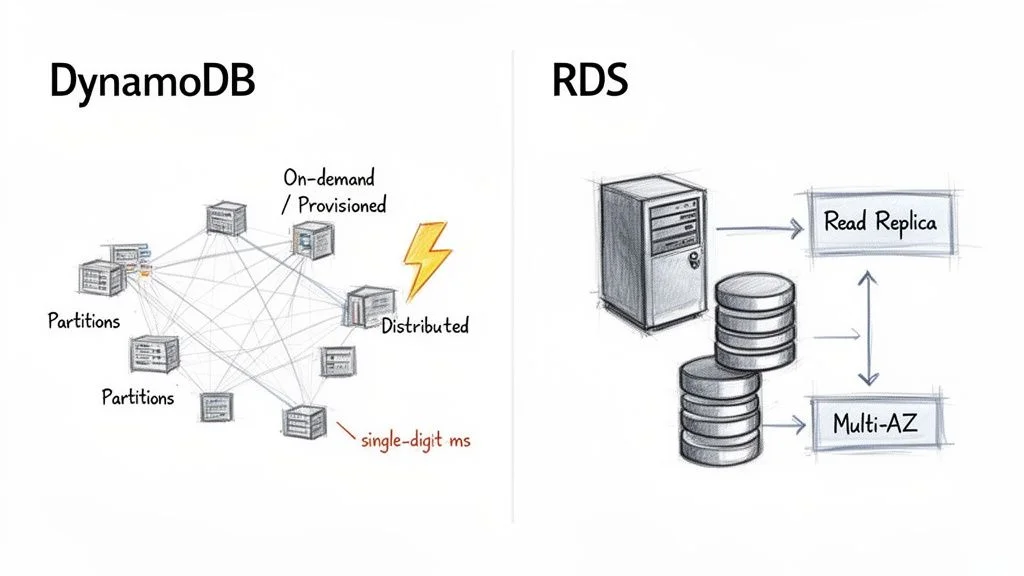
DynamoDB was designed from the ground up as a fully managed, serverless, and distributed NoSQL database. The term "serverless" is profoundly important here—it means you never provision, patch, or even think about the underlying servers. You interact purely with the database API, allowing developers to focus entirely on application logic rather than infrastructure.
Under the hood, DynamoDB automatically distributes your data and traffic into chunks called partitions. Each partition is a separate piece of storage and compute, running on its own solid-state drives (SSDs). This distributed, partitioned design is the "secret sauce" that enables DynamoDB to deliver consistent, single-digit millisecond latency, regardless of how massive your table grows. As your data volume or throughput needs increase, AWS transparently adds more partitions, ensuring seamless horizontal scaling without any manual intervention.
The Serverless Power of DynamoDB
DynamoDB's capacity models perfectly reflect its serverless nature:
- On-Demand Capacity: This is the simplest option. You pay for each read and write request your application performs. It's ideal for new applications, unpredictable workloads, or spiky traffic because it scales up and down instantly with zero configuration, preventing over-provisioning.
- Provisioned Capacity: With this model, you specify the number of reads (Read Capacity Units - RCUs) and writes (Write Capacity Units - WCUs) per second your application requires. This offers a more cost-effective choice if you have a clear understanding of your application's traffic patterns, as you commit to a certain level of throughput.
This serverless approach significantly reduces the operational burden. Your team's focus shifts from infrastructure management to designing efficient data access patterns.
Key Architectural Insight: DynamoDB’s architecture is engineered for extreme speed and scale by distributing data across many small, independent units (partitions). This inherently avoids the single-server bottlenecks common in traditional database designs, a crucial concept for the AWS Certified Solutions Architect Associate exam.
RDS Managed Relational Architecture
Amazon RDS, in contrast, follows a more traditional, server-centric path. It's not a database engine itself but a managed service that hosts popular relational engines like MySQL, PostgreSQL, or SQL Server on virtual servers, which are essentially EC2 instances. With RDS, you choose an instance type (e.g., db.t5.micro or db.m5.large) to provision the appropriate amount of CPU, memory, and networking capacity for your database.
While AWS manages tedious tasks like patching, backups, and underlying OS maintenance, you are still fundamentally working with a single primary database server. This is a critical distinction from DynamoDB's distributed model. The robust, relational structure is what gives RDS its superpower: ACID (Atomicity, Consistency, Isolation, Durability) compliance. This makes it the go-to choice for complex transactional workloads where data integrity is absolutely paramount, such as banking or inventory systems. For a deeper dive into its features, explore our detailed guide on Amazon Relational Database Service.
For high availability, RDS leverages a Multi-AZ (Multi-Availability Zone) setup. AWS synchronously replicates your primary database to a standby instance in a different Availability Zone. In the event of a primary instance failure, RDS automatically performs a failover to the standby, minimizing downtime.
Scaling in a server-based design like RDS is primarily vertical. Need more processing power? You upgrade to a beefier instance, which typically involves a brief downtime during a maintenance window. RDS does support Read Replicas to horizontally scale out read traffic, but all write operations still route through that single primary instance. This architecture provides the familiarity and powerful querying of SQL but with inherent scaling limits that DynamoDB was specifically designed to overcome.
Reflection Prompt: How might the "serverless" nature of DynamoDB simplify compliance requirements or disaster recovery planning compared to managing an RDS instance, especially for a small-to-medium business?
Comparing Data Models and Query Flexibility
The heart of the DynamoDB vs. RDS debate comes down to their data models and how you extract information. This isn't just a minor technical detail; it’s a fundamental design choice that will shape your entire application's development and long-term maintainability. Nailing this concept is a must-know for passing AWS certification exams and for building effective, scalable systems in the real world.
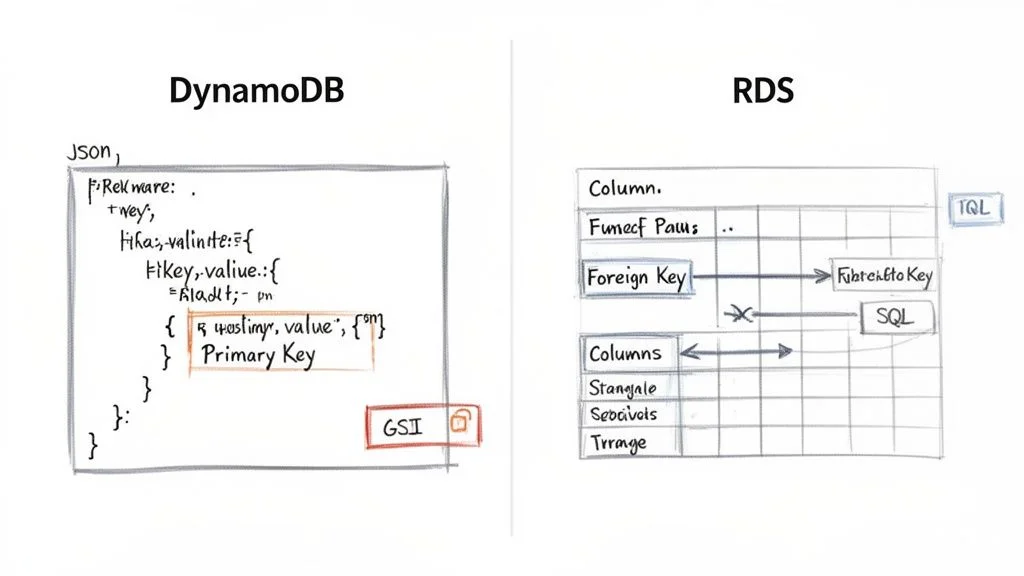
DynamoDB uses a flexible, "schema-on-read" model. It stores your data as items (conceptually similar to JSON documents) within tables. Each item requires a unique primary key, but beyond that, the structure can vary significantly. You can add or drop attributes from one item to the next without altering the table's overall structure. This agility is fantastic for rapidly evolving applications or handling diverse, semi-structured data, like user profiles where different users might have different sets of preferences.
Amazon RDS, conversely, enforces a strict, "schema-on-write" structure. You must meticulously define your tables, columns, data types, and the relationships between tables (using foreign keys) before you can insert a single row of data. This rigidity is its strength, guaranteeing data integrity and consistency. It's the perfect fit for applications where every piece of data must conform to a predefined model, such as in financial transactions or inventory management systems, which require strong referential integrity.
DynamoDB’s Access-Pattern-Driven Design
When working with DynamoDB, your data model is inextricably linked to your application's query patterns. You're not just storing data; you're structuring it from day one to efficiently answer the specific questions your application will ask.
This means understanding your access patterns upfront is crucial. The primary key—which can be a simple partition key (like UserID) or a composite key made of a partition key plus a sort key (like UserID and OrderDate)—is your main tool for efficient data retrieval.
Consider a simple user profile table:
- Item: A single user's profile.
- Partition Key:
UserID(e.g.,user#123). - Attributes:
Username,Email,RegistrationDate. - Nested Data: An attribute like
Preferencescould hold a JSON object{ "theme": "dark", "notifications": true }. - If you also frequently need to query by
Email(which is not part of the primary key), you would create a Global Secondary Index (GSI) on theEmailattribute. This creates a separate, indexed copy of your data, allowing efficient lookups by email. Alternatively, Local Secondary Indexes (LSIs) can be used when you need different sort keys for the same partition key. Understanding GSIs and LSIs is vital for optimizing DynamoDB performance and a common subject in the AWS Solutions Architect exams. You can get a deeper understanding of its core principles in our guide on the Amazon DynamoDB NoSQL database.
Reflection Prompt: Imagine you're building a social media app. For user profiles, how would you decide between using a simple
UserIDas a partition key or a composite key withUserIDand aCreationDatesort key? What access patterns would drive that decision?
RDS and the Power of SQL
With Amazon RDS, you get the full, unrestricted power of the Structured Query Language (SQL). Once your data is logically organized into well-defined tables, you can execute virtually any query imaginable.
This is where RDS truly shines. You can perform complex operations that are either highly challenging or impossible to do directly and efficiently in DynamoDB:
- JOINs: Combine data from multiple tables in a single query, like pulling together information from
Customers,Orders, andProductstables to see what specific customers bought. - Aggregations: Use functions like
SUM(),AVG(), andCOUNT()withGROUP BYclauses to perform sophisticated analytics and reporting on the fly, such as calculating total sales per region. - Ad-Hoc Queries: Run spontaneous, unplanned queries to explore your data. Business intelligence (BI) tools and data analysts rely heavily on this capability for dynamic reporting and insights.
Of course, this query freedom comes with the cost of schema rigidity. Need to add a new column to a large table? You typically have to run an ALTER TABLE command, which can be a slow, potentially table-locking operation, especially on production databases with heavy traffic.
Crucial Insight for Exams: A common exam question scenario centers on this idea: With DynamoDB, you design your tables to fit your queries. With RDS, you design your tables based on logical entities, and then you can design any query to fit your needs.
Query Languages and Performance Pitfalls
How you actually interact with each database is also a major point of difference.
DynamoDB Querying
You don't write SQL. Instead, you interact with DynamoDB through its dedicated API using actions like GetItem (retrieving a single item by its primary key), PutItem (adding or replacing an item), UpdateItem (modifying attributes of an item), and Query (retrieving items that share the same partition key and optionally filter by sort key). The Query action is incredibly efficient, letting you retrieve specific items or ranges based on the primary key.
There’s a massive pitfall to watch out for: the Scan operation. A Scan reads every single item in your table and then filters the results client-side. On a large table, this is notoriously slow, consumes a huge amount of your provisioned read capacity (or incurs high on-demand costs), and can lead to massive, unexpected bills. A Scan is almost always a red flag indicating a sub-optimally designed data model or access pattern.
RDS Querying
With RDS, you're using standard SQL. While powerful, it has its own performance traps. Badly written queries, missing or inefficient indexes, or complex JOIN operations across huge tables can bring even a powerful database instance to its knees. Performance tuning—analyzing query execution plans and strategically adding indexes—is a core operational task for any RDS administrator or database professional.
This stark contrast in data modeling and query flexibility is the central issue in the DynamoDB vs. RDS comparison. Making the right choice is all about aligning your application's data structure and access needs with the fundamental philosophy of the database you choose.
Performance, Scalability, and Consistency: The Core Differences
When evaluating DynamoDB and RDS, the discussion inevitably focuses on performance and scalability. These aren't just technical buzzwords; they directly impact your application's responsiveness, its ability to grow, and ultimately, your operational budget. The way each database handles growth couldn't be more different, stemming directly from their core design philosophies.
DynamoDB was born in the cloud and built for one thing above all else: seamless horizontal scaling. The entire purpose is to provide consistent, single-digit millisecond performance whether you have a handful of users or millions. As traffic and data pour in, DynamoDB automatically spreads that load across more and more hardware behind the scenes, with zero manual effort required from you. This is the magic of true horizontal scaling, making DynamoDB the default choice for applications with massive, unpredictable traffic patterns, such as real-time gaming or AdTech platforms.
How DynamoDB Delivers Speed at Scale
DynamoDB's predictable high performance comes from its simple key-value architecture. If you query using the primary key, your lookups are incredibly fast. For even greater speed, you can layer on DynamoDB Accelerator (DAX), a fully managed, in-memory cache. DAX sits in front of your DynamoDB tables and can transform millisecond read times into microseconds, a game-changer for latency-sensitive applications like real-time bidding platforms or gaming leaderboards where every microsecond counts.
This architectural power is a significant driver behind the booming database-as-a-service market. Projections indicate it will reach $80.95 billion by 2030, growing at a compound annual rate of 19.3%. With over a 30% market share, AWS is a leader in this space, largely thanks to powerful and scalable services like DynamoDB and RDS.
RDS Scaling: The Traditional Vertical and Horizontal Dance
Amazon RDS adopts a more traditional approach to scaling. Its primary method is vertical scaling, which means beefing up the single primary server. When your database experiences performance bottlenecks, you can upgrade your instance type—for example, from a db.m5.large to a db.m5.xlarge—to gain more CPU and RAM. This "scaling up" strategy works well for many workloads but typically requires a short maintenance window for the instance switch, and you eventually hit a ceiling based on the largest instance AWS offers.
For applications overwhelmed by read requests, RDS offers a form of horizontal scaling with Read Replicas. You can provision one or more copies of your main database and route all read traffic to them. This offloads read-heavy queries from the primary instance, allowing it to focus solely on write operations. It's an excellent solution for use cases like reporting dashboards or content-heavy websites but introduces its own complexity: replication lag, where the replica might be slightly behind the primary.
Crucial Distinction for Certification Exams: DynamoDB scales both reads and writes horizontally, almost without theoretical limit, and automatically. RDS, on the other hand, primarily scales reads horizontally using replicas; write scaling is purely vertical (upgrading the primary instance's resources). Understanding this fundamental trade-off is vital for architectural decisions.
To truly grasp these differences, it's helpful to understand the core principles of cloud computing scalability. These concepts explain why a distributed system like DynamoDB can offer a completely different class of scalability compared to a server-centric system like RDS.
The Consistency Question: A Tale of Two Models
Hand-in-hand with performance is the concept of data consistency—a major topic for any AWS certification exam. DynamoDB and RDS approach this from fundamentally different angles, impacting how applications are designed.
DynamoDB's Tunable Consistency: By default, DynamoDB reads are eventually consistent. When you write new data, it's immediately replicated across multiple storage locations. If you immediately read that data again, there's a small window where you might retrieve the older version until the replication process completes. This model provides the absolute best read performance and lowest latency, suitable for many modern web and mobile applications (e.g., social media feeds).
However, if your application cannot tolerate stale data, like checking inventory before a customer makes a purchase, DynamoDB allows you to request a strongly consistent read. This guarantees you'll retrieve the most up-to-date data, but it comes with a trade-off: potentially higher latency and double the read capacity unit cost.
RDS's Foundational Strong Consistency: In a standard, single-instance RDS setup, you get strong consistency out of the box. This is a core promise of relational databases and their ACID properties. When you successfully write data, any subsequent read operation is guaranteed to see the new version immediately. This is essential for applications requiring strict transactional integrity, such as banking or order processing.
The story changes, however, once you introduce RDS Read Replicas. Because the replication process from the primary to the replica is typically asynchronous, there's often a small "replication lag." This means data on the replica might be a few moments behind the primary. Reading from a replica is therefore eventually consistent, much like DynamoDB's default behavior. Recognizing this trade-off is critical for designing a robust and reliable RDS architecture that balances performance and consistency requirements.
Reflection Prompt: Consider an application where users can both post new content and view existing content. Where might eventual consistency be acceptable, and where would strong consistency be an absolute requirement? Think of an example for each scenario.
Breaking Down Pricing Models and Cost Management
When you're trying to decide between Amazon DynamoDB and Amazon RDS, cost is a huge factor. But here’s the catch: their pricing models are fundamentally different. Misunderstanding these models can lead to significant and unexpected billing surprises down the road.
Think of it this way: DynamoDB is like a utility bill where you pay for exactly what you consume, scaling directly with your usage. RDS, on the other hand, is more akin to renting a dedicated server—you pay a fixed hourly rate whether it's busy or not, and then additional costs for storage and data transfer.
DynamoDB gives you two primary ways to pay, which directly tie into its serverless architecture:
- On-Demand Capacity: This is the simplest model. You pay a flat rate for every million read and write requests, plus storage. It's the perfect choice for brand-new applications with unknown traffic patterns, or for workloads that are incredibly spiky and unpredictable. This model eliminates paying for idle capacity.
- Provisioned Capacity: Here, you explicitly tell AWS how many reads (Read Capacity Units - RCUs) and writes (Write Capacity Units - WCUs) per second you need. In exchange for this predictability, you get a much lower per-request cost, making it ideal for applications with steady, well-understood traffic.
RDS follows a more traditional, instance-based pricing model. Your costs are primarily driven by the virtual server you're running.
Understanding RDS Instance-Based Costs
With RDS, your monthly bill is a combination of several charges:
- Instance Uptime: You pay an hourly rate for the EC2 instance powering your chosen database engine (e.g., MySQL or PostgreSQL). The price varies significantly based on the instance size (CPU, RAM) and region.
- Storage: You're charged per gigabyte, per month, for the storage you've allocated for your database and backups.
- I/O Operations: Some storage types (like Provisioned IOPS SSD) charge for I/O requests.
- Data Transfer: As with most AWS services, data transferred out to the internet typically incurs a fee.
This structure makes RDS very cost-effective for applications with stable, predictable workloads where the database is consistently active. For such use cases, a fixed hourly cost can often be more economical than paying for every single request on a high-traffic application with a variable workload.
Key Insight: A common mistake in cost estimation is to compare only the base cost of a small RDS instance to DynamoDB's on-demand rates. For a spiky workload, that RDS instance might be sitting idle 90% of the time, yet you're paying for 100% of its uptime. In that scenario, DynamoDB could be dramatically cheaper due to its pay-per-request model.
A Real-World Cost Scenario
Let’s imagine you're launching a new mobile app designed for a specific event or seasonal spike. You have a big marketing campaign planned for launch, but after that, you expect traffic to be relatively quiet for several months.
- With RDS: You'd have to provision an instance (e.g.,
db.t3.medium) large enough to handle the peak traffic during the campaign. If this instance costs around $40 per month, you're paying that amount whether you have one user or one million. During the slow periods, you're effectively burning money on unused capacity. - With DynamoDB On-Demand: In those quiet weeks post-campaign, your bill could be next to $0 (or within the generous free tier). When the marketing campaign hits and you're suddenly serving millions of requests, your bill scales perfectly with that usage. You only pay for the actual work your database performs.
This example clearly illustrates how DynamoDB's serverless model shines for variable or unpredictable workloads, while RDS often becomes the more economical choice for applications with consistent, around-the-clock traffic.
Recent pricing changes have made this distinction even clearer. In 2025, Amazon DynamoDB saw significant pricing improvements, making it more competitive for organizations with variable workloads. The on-demand pricing for DynamoDB dropped by up to 67%, and the free tier expanded to include 25 GB of storage and 200 million monthly requests, fundamentally changing its value proposition. You can discover more insights about these evolving database cost structures on Bytebase.
Strategies for Cost Optimization
No matter which database you choose, adopting cost optimization strategies is crucial for managing your AWS bill.
For DynamoDB:
- Leverage Auto Scaling (for Provisioned Capacity): If you're using provisioned capacity, set up auto-scaling. It will automatically adjust your RCUs and WCUs based on real-time traffic, which is the best way to avoid overprovisioning and ensure you only pay for what you need during peak times.
- Optimize Data Model and Access Patterns: Avoid
Scanoperations at all costs. An efficient data model with well-designed primary keys and GSIs dramatically reduces the number of RCUs/WCUs consumed. - Leverage the Free Tier: The free tier is incredibly generous, making it perfect for small projects, development environments, or just getting your feet wet without incurring costs.
For RDS:
- Reserved Instances (RIs) or Savings Plans: If you know you'll need the database for at least a year (or three), commit to a Reserved Instance or utilize AWS Savings Plans. These can slash your instance costs by up to 72% compared to on-demand pricing, especially valuable for steady-state production workloads.
- Right-Sizing Instances: Regularly monitor your instance's CPU, memory, and I/O usage. It's easy to overprovision; periodically check to ensure you aren't paying for a larger instance than your application actually needs.
- Delete Unused Databases: Development or test databases often get left running. Implement processes to terminate them when no longer required.
Picking the Right Tool for the Job: Common Use Cases
The real decision between Amazon DynamoDB and Amazon RDS isn't just about technical specifications; it’s about matching the database's strengths to your application’s specific requirements. You must consider your anticipated access patterns, how you expect to scale, and the fundamental structure of your data. Getting this right is crucial for building effective, efficient systems and is a recurring theme in AWS certification exams.
Let's walk through a few real-world scenarios to see how this plays out in a DynamoDB vs RDS showdown.
E-Commerce Shopping Cart vs. Financial Ledger
An e-commerce shopping cart is a classic use case for DynamoDB. Consider the massive volumes of reads and writes as millions of users concurrently add items, change quantities, or abandon their carts. The data for each cart is simple, self-contained, and typically accessed by a CartID (a perfect fit for DynamoDB's key-value structure). Crucially, its seamless auto-scaling means you can handle massive traffic spikes during a Black Friday sale without a single dropped cart or performance degradation.
A financial ledger system, on the other hand, is firmly in RDS territory. When you're managing monetary transactions, every operation must be ACID compliant to ensure data integrity. There's zero room for error; atomicity is everything. The data itself is also inherently relational—accounts are linked to transactions, which are linked to audit trails. Running reports, reconciling accounts, and verifying data integrity requires the powerful JOIN queries and transactional capabilities that SQL databases excel at.
Gaming Leaderboard vs. Traditional CRM
For a gaming leaderboard, DynamoDB is the clear winner. It's designed for the firehose of write operations that come from millions of players posting scores simultaneously. By designing your primary and sort keys smartly (e.g., GameID as partition key and Score as sort key), you can pull up a leaderboard with incredibly low latency. Features like DynamoDB Streams can even be used to calculate rank changes and update leaderboards in near real-time.
Now, consider a traditional Customer Relationship Management (CRM) system. This is a quintessential job for RDS. CRM data is all about relationships: customers are linked to contacts, sales opportunities, support cases, and interaction histories. Business analysts frequently need to run complex, ad-hoc queries to segment customers by various attributes, analyze sales funnels, or build predictive sales forecasts—something that's intuitive and efficient in SQL but an immense challenge to do directly in DynamoDB.
Key Takeaway for Exam Scenarios: If the question describes a workload characterized by high-velocity, simple data access (think session state, user profiles, IoT sensor readings, gaming scores), your answer is likely DynamoDB. If it mentions financial transactions, complex relationships, strong data integrity, or flexible business intelligence reporting, RDS is almost always the right choice.
Of course, your decision-making also has to factor in cost, especially when workloads fluctuate. This decision tree offers a simple framework for thinking about cost based on how predictable your traffic is.
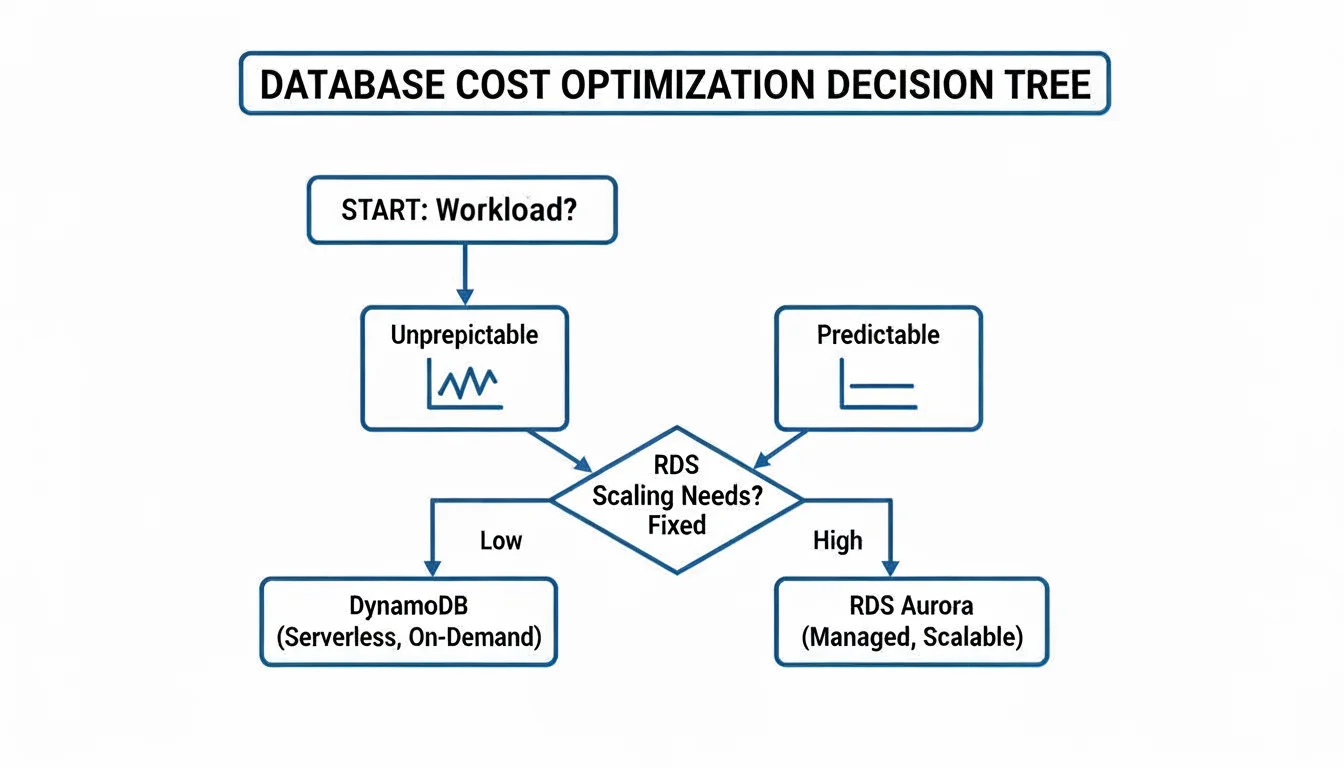
As you can see, DynamoDB's on-demand pricing often makes more sense for spiky, unpredictable workloads. For steady, predictable traffic, the provisioned model of RDS (especially with Reserved Instances) usually provides better value.
To dive deeper and see where other databases fit into the AWS ecosystem, check out our complete guide on evaluating AWS database options. By framing your choice around these practical examples and the underlying architectural principles, you'll be well-prepared to select the right database for any project—or confidently ace that certification exam question.
DynamoDB vs. RDS: Answering the Tough Questions
When you're deep in the design process, trying to decide between DynamoDB and RDS, a few key questions always seem to surface. These are the ones that frequently appear in certification exams and come up during critical design reviews. Let's break them down with some straightforward, practical answers, tying them back to fundamental AWS concepts.
Can RDS Scale Horizontally Like DynamoDB?
This is a classic point of confusion and a common trick question on AWS exams. While DynamoDB is renowned for its almost effortless horizontal scaling for both reads and writes, RDS takes a different path. The primary scaling method for an RDS database is vertical scaling—that is, you enhance the power of your single primary server by moving to a bigger, more powerful instance class (e.g., upgrading from db.m5.large to db.m5.xlarge).
To handle more read traffic, RDS does offer a form of horizontal scaling with Read Replicas. You can spin up multiple replicas and direct read-heavy queries to them, offloading the primary database. However, it's crucial to remember that all write operations still have to go through that single primary instance. This is where DynamoDB significantly pulls ahead for applications that need to handle a massive, distributed volume of writes.
Key Distinction for Exams: DynamoDB scales reads and writes horizontally, automatically and seamlessly. RDS scales reads horizontally with replicas but only scales writes vertically by upgrading the primary instance's power. This fundamental difference drives many architectural decisions.
Is DynamoDB Always Cheaper for Low Traffic?
It's a common misconception that serverless always means cheaper for low traffic, but no, not always. If you have a workload with very low but consistently predictable traffic, a small RDS instance, especially when purchased with a Reserved Instance (RI) plan, can actually be cheaper than paying for DynamoDB's on-demand throughput. This is because the fixed hourly cost of a small RI can be very low over a long period.
DynamoDB's cost-effectiveness truly kicks in with spiky or unpredictable traffic. Its on-demand model means you aren't paying for resources sitting idle during quiet periods. This "pay-for-what-you-use" model avoids the wasted cost of an oversized RDS instance idling. But for a steady, consistent workload, a carefully sized RDS instance often provides better bang for your buck. You really need to model your specific traffic patterns (including average throughput and peaks) to accurately compare costs.
Which Is Better for Analytics and Reporting?
For any kind of ad-hoc querying, business intelligence (BI) dashboards, or complex reports that rely on joining data from different tables and performing sophisticated aggregations, RDS is the hands-down winner. Its SQL engine is purpose-built for these exact tasks, offering powerful declarative query capabilities.
You can run analytics on data stored in DynamoDB, but it’s not a direct, SQL-like process on the live database. It typically involves exporting your data to a service like Amazon S3 and then using a tool like Amazon Athena (for ad-hoc SQL queries on S3 data) or AWS Glue/Amazon Redshift (for data warehousing and more complex analytics). This introduces extra steps, complexity, and latency compared to directly querying RDS. To get a wider perspective on how different database architectures handle such tasks, this definitive enterprise database comparison offers some great insights that are relevant here too.
Ready to master AWS concepts and accelerate your career? MindMesh Academy provides expert-curated study guides and evidence-based learning tools to help you ace your certification exams, from foundational knowledge to advanced architecture. Start your journey with MindMesh Academy today!

Written by
Alvin Varughese
Founder, MindMesh Academy
Alvin Varughese is the founder of MindMesh Academy and holds 15 professional certifications including AWS Solutions Architect Professional, Azure DevOps Engineer Expert, and ITIL 4. He's held senior engineering and architecture roles at Humana (Fortune 50) and GE Appliances. He built MindMesh Academy to share the study methods and first-principles approach that helped him pass each exam.