Your Guide to DB as a Service for Cloud Certification
Your database is the high-performance engine powering your applications. Historically, if you wanted such an engine, you'd need to build the garage, acquire the specialized tools, and become a master mechanic yourself. Database as a Service (DBaaS) fundamentally changes this by handing the keys to a professional pit crew. You gain all the performance and reliability without ever having to touch a wrench or worry about infrastructure.
At MindMesh Academy, we understand the critical role DBaaS plays in modern cloud architecture and its prominence in major IT certifications. This guide will walk you through everything you need to know, from core concepts to advanced strategies, helping you not only understand DBaaS but also excel in your cloud certification exams.
What Is DB as a Service and Why It Matters
At its core, DBaaS is a cloud service model where a provider like Amazon Web Services (AWS), Google Cloud, or Microsoft Azure hosts and fully manages a database system for you. Instead of grappling with physical servers, software installation, endless security patches, and complex configurations, you get instant access to a ready-to-use database through a straightforward API or a web dashboard.
This model completely redefines how organizations budget for data infrastructure. It shifts database management from a substantial upfront capital expense (CapEx) for hardware and software to a predictable, pay-as-you-go operational expense (OpEx). For IT professionals studying for certifications like AWS Certified Cloud Practitioner or Microsoft Azure Fundamentals, understanding this CapEx to OpEx shift is a foundational concept.
The Shift to Managed Database Services
This isn't merely a minor convenience; it signifies a seismic shift in how modern organizations approach data infrastructure management. The market trends underscore this transformation. The global DBaaS market is experiencing exponential growth, projected to soar from USD 17.48 billion in 2021 to a staggering USD 80.95 billion by 2030. You can delve deeper into these figures with the full DBaaS market report.
This remarkable expansion isn't arbitrary; it's driven by tangible benefits that are reshaping IT careers, from solution architecture to DevOps engineering, and redefining business strategies.
- Focus on What Matters: By offloading the operational burden of database maintenance, your highly skilled developers, data engineers, and solution architects are liberated to concentrate on high-value activities: building innovative applications, optimizing data models, and extracting critical business insights. Imagine a PMP-certified project manager no longer needing to budget for database administration tasks, allowing them to focus on feature delivery.
- Accessible Power: The pay-as-you-go model democratizes access to powerful database technology. Startups and small businesses can leverage the same robust, scalable database solutions as massive enterprises, eliminating the need for prohibitive upfront investments. This evens the playing field for innovation.
- On-Demand Scalability: Anticipating a massive traffic surge from a viral marketing campaign or seasonal sales event? With DBaaS, you can dynamically scale your database resources up (e.g., adding more CPU, memory) or out (e.g., adding read replicas) in minutes to effortlessly handle the increased load. When demand subsides, you can scale back down just as easily, optimizing costs. This elasticity is a core concept tested in AWS Solutions Architect and Azure Administrator exams.
For anyone working in IT, from system administrators to cloud architects, mastering DBaaS isn't just beneficial—it's absolutely essential. It's a foundational skill frequently tested in major cloud certifications (like AWS Certified Solutions Architect, Azure Database Administrator, or even ITIL 4 for service management) and a prerequisite for securing senior roles in cloud architecture and data engineering.
To truly appreciate the impact of DBaaS, it helps to compare it directly with traditional, self-managed database environments.
On-Premises Database vs DBaaS: A Quick Comparison
This table concisely highlights the fundamental differences in management responsibilities, cost structures, and scalability capabilities between running your own database and adopting a DBaaS model. This comparison is vital for certification exam questions that often present scenario-based choices.
| Aspect | On-Premises Database | DB as a Service (DBaaS) |
|---|---|---|
| Management | You're responsible for everything: hardware, OS, patches, backups, and scaling. | The provider manages the underlying infrastructure; you focus on your data and applications. |
| Cost Model | High upfront cost (CapEx) for servers, storage, and software licenses. | A predictable, pay-as-you-go subscription model (OpEx), paying only for consumed resources. |
| Scalability | A slow, manual process requiring extensive planning, procurement, and hardware installation. | Fast, automated scaling (both vertical and horizontal) available with a few clicks or API calls. |
| Expertise | Demands a dedicated in-house team of specialized database administrators (DBAs) and infrastructure engineers. | Drastically reduces the need for day-to-day DBA "firefighting," freeing up specialized talent. |
As you can observe, the DBaaS model is meticulously engineered to minimize operational friction. It empowers your teams to concentrate on the "what" (your data, business logic, and applications) by expertly handling the "how" (the complex underlying infrastructure and its maintenance).
Reflection Prompt: Consider a recent project where database management consumed significant time. How might leveraging a DBaaS solution have altered the project timeline, resource allocation, or overall success?
Understanding Core DBaaS Architectures
To truly grasp the inner workings and profound benefits of DB as a service, we must look beneath the surface at the architectural designs that power it. These aren't just dry technical specifications; they are the very blueprints that deliver the cost savings, unparalleled scalability, and operational freedom synonymous with the DBaaS model. Gaining a solid understanding of these architectures is indispensable for both real-world application and excelling in your certification exams.
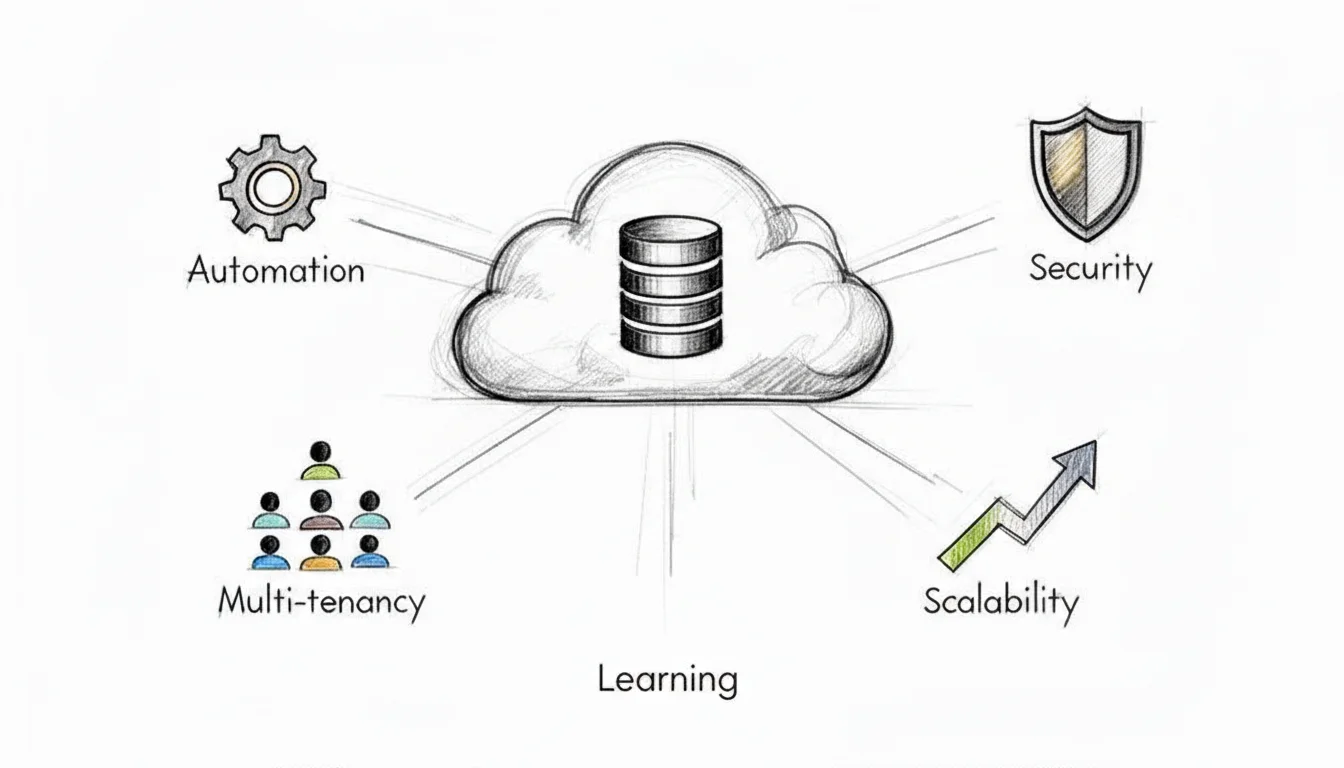
At the core of nearly every public cloud DBaaS offering is the principle of multi-tenancy. A helpful analogy is a modern apartment building. The provider constructs and meticulously maintains the entire building—the foundation, shared utilities, plumbing, and electrical systems. Each resident, or "tenant" in our context, enjoys their own secure, private apartment within that larger, shared structure.
This approach is vastly more efficient than building a separate, standalone house for every single person. Similarly, a DBaaS provider operates a massive, shared pool of hardware and software resources, securely carving out isolated "slices" for each customer. This shared resource model is precisely what enables the characteristic pay-as-you-go pricing, instant scalability, and high efficiency that make DBaaS so compelling.
Relational vs. NoSQL: The Two Main Flavors
When you provision a new database instance, one of your initial and most critical decisions will be selecting the appropriate database type. DBaaS providers typically offer a comprehensive menu, but your options will almost always fall into one of two major categories, each with distinct use cases and architectural considerations.
-
Relational (SQL) Databases: These are the traditional workhorses of the data world, exemplified by offerings like PostgreSQL, MySQL, SQL Server (e.g., Azure SQL Database), and Amazon Aurora. They organize data into highly structured tables with predefined schemas, akin to a perfectly organized spreadsheet. This rigid structure inherently guarantees strong consistency and supports complex transactions, adhering to ACID (Atomicity, Consistency, Isolation, Durability) properties. This makes them indispensable for financial systems, e-commerce transaction processing, and any application demanding absolute transactional integrity.
- Certification Relevance: Expect scenario questions on when to choose a relational database (e.g., OLTP workloads, strong data integrity requirements).
-
NoSQL Databases: This newer family of databases offers significantly greater flexibility. Services like Amazon DynamoDB, MongoDB Atlas (managed service), or Azure Cosmos DB store data in diverse formats, such as documents, key-value pairs, wide-column stores, or graphs. They excel at handling unstructured or semi-structured data at massive scale and high velocity. This makes them an ideal fit for modern applications like mobile apps, IoT data streams, real-time gaming leaderboards, and social media feeds where the data model might evolve frequently. They typically prioritize availability and partition tolerance over strict consistency (often adhering to BASE — Basically Available, Soft state, Eventually consistent).
- Certification Relevance: Be prepared to identify suitable NoSQL databases for use cases involving large volumes of unstructured data, high write throughput, or flexible schema requirements.
Picking the right database type for the job is a fundamental skill for any cloud professional. You would unequivocally use a relational DBaaS for a banking application where every transaction must be recorded flawlessly and consistently. Conversely, you'd opt for a NoSQL DBaaS to construct a gaming leaderboard that needs to process millions of score updates per second with minimal latency and high availability. For a deeper dive, explore our guide on evaluating database options like RDS, Aurora, and DynamoDB.
The Secret Sauce: Automation
The true "magic" behind DBaaS isn't solely in the underlying architecture; it's profoundly enabled by the robust layer of automation built on top. This automation is the very "service" component of Database as a Service, transforming what were once complex, manual, and error-prone administrative chores into simple API calls or just a few clicks within a cloud provider's web console.
This diagram helps visualize the evolution from antiquated, manually-managed databases to the highly streamlined, automated DBaaS paradigm we leverage today.
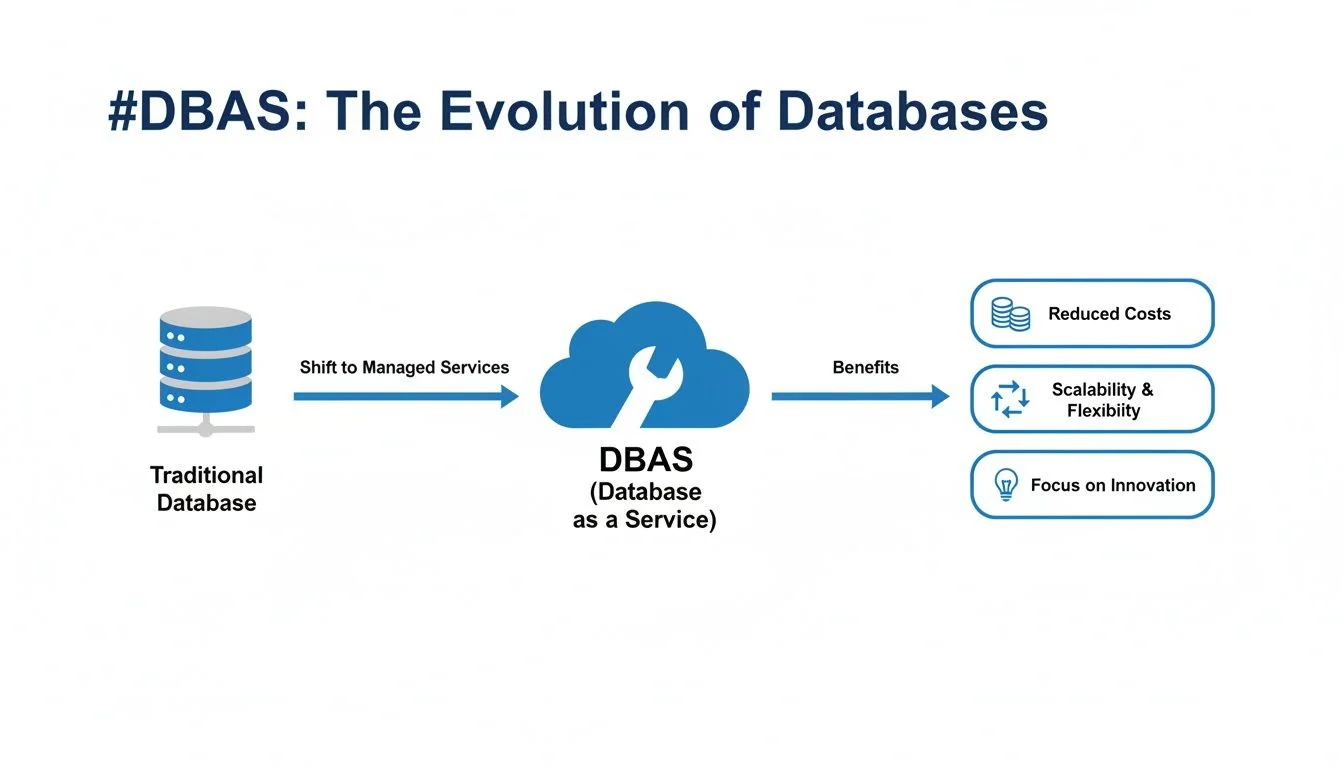 Caption: The journey from manual database management to automated DBaaS, illustrating how cloud providers abstract away complexity and enhance operational efficiency.
As the diagram illustrates, the DBaaS model completely absorbs the headaches of provisioning, patching, and scaling, thereby freeing up your teams—especially DevOps and SRE professionals—to focus on developing exceptional applications rather than managing infrastructure.
Key Takeaway: Automation is the indispensable engine driving DBaaS. It systematically handles all the repetitive, time-consuming, and error-prone tasks of database administration, which is precisely what enables providers to offer such reliable, efficient, and cost-effective services at immense scale. This allows you to focus on application logic and data insights.
This comprehensive automated management typically encompasses several critical functions that are frequently tested in certification exams:
- Provisioning: Spinning up a new, fully configured database instance, complete with networking, storage, and security settings, now takes mere minutes, dramatically reducing the weeks it once required. For example, creating an AWS RDS instance or an Azure SQL Database is a rapid, guided process.
- Patching & Updates: The provider takes full responsibility for applying essential security patches, minor version upgrades, and major version updates. These are often performed automatically during predefined maintenance windows, frequently with zero downtime through blue/green deployments or multi-AZ failovers.
- Scaling: Need more processing power or storage? Automation seamlessly manages the process of adding more CPU, memory, or storage. It can also automatically provision and manage database replicas (e.g., read replicas in AWS RDS) to intelligently distribute read traffic, enhancing performance and resilience.
- Backups: Automated, point-in-time backups are a standard feature. These typically include transactional logs, allowing for granular point-in-time recovery options that can restore a database to its exact state from just a few minutes ago.
Understanding these automated features is paramount for cloud certification exams. Being able to clearly articulate how a DBaaS platform automates patching, handles backups, or scales gracefully under load demonstrates a deep, practical comprehension of modern cloud architecture and operational best practices.
Reflection Prompt: How do automated patching and scaling in DBaaS relate to the principles of continuous integration/continuous delivery (CI/CD) or site reliability engineering (SRE)?
Weighing the Benefits and Trade-offs of DBaaS
Deciding to adopt a DB as a service model is a significant strategic decision, extending far beyond a mere technical switch. It's a classic scenario of trade-offs: you unlock incredible advantages, but you must also be acutely aware of a few critical downsides. To make the most informed choice for your organization—and to ace those certification questions—you must analyze both sides of the coin with a balanced perspective.
The core promise of DBaaS is elegantly simple: focus on innovation, not infrastructure management. When you delegate the tedious, low-level operational work of managing databases to an expert provider, you reclaim your team's most valuable resource—their time and intellectual energy.
The Major Wins of Using DBaaS
The most frequently lauded benefit is dynamic scalability and elasticity. Imagine your burgeoning e-commerce site unexpectedly goes viral overnight. In a traditional, on-premises setup, such an overwhelming traffic spike would almost certainly bring your servers to their knees, resulting in lost revenue and damaged customer trust. With DBaaS, you can rapidly scale up your database capacity (e.g., increasing instance size, adding read replicas) with just a few clicks or an API call to effortlessly handle the peak load, then scale it right back down when traffic normalizes. This inherent elasticity is a true game-changer, a concept heavily emphasized in certifications like the AWS Certified Solutions Architect Professional.
Next is the profound impact on your organization's bottom line. DBaaS fundamentally transforms your database costs from a hefty upfront capital expenditure (CapEx) to a predictable operational expenditure (OpEx). You eliminate the need to purchase massive, expensive servers that often sit underutilized. Instead, you only pay for the resources you actually consume, adopting a utility-like model. This pay-as-you-go approach makes top-tier, enterprise-grade database technology accessible to everyone, from a two-person startup to a multinational corporation, fostering agility and cost efficiency.
This flexible and efficient model is also fueling massive market expansion. The DBaaS market is projected to skyrocket at a 19.9% Compound Annual Growth Rate (CAGR) through 2034, with North America leading this charge. For any IT professional, developing expertise in these services is a strategic career move. When implemented judiciously, companies frequently report cost reductions of 30-50% in their total cost of ownership (TCO) for databases, largely attributable to features like auto-scaling and reduced operational overhead. You can explore these compelling trends further in this comprehensive cloud database market analysis.
The true brilliance of DBaaS lies in how it systematically alleviates the operational weight from your shoulders. All the essential yet incredibly time-consuming tasks—such as automated backups, proactive security patching, high-availability configurations, and routine maintenance—are expertly managed by the cloud provider. This frees your highly skilled team from constant firefighting and empowers them to dedicate their efforts to building innovative products and features that drive business value.
Navigating the Potential Downsides
Of course, the landscape of DBaaS isn't entirely without its complexities. One of the most frequently cited concerns is vendor lock-in. When you architect your application around a specific provider's proprietary database service (e.g., deeply integrating with Amazon DynamoDB or Azure Cosmos DB), migrating to a competitor's platform down the road can become a significant, costly, and time-consuming headache. Each platform often features its own unique APIs, data types, and specialized functionalities, meaning a migration isn't a simple "lift-and-shift"; it can feel like a substantial re-engineering project.
Another critical concept to internalize is data gravity. As your dataset expands, accumulating vast volumes of information, it becomes increasingly challenging and expensive to move. The sheer mass of data creates a kind of gravitational pull, making it difficult to relocate your applications or implement a truly multi-cloud strategy without incurring significant egress costs or performance penalties. To fully appreciate these constraints, it’s beneficial to understand the fundamental differences between deployment models, such as on-premises vs cloud computing.
Finally, there's the perception of reduced control. With a self-hosted database, you typically have root access to the underlying operating system, allowing you to fine-tune every obscure setting and install niche utilities. A DBaaS model necessitates a trade-off: you exchange that granular, low-level control for the immense convenience of a fully managed service. While you maintain complete authority over your data, database schema, and access policies, you generally cannot, for instance, SSH into the underlying server instance to perform custom OS-level diagnostics. For the vast majority of use cases, this delegation of infrastructure management is a highly beneficial trade-off. However, for teams with very specific, highly customized configuration requirements or unique compliance needs, this perceived limitation might be a factor. You can learn more about how a fully managed service like Amazon DynamoDB handles these details for you as a practical, real-world example.
Ultimately, selecting a DBaaS solution requires carefully weighing these benefits against the potential trade-offs to ensure the chosen path truly aligns with your organization's long-term strategic goals, technical requirements, and budget constraints.
How to Secure Your Data in a DBaaS Environment
When you transition your database to the cloud, you're not just relinquishing control and hoping for the best. Instead, security evolves into a meticulously defined partnership between you and your cloud provider. This crucial concept is known as the shared responsibility model, and it's absolutely imperative to grasp, both for success in your certification exams (e.g., CompTIA Security+, AWS Certified Security - Specialty, Azure Security Engineer Associate) and for safeguarding your company from data breaches.
I often use the analogy of a secure self-storage facility. The company owning the facility is responsible for the perimeter fence, the main gate, robust building construction, and the overall security cameras. That's their domain. However, you—the renter—are entirely responsible for the contents within your specific storage unit, how those contents are organized, and critically, who you entrust with a key to your unit.
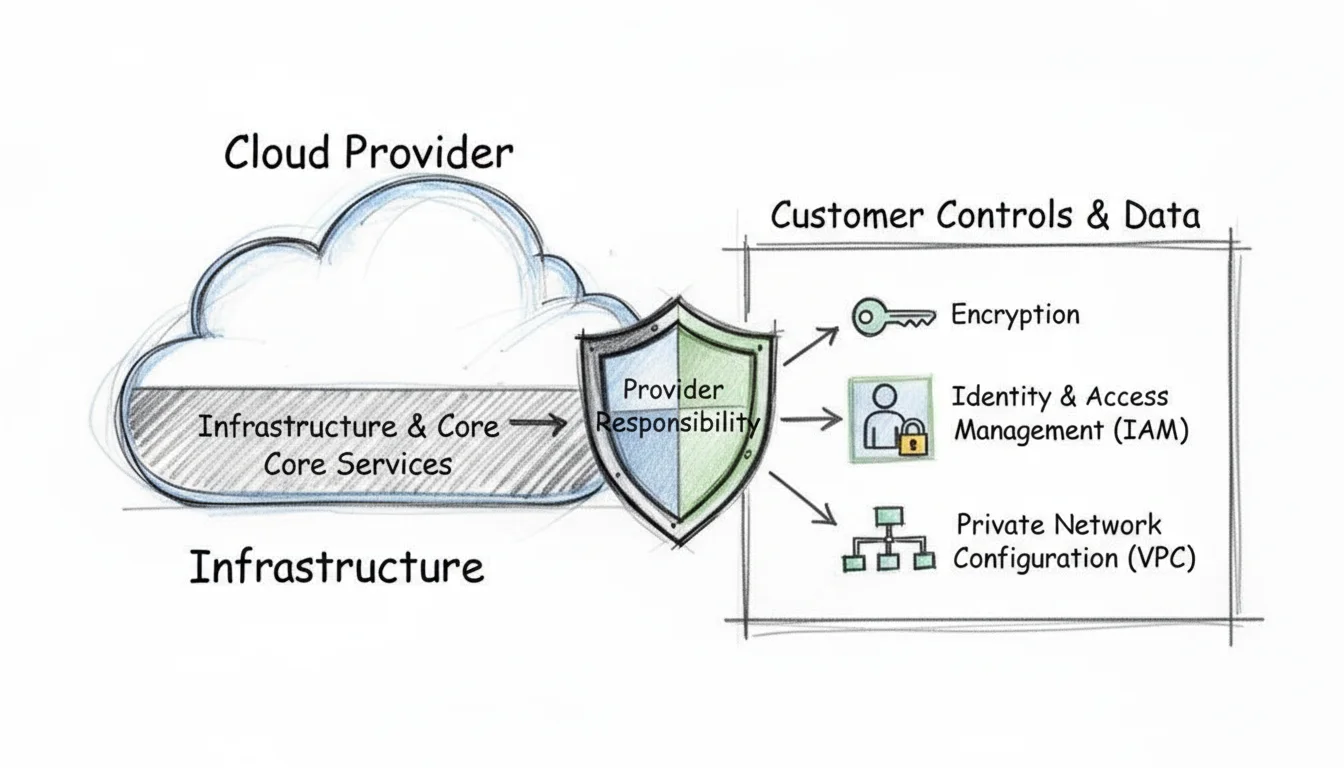 Caption: The Shared Responsibility Model in cloud security clearly delineates the provider's role in securing the cloud infrastructure and the customer's role in securing their data and access within the cloud.
In the DBaaS paradigm, the cloud provider robustly secures the "building"—this includes the physical data centers, the underlying servers, networking infrastructure, and the core database software itself. Your job, as the customer, is to secure the "storage unit"—this encompasses the data itself, how it's accessed, and who has permission to interact with it. Let's delve into the key areas you, as the IT professional, need to meticulously lock down.
Implementing Strong Access Controls
Your foremost and most critical line of defense for any database, whether on-premises or DBaaS, is rigorously controlling who gains access and precisely what actions they can perform once inside. This is the domain of Identity and Access Management (IAM). The foundational principle here is the principle of least privilege. It's straightforward: only grant the absolute minimum permissions necessary for a user, application, or service to competently perform its designated function, and no more.
For instance, a simple web application designed solely to display product listings should never, under any circumstances, possess the permission to delete entire database tables. Similarly, a business intelligence analyst running read-only reports does not require the power to modify core database configurations or user permissions. IAM policies (e.g., AWS IAM policies, Azure RBAC roles) are precisely where you define and enforce these crucial boundaries.
Key Insight for Certifications: A poorly configured or overly permissive IAM policy is statistically one of the most common vectors for data breaches. This is a frequent focus on certification exams. Always adopt a "deny all by default" posture, then meticulously add only the necessary permissions. Crucially, regularly audit who has access to what, and review those permissions.
Treating IAM as an afterthought is a surefire recipe for disaster. Getting it right—from the initial design to ongoing maintenance—is a non-negotiable step in securing your DBaaS environment.
Encrypting Your Data Everywhere
Encryption is your data's ultimate camouflage. It transforms sensitive information into an unreadable, scrambled format that is completely unintelligible without the correct decryption key. For a truly secure DBaaS setup, you must implement encryption across two distinct states of your data's lifecycle.
- Encryption in Transit: This safeguards your data as it traverses network pathways—for example, from your application server to the database instance. This is typically achieved using robust protocols like Transport Layer Security (TLS), which is the same technology responsible for the familiar padlock icon in your web browser, indicating a secure connection. Ensure all application-to-database connections enforce TLS 1.2 or higher.
- Encryption at Rest: This protects your data while it's stored statically on a disk in the cloud provider's data center. Most modern DBaaS platforms make this implementation remarkably straightforward; it's often a simple checkbox or configuration setting you enable during database creation. The cloud provider typically manages the encryption keys (e.g., using AWS Key Management Service (KMS) or Azure Key Vault), shielding your data even from potential physical access to the underlying hardware.
Many sophisticated DBaaS offerings also natively support Transparent Data Encryption (TDE). This advanced feature is embedded directly within the database engine itself and automatically encrypts data as it's written to storage and decrypts it seamlessly when read, all without requiring application changes. It provides an excellent, transparent layer of protection for sensitive information.
Isolating Your Database with Network Security
You would never place your company's most critical safe in the middle of a public lobby, would you? The same logical principle applies to your database: it should never be directly exposed to the public internet unless absolutely necessary, and then only with extreme caution. This is precisely where robust network isolation strategies come into play.
Cloud providers enable you to carve out your own private, logically isolated segment of their vast cloud infrastructure, commonly referred to as a Virtual Private Cloud (VPC) on AWS, or a Virtual Network (VNet) on Azure. By strategically placing your DBaaS instance within a private subnet (a segment of your VPC/VNet) that has no direct public internet access, you effectively render it completely invisible and unreachable from the outside world.
To meticulously control ingress and egress traffic flow, you utilize network security rules, often referred to as security groups (AWS) or network security groups (NSGs) (Azure). Think of these as a highly configurable virtual firewall specifically for your database instance or subnet. For example, you can craft a rule that explicitly states: "only allow incoming traffic from the private IP addresses of our designated application servers on the official database port (e.g., 5432 for PostgreSQL, 3306 for MySQL, 1433 for SQL Server)." Misconfiguring these rules is a common security pitfall, but adhering to a simple checklist can mitigate significant risks:
- Deny All by Default: Your starting point for any security group or network ACL should always be an implicit or explicit rule that blocks all incoming traffic.
- Allow Specific Sources: Only add "allow" rules for the precise IP addresses or security groups of your trusted application servers or other authorized services. Avoid
0.0.0.0/0for inbound rules unless absolutely essential and rigorously justified. - Restrict Ports: Only open the absolute minimum number of ports you unequivocally need for database connectivity (e.g., port 5432 for PostgreSQL). Close all other unused ports.
This layered security strategy—comprising strong IAM, ubiquitous encryption, and meticulous network isolation—constructs a formidable security posture for any DBaaS deployment. Mastering these concepts is not merely beneficial for passing your next certification exam; it is absolutely critical for effectively performing your job in the modern, cloud-centric IT landscape.
Reflection Prompt: If a new application needs to connect to an existing DBaaS instance, what are the three most critical security considerations you would address before allowing that connection?
Keeping Your Database Up and Running with DBaaS
When your application’s database experiences downtime, your business often follows suit. Downtime is far more than a mere inconvenience; it directly translates into lost sales, frustrated customers, damaged brand reputation, and potential compliance penalties. This is precisely why a DB as a service platform offers more than just simplified setup—it's a potent ally in engineering systems that are designed to withstand failures and maintain continuous operation, a cornerstone of Site Reliability Engineering (SRE).
We're discussing the vital concept of business continuity: ensuring your services remain online, accessible, and your data stays intact and consistent, regardless of what disaster may strike.
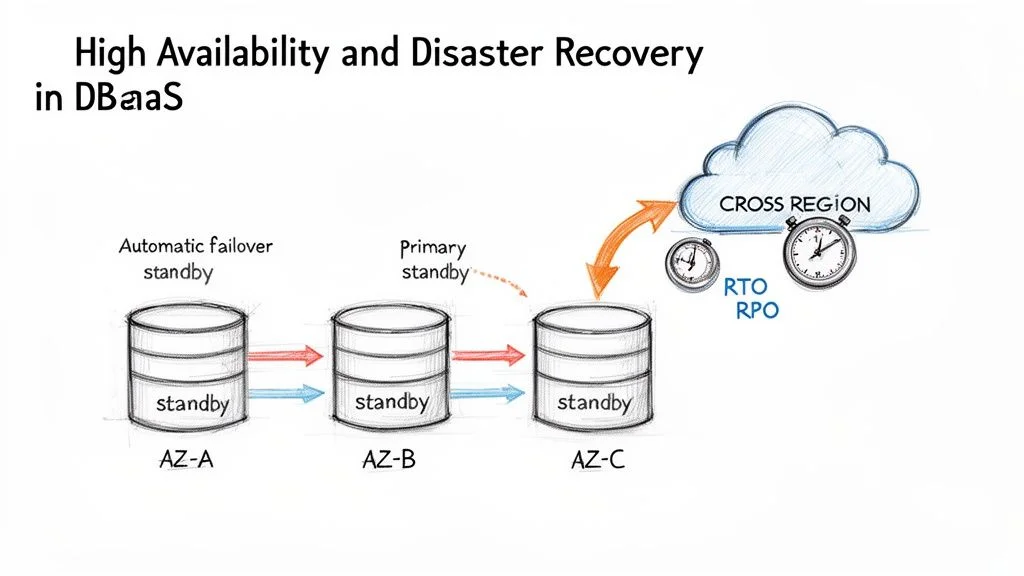 Caption: DBaaS high availability (HA) and disaster recovery (DR) strategies, demonstrating how multi-AZ deployments and cross-region replication ensure business continuity.
If you're meticulously preparing for a cloud certification like the AWS Certified Solutions Architect Associate, Microsoft Certified: Azure Solutions Architect Expert, or AWS Certified DevOps Engineer Professional, internalizing these concepts is absolutely critical. You'll repeatedly encounter two fundamental terms: High Availability (HA) and Disaster Recovery (DR). Think of HA as your strategy for gracefully surviving localized, small-scale failures, such as a single server hardware malfunction within a data center. DR, on the other hand, is your comprehensive plan for enduring and recovering from a catastrophic, widespread event, like an entire data center or geographic region being rendered offline.
High Availability Through Multi-AZ Deployments
The foundational workhorse of modern DBaaS high availability is the Multi-Availability Zone (Multi-AZ) deployment. An Availability Zone (AZ) is a fully isolated and independent data center, equipped with its own distinct power, cooling, networking, and physical security. While located within the same geographic region, AZs are physically separate and connected by low-latency networks, designed to prevent failures in one from cascading to others.
When you enable a Multi-AZ setup for your DBaaS instance (e.g., AWS RDS Multi-AZ, Azure SQL Database Geo-replication), your cloud provider automatically provisions and meticulously manages a perfect, synchronized copy of your primary database in a separate Availability Zone. Every data write operation to your primary database instance is then synchronously replicated to this standby replica in near real-time.
The true brilliance here lies in the automatic failover capability. If the primary database instance experiences an outage for any reason—be it a hardware failure, network interruption, or even a localized power event—the DBaaS platform instantly detects the issue. It then automatically promotes the standby replica to become the new primary, seamlessly redirecting traffic. This critical switchover typically occurs in just a couple of minutes, often with minimal to no manual intervention, significantly improving your RTO.
This Multi-AZ configuration serves as your primary line of defense, proactively shielding your application from the inevitable, localized failures that can occur within a single data center environment. It's a key strategy for achieving high availability and a frequent topic in certification exams.
Understanding Your Recovery Objectives
Before you can architect a robust recovery plan, you must clearly answer two fundamental questions. These key metrics form the bedrock of any serious Disaster Recovery (DR) strategy and are frequently assessed in certifications.
- Recovery Time Objective (RTO): How long can your application realistically afford to be unavailable following a disaster? This defines the maximum acceptable downtime. An RTO of 15 minutes means your entire application must be fully operational and serving users again within that precise window. For example, a mission-critical e-commerce site might have an RTO of mere seconds or minutes, while an internal analytics dashboard might tolerate an RTO of several hours.
- Recovery Point Objective (RPO): How much data can your business tolerate losing? This specifies the maximum acceptable amount of data loss, typically measured in units of time. An RPO of 5 minutes indicates that you cannot afford to lose more than the last five minutes of committed transactions. For a financial application, the RPO might be zero, requiring synchronous replication across regions.
Your specific business requirements and the criticality of the data will dictate these RTO and RPO numbers. Achieving extremely low RTOs and RPOs often entails higher costs and more complex architectures, a trade-off often explored in professional-level certification exams.
Disaster Recovery with Automated Backups
While Multi-AZ deployments excel at handling local failures within a region, you require a more expansive plan for surviving widespread regional disasters. This is where automated backups and strategic replication become your most invaluable allies. DBaaS platforms provide incredibly powerful, built-in tools for this purpose.
Point-in-Time Recovery (PITR): This sophisticated feature transcends simple daily snapshot backups by continuously archiving your database's transaction logs (also known as write-ahead logs or WALs). It enables you to restore your database not just to a specific day, but to an exact second within your retention period. Did an engineer accidentally execute a DELETE query without a WHERE clause? PITR allows you to "rewind the clock" to the precise moment before the erroneous action, like restoring to last Tuesday at 2:15:37 PM, minimizing data loss and operational impact.
Cross-Region Replication: For the absolute highest level of data protection and resilience, you can automatically configure your database backups, or even actively replicate your data, to an entirely different geographic region. If an extreme event like a natural disaster or a massive power grid failure incapacitates an entire cloud region (e.g., US East), you can bring your database online using the replicated data stored safely in a geographically distant region (e.g., US West). This strategy forms the bedrock of a robust, enterprise-grade disaster recovery plan.
For anyone pursuing advanced certifications, it's highly beneficial to explore various DR patterns beyond basic backups. You can deepen your understanding by investigating common backup and recovery strategies like pilot light and warm standby to truly solidify your knowledge for scenario-based exam questions.
By strategically layering Multi-AZ for high availability on top of automated, point-in-time backups and cross-region replication for disaster recovery, a DB as a service platform furnishes you with a complete and potent toolkit for ensuring genuine business continuity and resilience.
Strategies for Migrating to a DBaaS Platform
*Caption: A video guide on effective strategies for migrating your databases to a DBaaS platform.*Moving an existing database into a DBaaS environment is akin to relocating a critical piece of city infrastructure—it demands meticulous planning and execution to prevent widespread disruption. A well-defined and robust migration strategy is what differentiates a smooth, almost invisible transition from a project that spirals into extended downtime, catastrophic data loss, and significant budget overruns.
The entire migration process commences with a thorough assessment of your current database landscape. Before even contemplating moving a single byte of data, you need an exhaustive understanding of your existing setup. This entails taking a full inventory of all your databases, documenting their performance characteristics and usage patterns, identifying schema complexities, and meticulously mapping out all the interconnections with your applications, microservices, and other data consumers.
Choosing Your Migration Approach
Once you have established a crystal-clear picture of your starting point and thoroughly understood your application's dependencies, it's time to select the appropriate migration path. Broadly speaking, you have two primary options, each presenting its own set of technical considerations and business trade-offs.
Homogeneous Migration (Lift-and-Shift)
This represents the most direct and often least complex migration route. A homogeneous migration involves moving your database to a DBaaS provider that supports and runs the exact same database engine. Consider, for example, migrating your on-premises PostgreSQL server over to a fully managed service like Amazon RDS for PostgreSQL or an on-premises SQL Server instance to Azure SQL Database.
Because the underlying database engine, logical schema, data types, and SQL dialect remain consistent, the technical complexity is substantially lower. This approach typically involves minimal or no application code changes, making it the simplest way to gain the immediate benefits of a managed service without undergoing a major architectural overhaul.
Heterogeneous Migration (Re-platform)
This approach is inherently more involved but often unlocks significant long-term advantages. A heterogeneous migration signifies that you are transitioning to a different database engine as part of the overall move. A classic example would be migrating from a self-hosted, proprietary Oracle database to a cloud-native, open-source-compatible option like Amazon Aurora (MySQL or PostgreSQL compatible) or to Azure Database for PostgreSQL.
Organizations frequently pursue this route to modernize their technology stack, escape burdensome and expensive proprietary licensing agreements, or adopt a database engine inherently better suited for their application's evolving needs (e.g., moving from relational to NoSQL for specific workloads). The primary challenge lies in the requirement for meticulous schema conversion, data type transformation, and potentially extensive application code modifications, necessitating rigorous testing to ensure correctness and performance.
This strategic shift isn't just a technical exercise; it's profoundly driven by impactful business goals. The DBaaS market is projected to reach an astounding USD 138.9 billion by 2034, largely because companies consistently report reducing infrastructure spending by up to 50%. They increasingly view DBaaS as an essential tool for taming the complexities of modern data management and driving digital transformation.
The Five Phases of a Successful Migration
Regardless of whether you choose a homogeneous or heterogeneous path, a successful database migration project generally adheres to a well-defined, five-phase lifecycle. Diligently following this structured process is paramount for keeping the project on track, minimizing risks, and achieving desired outcomes. As you meticulously plan the move, it's also highly advisable to review established Top Database Migration Best Practices to proactively avoid common pitfalls and ensure a smooth transition.
- Assessment and Planning: This initial phase is where you comprehensively define the migration scope, select your target DBaaS provider and service, establish clear performance and availability targets (RTO/RPO), and set realistic goals for downtime during the final cutover.
- Schema Conversion: For heterogeneous migrations, this is a make-or-break step. You will utilize specialized tools (e.g., the AWS Schema Conversion Tool (SCT) for AWS migrations, or various third-party tools) to translate the source database schema, stored procedures, functions, and potentially application code into a format compatible with the new target database engine.
- Data Migration: This is where the actual data transfer takes place. Services like the AWS Database Migration Service (DMS) or Azure Data Migration Service are purpose-built for this. You can perform a massive one-time bulk data load and then keep the new target database continuously in sync by replicating any ongoing changes (Change Data Capture - CDC) from the source. This live replication capability is crucial for minimizing application downtime during the final cutover.
- Testing: Do not, under any circumstances, scrimp on this critical phase. It is your invaluable opportunity to validate every aspect of the migration. You must rigorously test for data integrity and consistency, execute comprehensive load tests to ensure performance meets or exceeds expectations, and meticulously verify that every part of your application (APIs, reports, batch jobs) still functions correctly and efficiently against the new DBaaS instance.
- Cutover: This is the climactic moment of truth. You update your application's database connection strings to point to the new DBaaS endpoint. Once you confirm that everything is stable, fully operational, and performing as expected, you can then safely decommission your old on-premises database systems. This phase should be executed with extreme precision and often during off-peak hours to minimize business impact.
To help clarify the practical implications, let's compare some common strategies you might employ specifically during the data migration phase.
DBaaS Migration Strategies Overview
The table below delineates different methods for the actual data transfer, highlighting their ideal use cases, impact on application downtime, and relative complexity. Choosing the correct strategy is paramount for project success.
| Strategy | Description | Best For | Downtime |
|---|---|---|---|
| Offline (Backup/Restore) | Take a full, consistent backup of the source database, transfer the backup file to the cloud (e.g., S3, Blob Storage), and then restore it onto the new DBaaS instance. | Smaller databases (e.g., <100 GB) where several hours of application downtime are acceptable. | High (Equals time to backup, transfer, and restore) |
| Online (Replication) | Establish continuous, real-time replication from the source database to the target DBaaS instance. Once the target is fully synchronized, you perform a rapid, planned application cutover. | Large, mission-critical databases where application downtime must be minimized to just a few minutes or seconds (near-zero RTO). | Minimal (Seconds to minutes during final cutover) |
| Hybrid Approach | Begin with an initial full offline backup/restore to "seed" the target DBaaS instance with the bulk of the data, then enable online replication (CDC) to catch up on all subsequent changes. | Very large databases (multi-terabyte) where pure online replication would be too slow to initialize, but low downtime is still required. | Minimal (Similar to online, but initial seeding can be faster) |
Choosing the appropriate migration method depends entirely on your specific business requirements for application uptime, your database's size and complexity, and your tolerance for data loss during the transition.
By strategically breaking down a large, potentially intimidating migration project into these manageable phases and diligently selecting the right tools and strategies for each step, you can navigate the transition to DBaaS smoothly, predictably, and with minimal disruption to your business operations.
Reflection Prompt: Imagine you are migrating a critical financial application database. Which migration strategy would you prioritize and why, considering RTO and RPO?
Frequently Asked Questions About Database as a Service
As you increasingly work with and integrate DBaaS solutions into your IT ecosystem, a few key questions almost invariably arise. Let's delve into the three most common inquiries I receive from IT professionals and individuals meticulously preparing for their cloud and database certifications.
Is DBaaS Really Cheaper in the Long Run?
It's tempting to look at a low monthly DBaaS bill and immediately conclude it's the most budget-friendly choice. However, that's not always the complete picture. The true answer hinges on your specific workload characteristics and a careful, comprehensive Total Cost of Ownership (TCO) analysis.
For applications exhibiting highly spiky, unpredictable traffic patterns, or those experiencing rapid, organic growth, the agile, pay-as-you-go model of DBaaS is often a clear winner. You effectively bypass massive upfront hardware procurement costs and strictly pay only for the resources you actively consume. Conversely, if you operate a highly stable, consistently high-volume application running 24/7 with predictable resource needs, the long-term expense of a meticulously self-managed database running on reserved cloud instances or even optimized on-premises hardware could potentially be lower over an extended period. When performing a TCO comparison, never forget to factor in the often-hidden costs of self-management: specialized staffing (DBAs, infrastructure engineers), software licensing, power consumption, cooling, physical security, and ongoing maintenance. A true TCO analysis will illuminate the most cost-effective path. This is a common TCO question on cloud certification exams.
How Do I Pick Between a SQL and NoSQL Service?
Choosing between a relational (SQL) and a NoSQL database is one of the most pivotal architectural decisions you'll encounter. The debate isn't about which type is inherently "better" overall, but rather about which is the unequivocally "right tool for the specific job" you need to accomplish.
Your database choice fundamentally boils down to three core considerations: the inherent structure of your data, your application's stringent requirements for consistency, and your desired scaling strategy.
- Go with Relational (SQL) DBaaS (e.g., AWS RDS, Azure SQL Database, Google Cloud SQL) when your data fits neatly into predefined tables and rows with clear relationships, such as financial transactions, customer orders, or inventory management. This is your optimal choice when you absolutely require strict transactional integrity (adherence to ACID compliance) and need robust querying capabilities across related datasets.
- Opt for NoSQL DBaaS (e.g., Amazon DynamoDB, Azure Cosmos DB, MongoDB Atlas) when you're dealing with unstructured or semi-structured data, like IoT sensor logs, social media user profiles, gaming leaderboards, or content management systems. If your paramount priorities are massive horizontal scalability, extreme read/write throughput, and schema flexibility (allowing data models to evolve easily), NoSQL databases are purpose-built for these requirements, often adhering to BASE (Basically Available, Soft state, Eventually consistent) principles.
What Control Do I Give Up with DBaaS?
This is a frequently raised and entirely valid concern. When you transition to DBaaS, you are indeed making a deliberate trade-off: you are delegating the low-level, intricate infrastructure management responsibilities to the cloud provider in exchange for unparalleled operational simplicity, increased agility, and reduced administrative overhead. Consequently, you will not typically have direct SSH access to the underlying server instances, nor will you be able to manually fiddle with the operating system, install custom patches, or deploy highly niche database extensions yourself.
However, it is crucial to understand that you retain full and complete control over everything that truly matters from a data and application perspective. You unequivocally own your data, you define and manage the database schema, and you remain firmly in the driver's seat for critical activities like performance tuning (e.g., optimizing SQL queries, indexing strategies), data access patterns, and application-level security. Most importantly, you retain absolute authority over who can access your data through robust IAM policies, user accounts, and network security configurations. In essence, you're transitioning from the role of a hands-on server mechanic to that of a more strategic and focused data architect, leveraging the cloud provider's expertise for infrastructure heavy lifting.
Ready to master these foundational DBaaS concepts and accelerate your IT certification journey? MindMesh Academy offers meticulously crafted, expert-led study guides and comprehensive practice tools for AWS, Azure, CompTIA, and many other leading certifications. Start empowering your career today by exploring our resources at AWS Solutions Architect Associate Practice Exams.

Written by
Alvin Varughese
Founder, MindMesh Academy
Alvin Varughese is the founder of MindMesh Academy and holds 15 professional certifications including AWS Solutions Architect Professional, Azure DevOps Engineer Expert, and ITIL 4. He's held senior engineering and architecture roles at Humana (Fortune 50) and GE Appliances. He built MindMesh Academy to share the study methods and first-principles approach that helped him pass each exam.