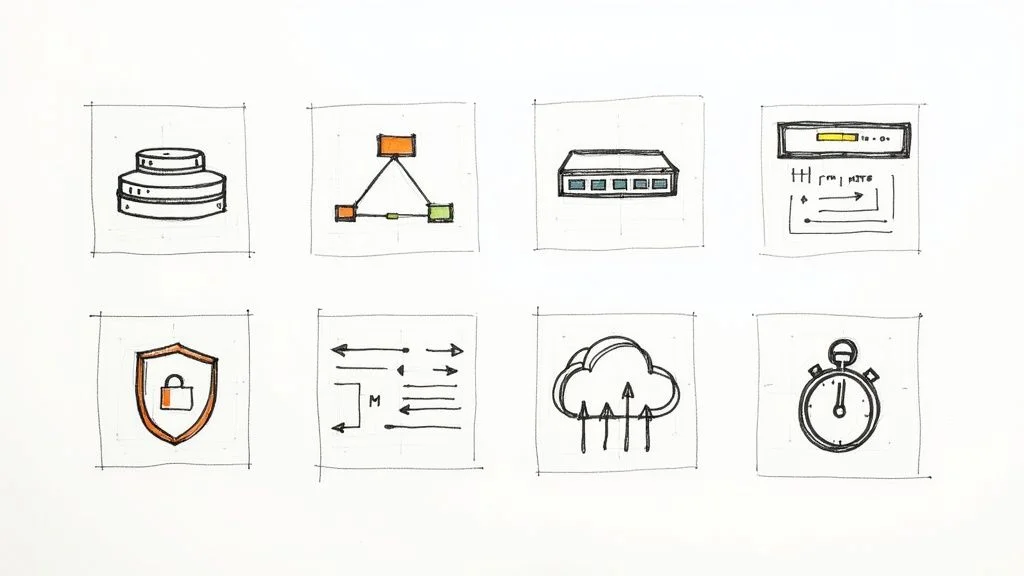
Master Your Exam: 8 CCNA Exam Questions Types for 2025
Master Your Exam: 8 CCNA Exam Question Types for 2025
The Cisco Certified Network Associate (CCNA) certification is more than just a credential; it's a foundational stepping stone for IT professionals aiming for a rewarding career in networking. While theoretical knowledge is essential, true success on the CCNA exam—and in the real world—hinges on mastering how that knowledge is applied and tested. Understanding the core mechanisms of network infrastructure, from how routers, switches, and Wi-Fi infrastructure interact to build a resilient network, is paramount.
At MindMesh Academy, we believe in equipping you with the strategic blueprint to not just pass, but to excel. This comprehensive guide moves beyond generic advice to dissect the 8 most critical types of CCNA exam questions you are guaranteed to encounter in 2025. We'll provide detailed examples, actionable study tips, and practical troubleshooting insights for each category. Whether you're grappling with subnetting calculations under pressure or deciphering complex routing protocol outputs, this article is designed to give you a clear advantage.
We'll explore everything from foundational OSI model identification and VLAN configurations to advanced network security and IPv6 addressing. Our goal is to demystify the exam by showing you how concepts are tested, rather than just what is tested. By understanding the format, logic, and common pitfalls of these questions, you can approach your CCNA exam with the confidence to thrive. Let's delve into the key areas that will define your performance.
1. OSI Model Layer Identification Questions
A significant portion of the CCNA exam is dedicated to foundational networking concepts, and none is more fundamental than the OSI (Open Systems Interconnection) model. These questions test your ability to precisely map networking functions, devices, and protocols to their specific layers. Mastering this seven-layer framework is crucial because it provides a standardized structure for both understanding network communication and systematically troubleshooting issues, from the physical cable to the application interface.
Typical CCNA exam questions in this category will present a scenario and ask you to identify the responsible OSI layer. For instance, you might be asked:
- "At which layer do encryption and data formatting typically occur?" (Answer: Layer 6, Presentation)
- "Which layer is responsible for establishing, managing, and terminating sessions between applications?" (Answer: Layer 5, Session)
- "A network engineer is troubleshooting an issue where two devices cannot communicate. They suspect a problem with logical addressing. Which OSI layer should they investigate?" (Answer: Layer 3, Network)
The exam demands more than just rote memorization of layer names; it requires a practical understanding of how data is encapsulated and processed as it moves through the network stack.
Key Concepts and Practical Tips
To master these questions, focus on the core function of each layer and the specific technologies and PDUs (Protocol Data Units) that operate within it.
- Create a Detailed Reference Chart: Systematically map common protocols (e.g., HTTP, TCP, UDP, IP), network devices (e.g., Hubs, Switches, Routers), and essential functions (e.g., logical addressing, error detection, data segmentation) to their corresponding OSI layers.
- Utilize Mnemonics for Order: Classic memory aids help recall the layer order (Application down to Physical) such as "All People Seem To Need Data Processing." Or, for Physical up to Application: "Please Do Not Throw Sausage Pizza Away."
- Visualize the Data Flow: Use network simulation tools like Cisco Packet Tracer to observe the encapsulation and de-encapsulation process. Watching a PDU transform as it travels from Layer 7 down to Layer 1 (and back up) provides invaluable context and reinforces conceptual understanding.
Pro Tip: Don't just learn the layer names. For the CCNA, you must understand the function of each layer, the key protocols operating at that layer, and the specific PDU associated with it (e.g., segments at Layer 4, packets at Layer 3, frames at Layer 2, bits at Layer 1). This level of detail is critical for both the exam and real-world troubleshooting.
This concept map visualizes the relationship between the central OSI Model and select layers, devices, and protocols.

The infographic highlights how physical hardware like hubs, transport protocols like TCP, and application services like HTTP are all organized within the OSI framework's distinct layers.
2. Subnetting and VLSM Calculation Questions
One of the most critical and challenging skills tested on the CCNA exam is your ability to perform subnetting and Variable Length Subnet Masking (VLSM) calculations. These questions are a fundamental pillar of network engineering, requiring you to efficiently partition IP address space to create logical, manageable network segments. They test your proficiency in binary-to-decimal conversion, understanding CIDR (Classless Inter-Domain Routing) notation, and allocating IP addresses without waste.
Typical CCNA exam questions will challenge you to:
- Determine network IDs, broadcast addresses, and valid host ranges for a given subnet. For example, given
172.16.45.120/26, identify its broadcast address and the total number of usable hosts. - Design a VLSM scheme for a company with multiple departments requiring a specific, varying number of hosts. This demonstrates your ability to optimize IP address usage.
- Identify the correct subnet mask for a network requiring a certain number of hosts, or vice-versa.
Success in this area demonstrates a deep understanding of Layer 3 logical addressing, which is essential for routing, network security, and efficient network design.
Key Concepts and Practical Tips
To conquer these challenging questions, you need both speed and accuracy. The CCNA exam is timed, so relying on manual binary conversion for every problem is not practical.
- Master the 'Magic Number' Method: This method allows for rapid calculations of network boundaries. By subtracting the "interesting octet" of the subnet mask from 256, you get an increment value that helps you quickly find consecutive network IDs, valid host ranges, and broadcast addresses.
- Adopt a Systematic Approach: For any subnetting problem, follow a consistent process:
- Identify the Network ID.
- Determine the First Usable Host IP.
- Calculate the Broadcast Address.
- Find the Last Usable Host IP. This systematic flow prevents confusion and minimizes errors under pressure.
- Start Large with VLSM: When designing a VLSM scheme, always begin by fulfilling the largest host requirement first and then work your way down to the smallest. This ensures the most efficient use of the available address space and prevents address exhaustion.
- Practice Manually and Relentlessly: Build speed and confidence by practicing with only a pencil and paper. Over-reliance on online subnet calculators will not prepare you for the actual exam environment. For more in-depth study methods, explore dedicated resources on subnetting practice.
Pro Tip: Memorize the powers of 2 (up to 2^16) and the standard subnet mask values (e.g., 128, 192, 224, 240, 248, 252 for
/25to/30). This foundational knowledge will dramatically increase your calculation speed and accuracy, saving you valuable time during the exam.
This video provides a practical walkthrough of a subnetting problem, which is a great way to reinforce the calculation process.
The tutorial demonstrates a step-by-step approach to breaking down a network address, helping you visualize the concepts and techniques required to solve these questions under pressure.
3. Routing Protocol Configuration and Troubleshooting
A core competency for any network professional, especially those aiming for certifications like the CCNA or Azure Network Engineer Associate, is the ability to configure and troubleshoot dynamic routing protocols. The CCNA exam heavily tests your understanding of protocols like OSPF (Open Shortest Path First) and EIGRP (Enhanced Interior Gateway Routing Protocol), which automate the process of route discovery and maintenance in a network. These questions assess your practical skills in setting up these protocols, influencing path selection, and diagnosing common issues that prevent network convergence.

Typical CCNA exam questions will present you with show command output or a configuration snippet and ask you to identify a problem or predict network behavior. For example, you might need to:
- Determine why OSPF neighbors are stuck in the
INITstate (often due to mismatched hello/dead timers or network types). - Explain why a specific route learned via EIGRP is preferred over one learned via OSPF, even if OSPF seems to have a "better" path (due to EIGRP's lower administrative distance).
- Correct a misconfiguration in an EIGRP setup that prevents routes from being advertised or learned.
Mastering this topic requires a blend of theoretical knowledge (how the protocols work) and hands-on command-line proficiency (how to configure and verify them). For more examples, refer to various CCNA practice test questions and resources to sharpen these specific skills.
Key Concepts and Practical Tips
Success with these questions comes from knowing both the "how" (configuration commands) and the "why" (underlying protocol behavior) of routing. Focus on memorizing key values and understanding verification commands.
- Memorize Administrative Distances (AD): Routers use AD to select the best path when they learn about the same destination from multiple routing sources. Key values to remember include EIGRP (90), OSPF (110), RIP (120), and Static (1). Lower AD is preferred.
- Master
showCommands for Verification: Become intimately familiar with the output ofshow ip route,show ip protocols,show ip ospf neighbor, andshow ip eigrp neighbors. These are your primary tools for verifying configurations and troubleshooting issues in your lab and on the exam. - Understand Metric Calculation: Know that OSPF uses a cost based on interface bandwidth (lower cost is better), while EIGRP uses a more complex composite metric (bandwidth, delay, reliability, load). This directly influences which path the protocol itself will choose as optimal.
- Practice Wildcard Masks: Both EIGRP and OSPF configurations use wildcard masks to identify which interfaces or networks participate in the routing process. Practice calculating these quickly, as they are the inverse of a standard subnet mask (e.g., a subnet mask of 255.255.255.0 corresponds to a wildcard mask of 0.0.0.255).
Pro Tip: Pay close attention to the
passive-interfacecommand. It is frequently used in exam scenarios to control routing updates. Using this command prevents a router from sending hello packets out an interface, which stops it from forming adjacencies on that link, while still allowing the network on that interface to be advertised (depending on the routing protocol and exact configuration). It's a key tool for security and efficiency.
4. VLAN Configuration and Trunking Questions
Virtual Local Area Networks (VLANs) are a cornerstone of modern switched network design, allowing administrators to segment a physical network into multiple logical broadcast domains. The CCNA exam heavily scrutinizes your ability to configure, manage, and troubleshoot VLANs and the trunk links that connect them. These questions test your practical skills in creating logical separation for security, traffic management, and organizational efficiency. This is a concept that extends beyond Cisco, for instance, into managing virtual networks in cloud environments like AWS VPCs or Azure VNets.
Typical CCNA exam questions will require you to analyze a network topology and either implement a VLAN configuration or troubleshoot a connectivity issue stemming from a misconfiguration. You might be asked to:
- Configure a "router-on-a-stick" to enable communication between different VLANs using a single physical router interface.
- Identify why two switches are failing to form a trunk, or why specific VLANs are not traversing the trunk link (e.g., due to a native VLAN mismatch or allowed VLAN list issue).
- Assign specific switch ports to the correct VLANs for end devices.
Success in this area proves you can manage a switched environment effectively, a critical skill for any network engineer.
Key Concepts and Practical Tips
To master VLAN and trunking questions, you need to go beyond theory and understand the specific Cisco IOS commands and verification steps, along with their real-world implications.
- Differentiate Port Types: Firmly grasp the difference between an access port (belongs to a single VLAN, carries traffic for that VLAN only, typically for end devices) and a trunk port (carries traffic for multiple VLANs, typically connecting switches or a switch to a router).
- Memorize Verification Commands: These are crucial for troubleshooting. Use
show vlan briefto see which ports are assigned to which VLANs andshow interfaces trunkto check the status of trunk links, including the allowed VLANs and the native VLAN. - Understand DTP (Dynamic Trunking Protocol): Learn the Dynamic Trunking Protocol (DTP) modes like
dynamic autoanddynamic desirable. Knowing how they negotiate will help you predict and troubleshoot link behavior. For example,dynamic autowill passively wait to form a trunk, whiledynamic desirablewill actively try to form one. - Master Inter-VLAN Routing: For router-on-a-stick, remember the two key steps on the router:
- Create a subinterface for each VLAN (e.g.,
interface gigabitethernet0/0.10for VLAN 10). - Apply the correct encapsulation with the specific VLAN ID (
encapsulation dot1q 10).
- Create a subinterface for each VLAN (e.g.,
Pro Tip: One of the most common exam traps and real-world issues is the native VLAN mismatch. If the native VLAN on one end of a trunk link does not match the other, it can cause control plane traffic (like CDP and VTP) to be dropped or misdirected, leading to unexpected connectivity problems and potential security vulnerabilities. Always verify native VLAN consistency on both sides of a trunk.
5. Access Control List (ACL) Configuration Questions
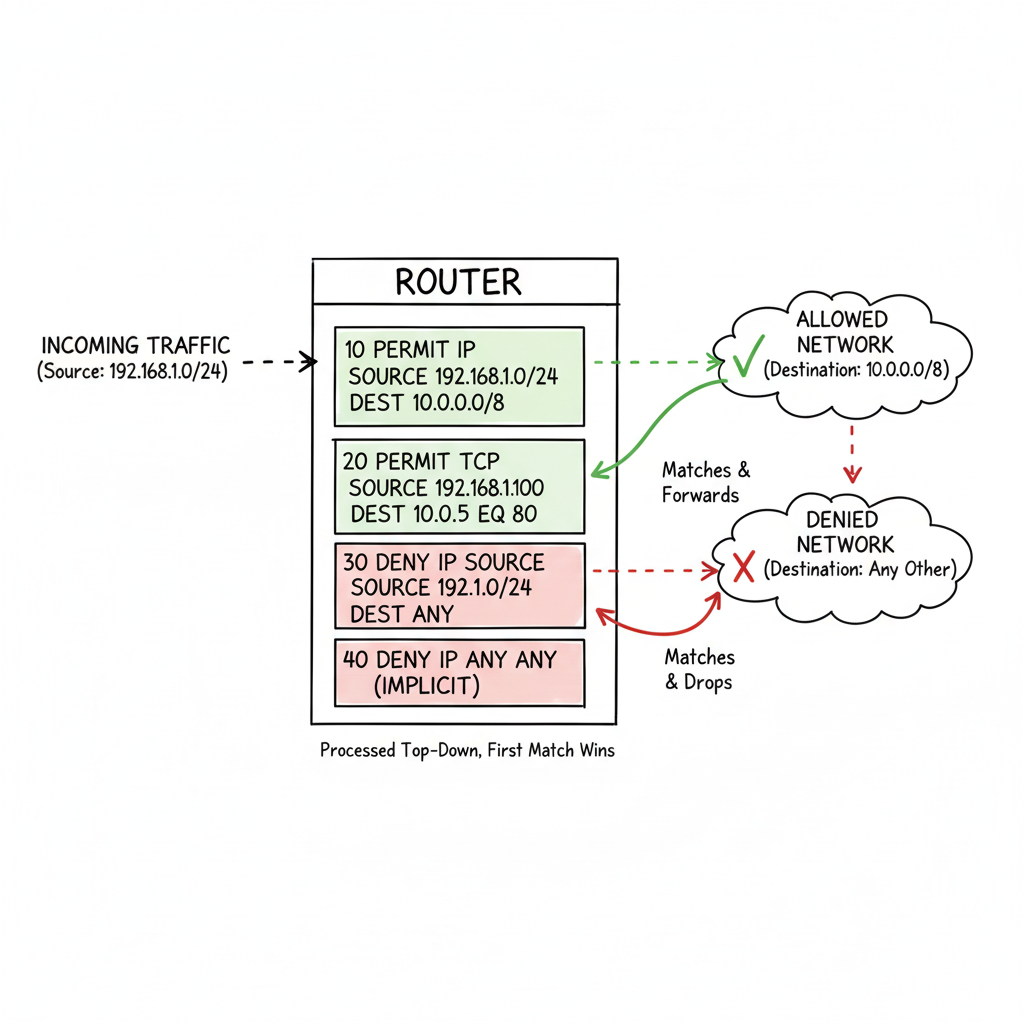
Access Control Lists (ACLs) are a fundamental security component in Cisco networks, acting as a set of sequential rules that control incoming and outgoing traffic. CCNA exam questions heavily feature ACLs, testing your ability to configure, apply, and troubleshoot them to filter network traffic. These questions require a precise understanding of ACL syntax, wildcard masks, and the logical flow behind permitting or denying specific data flows. This concept is analogous to security groups in AWS or network security groups in Azure, which filter traffic at a virtual level.
A mastery of ACLs is non-negotiable for the CCNA because they are the primary mechanism for implementing network security policies on routers and switches. Typical CCNA exam questions will task you with:
- Writing an ACL to meet specific criteria, such as blocking a single host while allowing the rest of its subnet, or permitting only web traffic from a specific network to any destination.
- Analyzing an existing ACL configuration to determine why it is not functioning as intended (e.g., due to an incorrect order of rules or the implicit deny).
- Identifying the correct interface and direction (inbound/outbound) to apply an ACL for a given security requirement.
Key Concepts and Practical Tips
To confidently answer ACL-related questions, you must internalize their types, placement rules, and verification commands.
- Differentiate Standard vs. Extended ACLs:
- Standard ACLs (numbered 1-99 or named
ip access-list standard) filter traffic based only on the source IP address. They are less granular. - Extended ACLs (numbered 100-199 or named
ip access-list extended) are more granular, filtering on source/destination IP, protocol (TCP, UDP, ICMP), and port numbers (e.g., 80 for HTTP, 443 for HTTPS).
- Standard ACLs (numbered 1-99 or named
- Master Placement Strategy: This is a crucial rule. The general guideline is to place:
- Standard ACLs as close to the destination as possible to avoid inadvertently blocking legitimate traffic that is not intended to be filtered.
- Extended ACLs as close to the source as possible to filter traffic efficiently before it consumes network resources unnecessarily.
- Use Keywords and Remarks for Clarity: Simplify your configurations by using the
hostkeyword for a single IP address (e.g.,host 192.168.1.10) andanyfor all addresses. Always use theremarkcommand to document the purpose of each ACL line; this is a crucial best practice for manageability and troubleshooting. - Remember the Implicit Deny: Every ACL, by default, has an invisible
deny ip any anystatement at the very end. If traffic does not match any of your explicitpermitrules, it will be silently dropped. You must explicitly permit any traffic you do want to allow.
Pro Tip: Use the
show access-listscommand to verify your ACL configuration and see hit counts for each rule. This is invaluable for troubleshooting, as it shows you exactly which lines in your ACL are being matched by traffic, helping you quickly identify if an ACL is working as intended or blocking too much/too little.
The infographic illustrates the core function of an ACL as a traffic filter on a network device, selectively allowing or blocking data packets based on predefined security rules.
6. Spanning Tree Protocol (STP) Questions
A core competency for any network engineer is ensuring a loop-free Layer 2 topology, and the CCNA exam heavily validates this skill through questions about Spanning Tree Protocol (STP). These questions test your ability to understand how STP prevents broadcast storms and MAC address table instability by logically blocking redundant paths in a switched network. You'll need to grasp its mechanisms, from root bridge election and port role determination to the various port states and BPDU (Bridge Protocol Data Unit) operations. This is a fundamental concept for anyone managing a physical network, akin to understanding redundancy in server clusters or load balancers for application availability.
Typical CCNA exam questions in this area present a network topology and require you to predict the outcome of STP's election process. You might be asked to:
- Identify the root bridge based on default or configured bridge priorities and MAC addresses.
- Determine which switch ports will be in a blocking state to prevent a loop.
- Troubleshoot a network suffering from a broadcast storm due to an STP misconfiguration or failure.
- Explain the role of different STP port states (blocking, listening, learning, forwarding).
The exam often features scenarios involving modern STP variations like PVST+ (Per-VLAN Spanning Tree Plus) and Rapid PVST+ (RSTP), demanding a practical understanding of their configuration and verification commands. To master network redundancy and loop prevention, a thorough understanding of the Spanning Tree Protocol is essential.
Key Concepts and Practical Tips
To correctly answer STP questions, you must be able to visualize the logical topology that STP creates. Focus on the election processes and how paths are calculated.
- Master Root Bridge Election: The switch with the lowest Bridge ID (which combines Bridge Priority and MAC address) wins the election and becomes the root bridge. The default priority is 32768, and it must be modified in increments of 4096.
- Calculate Port Roles and Costs:
- The root bridge has all its ports in a designated, forwarding state.
- Every non-root bridge has one Root Port (the path with the lowest cost back to the root bridge).
- All other forwarding ports on a non-root bridge are designated ports.
- Ports that are blocking traffic to prevent loops are in the blocking state.
- Remember standard port costs: 10Gbps = 2, 1Gbps = 4, 100Mbps = 19, 10Mbps = 100.
- Use Configuration Shortcuts: For quick root bridge placement, use the
spanning-tree vlan [id] root primaryorroot secondarycommands, which automatically set the priority to guarantee root or secondary root status respectively. - Enable Protective Features:
- Use PortFast on access ports connected to end devices (e.g., workstations, servers) to bypass the listening/learning states, allowing them to come up immediately.
- Always enable BPDU Guard alongside PortFast to prevent accidental loops or unauthorized switches from being introduced if a switch is mistakenly connected to a PortFast-enabled port.
Pro Tip: When faced with a topology diagram in the exam, always draw it out on your scratchpad. Label each switch with its priority and MAC address. Then, systematically:
- Identify the root bridge.
- From each non-root switch, trace the lowest-cost path back to the root to determine its Root Port.
- Identify the Designated Ports for each segment.
- The remaining ports will be in the blocking state. This visual method helps prevent errors.
As you prepare, leveraging different practice materials can be highly beneficial. To find high-quality STP scenarios and more, explore dedicated resources for CCNA exam prep questions.
7. IPv6 Addressing and Configuration Questions
As the internet continues to grow and the number of connected devices explodes (think IoT, cloud services), IPv4 address exhaustion has made IPv6 a critical component of modern networking. The CCNA exam reflects this industry shift, featuring questions that test your comprehensive understanding of IPv6 addressing, notation, types, and configuration. These questions ensure you can work competently in dual-stack environments and manage networks that are increasingly reliant on this next-generation protocol.
Typical CCNA exam questions in this area will require you to:
- Manipulate IPv6 addresses, such as compressing or expanding them correctly according to standard rules.
- Identify different IPv6 address types (e.g., global unicast, link-local, unique local, multicast) and their specific purposes.
- Calculate network prefixes and host addresses within an IPv6 subnet.
- Face scenario-based questions that test your ability to configure IPv6 on Cisco routers and switches using methods like SLAAC (Stateless Address Autoconfiguration) or DHCPv6, and troubleshoot common connectivity problems.

Key Concepts and Practical Tips
To excel in IPv6 questions, you need to be fluent in its rules and configurations. Focus on both the theory and the practical CLI commands.
- Master the Compression Rules: Remember the two main rules for shortening IPv6 addresses:
- Omit leading zeros within each 16-bit hexadecimal block (e.g.,
0DB8becomesDB8). - Use a double colon (
::) once within an address to replace the longest contiguous string of all-zero blocks.
- Omit leading zeros within each 16-bit hexadecimal block (e.g.,
- Know Your Address Types and Prefixes: Memorize the starting prefixes for key address types.
- Link-local addresses always start with
FE80::/10. They are used for communication only on the local link. - Global unicast addresses (publicly routable) often start with
2000::/3or3000::/3. - Multicast addresses begin with
FF00::/8. - Unique Local Unicast (ULA) addresses start with
FC00::/7(similar to private IPv4 addresses).
- Link-local addresses always start with
- Practice EUI-64 (Extended Unique Identifier): Understand how a router or host can automatically create a unique interface ID from its MAC address using the EUI-64 process. This involves splitting the 48-bit MAC address, inserting
FFFEin the middle, and flipping the seventh bit (Universal/Local bit). - Remember Key Configuration Commands: To enable IPv6 routing on a Cisco device, you must use the
ipv6 unicast-routingglobal configuration command. Forgetting this is a common reason for failed IPv6 connectivity in lab scenarios. Also, useipv6 address <ipv6-address>/<prefix-length>on interfaces.
Pro Tip: Pay close attention to detail, especially with address compression. A common mistake on the exam is misapplying the compression rules, such as using the
::shortcut more than once in a single address. An IPv6 address must be unambiguously expandable back to its full 128-bit form.
8. Network Device Management and Security Questions
Securing and managing network infrastructure is a core responsibility for any IT professional, and the CCNA exam reflects this with a strong focus on device hardening and management protocols. These questions test your ability to configure secure administrative access, implement foundational Layer 2 security features, and use standard protocols for device monitoring and synchronization. You'll be expected to move beyond basic connectivity and demonstrate how to protect the network's control and management planes from unauthorized access and common attacks. This ties into broader IT security certifications like CompTIA Security+ or even the fundamental principles of cloud security.
The types of CCNA exam questions in this area are highly practical and often command-line based. You might be given a scenario requiring you to:
- Configure SSH (Secure Shell) for secure remote access, replacing insecure Telnet.
- Implement port security on a switch to prevent MAC address flooding and unauthorized device connections.
- Set up DHCP snooping to mitigate rogue DHCP servers and IP spoofing attacks.
- Configure NTP (Network Time Protocol) for accurate time synchronization across devices, which is critical for log correlation and security auditing.
Success requires not just knowing the commands but understanding the security principles behind them and the context in which they should be applied.
Key Concepts and Practical Tips
To excel in this domain, focus on the specific configuration steps for each security and management feature. Hands-on practice in a lab environment is non-negotiable.
- Prioritize Secure Administrative Access:
- Always use
enable secretoverenable passwordfor a strongly encrypted privilege mode password. - For remote access, configure SSH by setting a hostname and domain name, generating crypto keys, and creating local user accounts. Then, apply
login localandtransport input sshto the VTY lines.
- Always use
- Implement Essential Layer 2 Security:
- Master port security configurations: Set the maximum number of allowed MAC addresses per port, define the violation action (shutdown, restrict, protect), and use sticky MAC addresses to dynamically learn and save MAC addresses.
- Understand DHCP Snooping: Configure it globally and on trusted/untrusted ports to prevent rogue DHCP servers from handing out incorrect IP addresses.
- Utilize Management Protocols:
- Understand how to configure NTP to synchronize device clocks, which is critical for accurate timestamping in log messages for troubleshooting and security forensics.
- Set up Syslog to forward log messages to a central server, providing centralized monitoring and storage.
- Know when to enable or disable discovery protocols like CDP (Cisco Discovery Protocol) and LLDP (Link Layer Discovery Protocol) for security purposes (e.g., disable on untrusted interfaces).
- Harden the Device Baseline:
- Disable unnecessary services like the HTTP server (
no ip http server) and the small servers (e.g.,no service tcp-small-servers). - Prevent command-line hangs from mistyped commands with
no ip domain-lookupand configure a correct DNS server.
- Disable unnecessary services like the HTTP server (
Pro Tip: Remember the key security violation modes for port security. Shutdown is the default and most secure, placing the port in an
err-disabledstate. Restrict drops offending traffic and increments a security counter, while Protect silently drops the traffic without logging. Knowing the differences and when to use each is a common exam topic.
CCNA Exam Question Topics Comparison
| Topic | Implementation Complexity 🔄 | Resource Requirements ⚡ | Expected Outcomes 📊 | Ideal Use Cases 💡 | Key Advantages ⭐ |
|---|---|---|---|---|---|
| OSI Model Layer Identification Questions | Low - mostly memorization | Minimal - study guides, diagrams | Strong foundational understanding of networking layers | Beginners learning network fundamentals | Fundamental concept, widely applicable |
| Subnetting and VLSM Calculation Questions | Medium - requires binary math | Moderate - practice problems, calculators | Precise IP address management and efficient subnetting | Network design, IP planning | Definite correct answers, critical skill |
| Routing Protocol Configuration and Troubleshooting | High - complex config & troubleshooting | High - lab simulators like Packet Tracer, GNS3 | Effective dynamic routing and network stability | Enterprise network routing and troubleshooting | Real-world applicability, troubleshooting skills |
| VLAN Configuration and Trunking Questions | Medium - requires command proficiency | Moderate - lab setups, packet tracer | Segmented network traffic, VLAN management | Network segmentation and switch management | Immediate production relevance |
| Access Control List (ACL) Configuration Questions | Medium - requires careful planning | Moderate - simulators, practice tools | Controlled traffic flow and enhanced network security | Network security and traffic filtering | Logical and structured security method |
| Spanning Tree Protocol (STP) Questions | Medium to High - involves topology analysis | Moderate - simulators, topology diagrams | Prevention of loops and broadcast storms | Redundant Layer 2 network design | Essential for stability of LAN topologies |
| IPv6 Addressing and Configuration Questions | Medium - complex notation & concepts | Moderate - dual-stack labs, practice tools | Future-proof network addressing and routing | Networks transitioning to IPv6 | Large address space, built-in security |
| Network Device Management and Security Questions | Medium - multiple commands and protocols | Moderate - labs, guides | Secure and manageable network device environments | Network device hardening and management | Critical security best practices |
From Practice to Performance: Your Next Steps
You have now journeyed through a comprehensive roundup of the most critical CCNA exam questions. We've dissected everything from the foundational OSI model and the mathematical precision of subnetting to the complex logic of routing protocols and the security implications of Access Control Lists. By engaging with these practice scenarios, you've done more than just review topics; you've actively started to build the problem-solving mindset required to excel.
The core takeaway is this: success on the CCNA exam is not about memorizing commands. It's about understanding the why behind each configuration, the how of troubleshooting a broken link, and the what if of network design choices. The questions we explored are designed to test that deeper comprehension, ensuring you can apply knowledge under pressure and translate it into real-world competence.
Synthesizing Your Knowledge
Think of each question category we covered as a vital cog in a larger, interconnected machine. Your ability to configure a VLAN is directly linked to your understanding of STP's role in preventing loops. Your ACL implementation relies on a solid grasp of IP addressing and subnet masks. This interconnectedness is the essence of modern networking and the central theme of the CCNA certification.
Let's distill the most crucial lessons from our exploration:
- Conceptual Fluency is Key: You must be able to instantly place a technology within the OSI model (e.g., "Routers operate at Layer 3, Switches at Layer 2"). This contextual understanding accelerates troubleshooting and problem isolation.
- Calculation is Non-Negotiable: Subnetting and VLSM are not optional skills. You must be able to perform these calculations quickly and accurately, ideally without relying on a calculator, as this builds fundamental intuition about IP address allocation. Practice until it becomes second nature.
- Configuration is Contextual: An ACL that works perfectly in one scenario might block critical traffic in another. The same applies to routing protocol metrics or STP configurations. Always consider the specific network requirements and potential impacts presented in the exam question.
- Security is Everywhere: From securing switch ports with Port Security to filtering traffic with ACLs and managing device access, security is an integral part of every topic, not a separate domain. Adopt a security-first mindset in all your configurations.
Your Action Plan for CCNA Mastery
Knowledge without action is merely potential. To convert your preparation into a passing score and, more importantly, into real-world competence, you need a structured plan. It's time to move from passively reading about CCNA exam questions to actively solving them in a dynamic environment.
Here are your immediate next steps to solidify your understanding:
- Build Your Virtual Lab: The single most effective study tool is hands-on practice. Use Cisco Packet Tracer (free) or more advanced simulators like GNS3 or EVE-NG. Recreate the scenarios from the questions in this article. Change the IP addresses, intentionally break the configurations, and then diligently fix them. This active learning process will solidify concepts far better than rereading notes.
- Adopt a "Troubleshooting First" Mindset: For every topic, ask yourself, "How could this break?" and "How would I fix it?" Use verification and troubleshooting commands like
show,debug,ping, andtracerouterelentlessly in your lab. The CCNA exam heavily tests troubleshooting skills, reflecting their importance in an IT professional's daily routine. - Implement a Spaced Repetition System (SRS): Networking is filled with details—protocol numbers, administrative distances, and configuration commands. Instead of cramming, use an SRS tool to review concepts at scientifically optimized intervals. This technique moves information from your short-term to your long-term memory, ensuring you retain it for exam day and beyond, much like how PMP candidates use flashcards for process groups.
- Simulate Exam Conditions: Find high-quality practice exams and take them under timed conditions. This builds mental stamina, helps you manage your time effectively during the actual test, and reduces exam day anxiety. Analyze your results to identify weak areas and focus your remaining study time strategically.
By embracing this active, hands-on approach, you transform your study sessions from a chore into a rewarding challenge. You build not just knowledge, but confidence. You are no longer just preparing to answer questions; you are preparing to be a capable, certified networking professional ready for the demands of the industry.
Ready to elevate your study strategy with a system built for retention? MindMesh Academy uses a powerful, adaptive learning platform with spaced repetition to help you master CCNA exam questions and core concepts efficiently. Stop cramming and start building lasting knowledge by visiting MindMesh Academy to see how our targeted approach can accelerate your certification journey.
Ready to Get Certified?
Prepare with expert-curated study guides, practice exams, and spaced repetition flashcards at MindMesh Academy:

Written by
Alvin Varughese
Founder, MindMesh Academy
Alvin Varughese is the founder of MindMesh Academy and holds 15 professional certifications including AWS Solutions Architect Professional, Azure DevOps Engineer Expert, and ITIL 4. He's held senior engineering and architecture roles at Humana (Fortune 50) and GE Appliances. He built MindMesh Academy to share the study methods and first-principles approach that helped him pass each exam.